PowerStore: Create clone of NAS server failing with error "The maximum number of file system has been reached. (0xE080100D0029)"
摘要: Create clone of NAS server may fail with error "The maximum number of file system has been reached. (0xE080100D0029)" even though limit is not reached. This article provides a workaround to create the NAS server. ...
本文适用于
本文不适用于
本文并非针对某种特定的产品。
本文并非包含所有产品版本。
症状
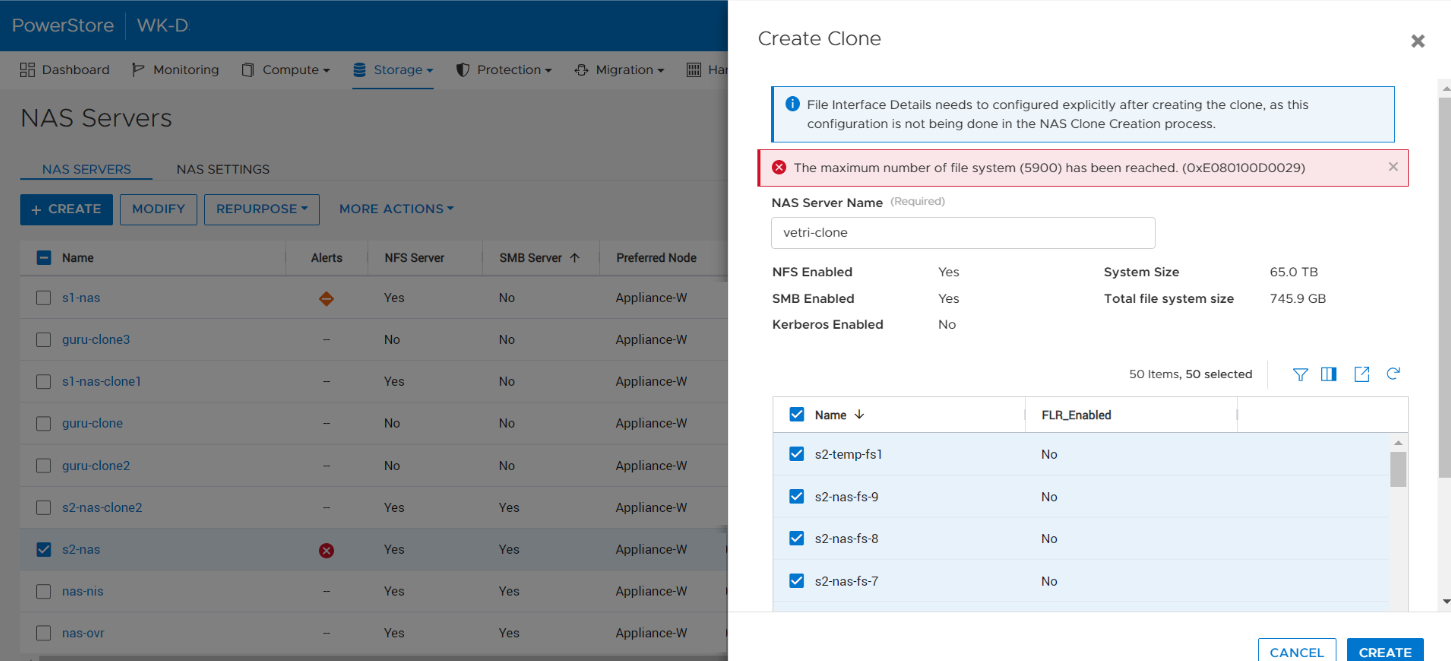
When a user tries to create the clone of a NAS server by selecting all the file systems within the PowerStore Manager NAS server or without specifying file_systems parameter (REST), the operation fails with the error The maximum number of file system (<file system limit value>) has been reached. (0xE080100D0029), even if the number of file systems in the appliance has not reached the limits.
原因
This issue occurs in certain situations where the source NAS server has a lot of snapshots created on the file systems and they are counted in the limit calculation.
解决方案
This issue is planned to be addressed in a future release of PowerStore.
In the meantime, use the following workarounds:
- Remove the unwanted snapshots from the NAS server reducing the overall count of snapshots within the NAS server.
- Select a subset of file systems within the NAS server while cloning the NAS server in the PowerStore UI.
- Explicitly specify the required file systems to be cloned with the NAS server in REST call.
受影响的产品
PowerStore文章属性
文章编号: 000210996
文章类型: Solution
上次修改时间: 13 6月 2025
版本: 5
从其他戴尔用户那里查找问题的答案
支持服务
检查您的设备是否在支持服务涵盖的范围内。