「IDPA:ACM LDAP匿名ルックアップを無効にした後、ACMがUIのパスワードを変更できない
摘要: IDPAバージョン2.7.3以前では、Dellの記事196092に従ってACM LDAP匿名ルックアップを無効にすると、UIからパスワードを変更するときにACMでエラー「ACM Secure openLDAP-idpauserユーザーの接続を検証できませんでした」が報告されます。
本文适用于
本文不适用于
本文并非针对某种特定的产品。
本文并非包含所有产品版本。
症状
Dellの記事196092「PowerProtect DPシリーズ アプライアンスおよびIDPA: アプライアンスConfiguration Managerで許可されたLDAP匿名ディレクトリー アクセス。ACM LDAP匿名ルックアップを無効にするために、UIからアプライアンス パスワードを変更しようとすると、ACMは「ACM Secure openLDAP-idpauserユーザーの接続を検証できませんでした」というエラーを報告します。
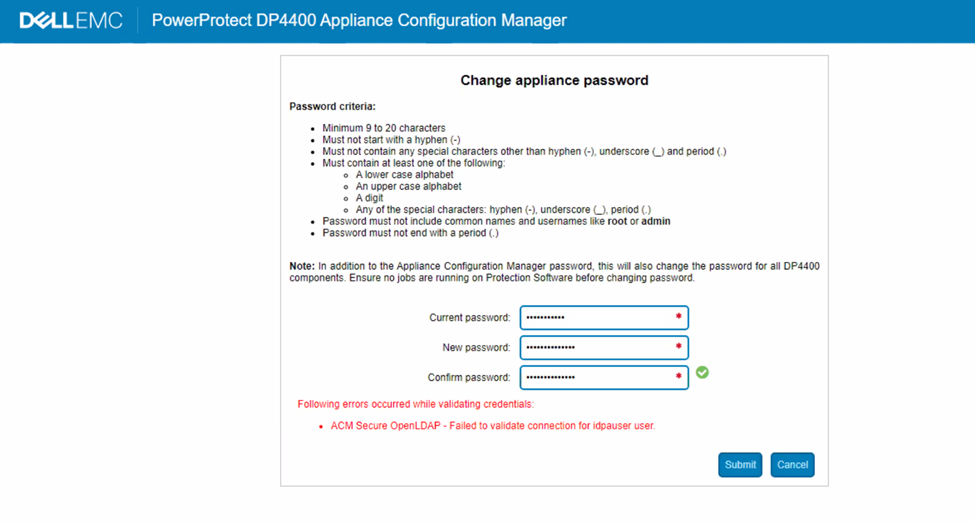
図1: DPシリーズのエラー メッセージ「idpauserユーザーへの接続を検証できませんでした」のスクリーンショット
原因
ACM server.logでは、パスワードの検証中に次のエラーが表示されます。
2023-05-01 06:59:28,768 INFO  [https-openssl-apr-8543-exec-1]-util.SSHUtil: Remote command using SSH execution status:  Host     : [ACM IP] User     : [root]       Password : [**********] Command  : [ldapsearch -x -b "dc=idpa,dc=local" -h <ACM FQDN> "(&(objectClass=posixGroup)(cn=idpagroup)(gidNumber=1000))"]   STATUS   : [48]
2023-05-01 06:59:28,768 INFO  [https-openssl-apr-8543-exec-1]-util.SSHUtil:     STDOUT   : [ldap_bind: Inappropriate authentication (48)^M
                        additional info: anonymous bind disallowed^M]
2023-05-01 06:59:28,769 INFO  [https-openssl-apr-8543-exec-1]-util.SSHUtil:     STDERR   : []
2023-05-01 06:59:28,769 ERROR [https-openssl-apr-8543-exec-1]-util.SSHUtil: Failed to executed remote command using SSH.
2023-05-01 06:59:28,769 ERROR [https-openssl-apr-8543-exec-1]-ldapintegration.LDAPIntegrationService: validatePosixGroup --> Failed to execute command - ldapsearch -x -b "dc=idpa,dc=local" -h <ACM FQDN> "(&(objectClass=posixGroup)(cn=idpagroup)(gidNumber=1000))"
2023-05-01 06:59:28,769 INFO  [https-openssl-apr-8543-exec-1]-ldapintegration.LDAPIntegrationService: validatePosixGroup --> Failed to validate posix group name.
com.emc.vcedpa.common.exception.ApplianceException: Failed to validate posix group.
2023-05-01 06:59:58,298 INFO  [https-openssl-apr-8543-exec-1]-appliancecredentialsmanager.ApplianceCredentialsManager: ACM test connection is successful for root
2023-05-01 06:59:58,298 INFO  [https-openssl-apr-8543-exec-1]-appliancecredentialsmanager.ApplianceCredentialsManager: Change password validation status: ApplianceCredentialsConnectionStatus [productCredentialsStatusList=[ProductCredentialsStatus [productName=ACM Secure OpenLDAP, failedCredentialsStatusList=[ACM Secure OpenLDAP - Failed to validate connection for idpauser user.], sameCredentialsStatusList=[]], ProductCredentialsStatus [productName=Protection Storage, failedCredentialsStatusList=[], sameCredentialsStatusList=[]], ProductCredentialsStatus [productName=Protection Software, failedCredentialsStatusList=[], sameCredentialsStatusList=[]], ProductCredentialsStatus [productName=Data Protection Central, failedCredentialsStatusList=[], sameCredentialsStatusList=[]], ProductCredentialsStatus [productName=Reporting & Analytics, failedCredentialsStatusList=[], sameCredentialsStatusList=[]], ProductCredentialsStatus [productName=Search, failedCredentialsStatusList=[], sameCredentialsStatusList=[]], ProductCredentialsStatus [productName=Hypervisor Manager, failedCredentialsStatusList=[], sameCredentialsStatusList=[]], ProductCredentialsStatus [productName=Hypervisor, failedCredentialsStatusList=[], sameCredentialsStatusList=[]], ProductCredentialsStatus [productName=Appliance Configuration Manager, failedCredentialsStatusList=[], sameCredentialsStatusList=[]]], resultStatus=false, sameCredentialStatus=false]
server.logは、コマンドを実行しようとしたときにLDAP匿名ルックアップが無効になったことを示しています。
acm-:/ # ldapsearch -x -b "dc=idpa,dc=local" -h <ACM FQDN> "(&(objectClass=posixGroup)(cn=idpagroup)(gidNumber=1000))"
ldap_bind: Inappropriate authentication (48)
        additional info: anonymous bind disallowed
acm-: #
IDPAバージョン2.7.3以前の現在のACMアプライアンス パスワード変更ワークフローでは、パスワード検証に匿名のLDAPルックアップが使用されます。ACMでLDAP匿名ルックアップが無効になっている場合、パスワード検証は失敗します。
エンジニアリング エスカレーションが送信され、今後のソフトウェア リリースで恒久的な解決が予定されています。以下の回避策に従って、恒久的な解決策が利用可能になるまでアプライアンスのパスワードを変更します。
解决方案
回避策:
ACMで匿名LDAPルックアップを有効にするには、次の手順に従います。
- rootユーザーを使用してACMにSSH接続します
- 「/etc/openldap」フォルダーに移動します。
cd /etc/openldap
- 次のコマンドを使用して、「ldif」ファイルを作成します。
vi ldap_enable_bind_anon.ldif
「i」を使用してvi挿入モードに入り、ファイルに次のコンテンツを貼り付けます。
dn: cn=config
changetype: modify
delete: olcDisallows
olcDisallows: bind_anon

dn: cn=config
changetype: modify
delete: olcRequires
olcRequires: authc

dn: olcDatabase={-1}frontend,cn=config
changetype: modify
delete: olcRequires
olcRequires: authc
- ファイルを保存します。キーボードの「Esc」を押して、viコマンド モードに戻ります。「:wq!」を押してファイルを保存します。
- 次のコマンドを使用して、ファイルの内容を確認します。
cat ldap_enable_bind_anon.ldif
出力例:
acm:/etc/openldap # cat ldap_enable_bind_anon.ldif
dn: cn=config
changetype: modify
delete: olcDisallows
olcDisallows: bind_anon

dn: cn=config
changetype: modify
delete: olcRequires
olcRequires: authc

dn: olcDatabase={-1}frontend,cn=config
changetype: modify
delete: olcRequires
olcRequires: authc
acm:/etc/openldap #
- 次のコマンドを使用して、匿名LDAPルックアップを有効にします。
ldapadd -Y EXTERNAL -H ldapi:/// -f /etc/openldap/ldap_enable_bind_anon.ldif
出力例:
acm:/etc/openldap # ldapadd -Y EXTERNAL -H ldapi:/// -f /etc/openldap/ldap_enable_bind_anon.ldif
SASL/EXTERNAL authentication started
SASL username: gidNumber=0+uidNumber=0,cn=peercred,cn=external,cn=auth
SASL SSF: 0
modifying entry "cn=config"

modifying entry "cn=config"

modifying entry "olcDatabase={-1}frontend,cn=config"

acm-:/etc/openldap #
- LDPAサーバーを再起動します。
systemctl restart slapd
- 次のコマンドを実行して、匿名LDAPルックアップが有効であることを確認します。
ldapsearch -x -b "dc=idpa,dc=local" -h <ACM FQDN> "(&(objectClass=posixGroup)(cn=idpagroup)(gidNumber=1000))"
or
ldapsearch -x -b "dc=idpa,dc=local" -h `hostname -f` "(&(objectClass=posixGroup)(cn=idpagroup)(gidNumber=1000))"
出力例:
acm:/etc/openldap # ldapsearch -x -b "dc=idpa,dc=local" -h `hostname -f` "(&(objectClass=posixGroup)(cn=idpagroup)(gidNumber=1000))"
# extended LDIF
#
# LDAPv3
# base <dc=idpa,dc=local> with scope subtree
# filter: (&(objectClass=posixGroup)(cn=idpagroup)(gidNumber=1000))
# requesting: ALL
#

# idpagroup, Group, idpa.local
dn: cn=idpagroup,ou=Group,dc=idpa,dc=local
objectClass: top
objectClass: posixGroup
cn: idpagroup
memberUid: idpauser
gidNumber: 1000

# search result
search: 2
result: 0 Success

# numResponses: 2
# numEntries: 1
acm:/etc/openldap #
- ACM UIにログインし、アプライアンスのパスワードを再度変更します。問題なく完了するはずです。
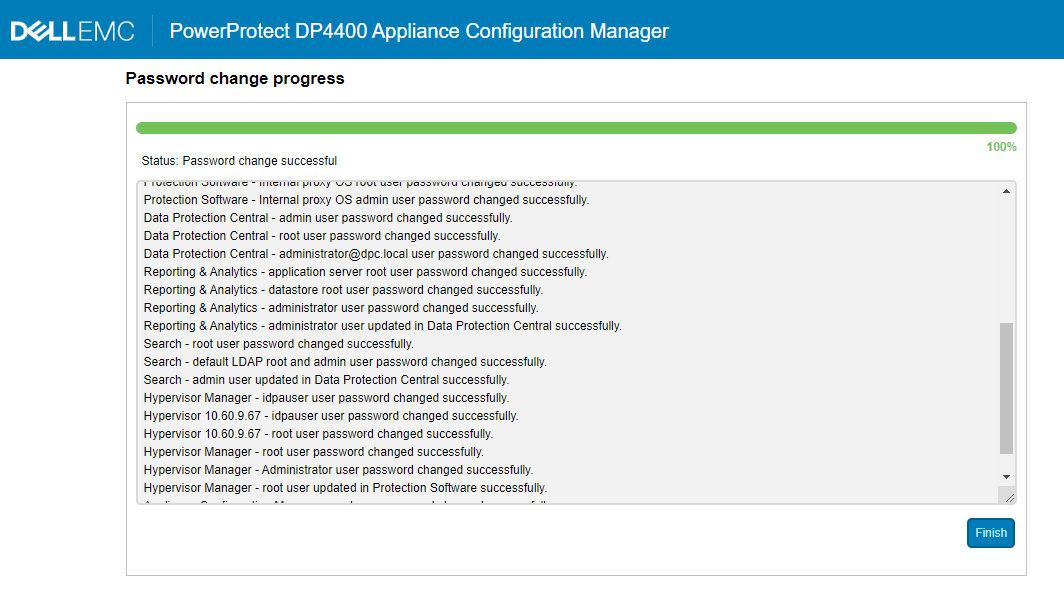
図2:DPシリーズのパスワード変更が進行中のスクリーンショット
- ACM匿名LDAPルックアップを無効にする必要があるかどうかを確認します。「はい」の場合は、Dellの記事196092「PowerProtect DPシリーズ アプライアンスとIDPA: Appliance Configuration Managerで許可されたLDAP匿名ディレクトリー アクセスを選択して、匿名ルックアップを再度無効にします。
受影响的产品
PowerProtect DP4400, PowerProtect DP5300, PowerProtect DP5800, PowerProtect DP8300, PowerProtect DP8800, PowerProtect Data Protection Software, Integrated Data Protection Appliance Family, Integrated Data Protection Appliance Software
, PowerProtect DP5900, PowerProtect DP8400, PowerProtect DP8900
...
文章属性
文章编号: 000212941
文章类型: Solution
上次修改时间: 01 8月 2025
版本: 5
从其他戴尔用户那里查找问题的答案
支持服务
检查您的设备是否在支持服务涵盖的范围内。