Avamar: vCloud Director DPE file level restore fails with error "User authentication failed" when logging to the VM using vCD UI.
摘要: vCloud Director DPE file level restore fails with error "User authentication failed" when logging to the VM using the vCD UI. The same type of restore is successful when done using Avamar Administrator or AUI. ...
本文适用于
本文不适用于
本文并非针对某种特定的产品。
本文并非包含所有产品版本。
症状
When initiating an FLR on a VM using the vCD UI and entering the VM credentials, the process fails, and the error message "User authentication failed" is displayed:
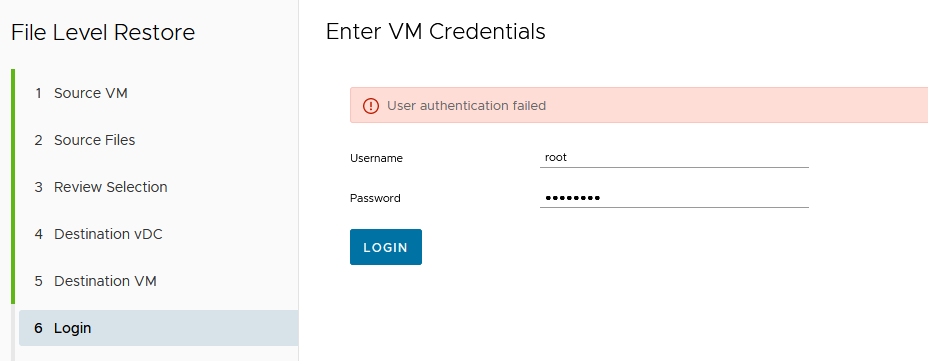
From the DPE side, the authentication error can be identified in SRV logs: /var/log/vcp/srv/vcpserver.log:
The same authentication error can also be observed in the backup gateway logs: /var/log/vcp/bg/<bg_name>/vcpbg.log:
The File Level Recovery (FLR) operation is successful when using the same VM credentials if performed using Avamar AUI or Avamar Administrator directly.
From the DPE side, the authentication error can be identified in SRV logs: /var/log/vcp/srv/vcpserver.log:
2023-04-25 07:50:57,613 [AMQP listener 7] INFO  (AdsClient.java:692) - Started connecting FLR destination VM ...
2023-04-25 07:50:57,625 [AMQP listener 7] INFO  (RestTemplateFactory.java:125) - POST https://sv-2000avu55.ebrc8002.cloud:8443/vcp-ba-ads-ws/flrDestinationBrowseConnection
2023-04-25 07:51:01,341 [eventListenerContainer-1] INFO  (EventListener.java:214) - NOTIFICATION: com/vmware/vcloud/event/task/complete
2023-04-25 07:51:01,363 [AMQP listener 7] ERROR (VcpBaseMessageHandler.java:164) - REQUEST : POST /api/vApp/vapp-17b030c9-c633-4ca3-a245-597ba5e46d7b/vm/vm-3ecd2a2d-6a81-49dd-a79f-ea4815733
96f/connections
2023-04-25 07:51:01,363 [AMQP listener 7] ERROR (VcpBaseMessageHandler.java:165) - HTTP 500 :
com.emc.vcp.service.exceptions.AdsClientException: 11023 : User authentication failed: Invalid guest login
        at com.emc.vcp.ads.client.RestTemplateFactory.handleException(RestTemplateFactory.java:239) ~[classes!/:19.7.0.90]
        at com.emc.vcp.ads.client.AdsClient.connectDestinationVM(AdsClient.java:699) ~[classes!/:19.7.0.90]
        at com.emc.vcp.service.VAppService.onFlrBrowseDestinationConnectionsPOST(VAppService.java:1294) ~[classes!/:19.7.0.90]
        at sun.reflect.NativeMethodAccessorImpl.invoke0(Native Method) ~[?:1.8.0_301]
        at sun.reflect.NativeMethodAccessorImpl.invoke(Unknown Source) ~[?:1.8.0_301]
        at sun.reflect.DelegatingMethodAccessorImpl.invoke(Unknown Source) ~[?:1.8.0_301]
        at java.lang.reflect.Method.invoke(Unknown Source) ~[?:1.8.0_301]
The same authentication error can also be observed in the backup gateway logs: /var/log/vcp/bg/<bg_name>/vcpbg.log:
2023-04-25 07:50:57,748 [https-jsse-nio-8443-exec-1] INFO  (LoggerInterceptor.java:30) - POST: /vcp-ba-ads-ws/flrDestinationBrowseConnection
2023-04-25 07:50:57,808 [https-jsse-nio-8443-exec-1] INFO  (TaskUpdates.java:121) -  Updating Task as running :  Task Status : running, Operation : FLR: Connecting Destination Virtual Machi
ne (3ecd2a2d-6a81-49dd-a79f-ea481573396f), Operation StartTime : 2023-04-25T07:50:49.797Z, Progress : 10, Cancel Requested : false, Error :  null ,
2023-04-25 07:50:58,338 [https-jsse-nio-8443-exec-1] INFO  (QueryVCenter.java:99) - Connections to VCenters: 1
2023-04-25 07:51:00,993 [vcp-ads-1] INFO  (ServiceADS.java:175) -  Running Restore Tracker Task..
2023-04-25 07:51:00,994 [vcp-ads-1] INFO  (AdsServices.java:640) - Restore tracker is empty. No pending restores.
2023-04-25 07:51:01,262 [https-jsse-nio-8443-exec-1] INFO  (TaskUpdates.java:72) -  Updating Task with error :  Task Status : error, Operation : FLR: Connecting Destination Virtual Machine
(3ecd2a2d-6a81-49dd-a79f-ea481573396f), Operation StartTime : 2023-04-25T07:50:49.797Z, Progress : 10, Cancel Requested : false, Error : com.vmware.vcloud.api.rest.schema.ErrorType@319778f7
,
2023-04-25 07:51:01,336 [https-jsse-nio-8443-exec-1] ERROR (AdsServices.java:2111) -
com.vmware.vim25.InvalidGuestLogin: Failed to authenticate with the guest operating system using the supplied credentials.
        at sun.reflect.NativeConstructorAccessorImpl.newInstance0(Native Method) ~[?:1.8.0_301]
        at sun.reflect.NativeConstructorAccessorImpl.newInstance(Unknown Source) ~[?:1.8.0_301]
        at sun.reflect.DelegatingConstructorAccessorImpl.newInstance(Unknown Source) ~[?:1.8.0_301]
        at java.lang.reflect.Constructor.newInstance(Unknown Source) ~[?:1.8.0_301]
        at java.lang.Class.newInstance(Unknown Source) ~[?:1.8.0_301]
        at com.vmware.vim25.ws.XmlGenDom.fromXml(XmlGenDom.java:253) ~[yavijava-6.0.05.jar!/:?]
        at com.vmware.vim25.ws.XmlGenDom.parseSoapFault(XmlGenDom.java:151) ~[yavijava-6.0.05.jar!/:?]
        at com.vmware.vim25.ws.XmlGenDom.fromXML(XmlGenDom.java:109) ~[yavijava-6.0.05.jar!/:?]
        at com.vmware.vim25.ws.SoapClient.unMarshall(SoapClient.java:253) ~[yavijava-6.0.05.jar!/:?]
        at com.vmware.vim25.ws.WSClient.invoke(WSClient.java:96) ~[yavijava-6.0.05.jar!/:?]
        at com.vmware.vim25.ws.VimStub.validateCredentialsInGuest(VimStub.java:4554) ~[yavijava-6.0.05.jar!/:?]
        at com.vmware.vim25.mo.GuestAuthManager.ValidateCredentialsInGuest(GuestAuthManager.java:70) ~[yavijava-6.0.05.jar!/:?]
The File Level Recovery (FLR) operation is successful when using the same VM credentials if performed using Avamar AUI or Avamar Administrator directly.
原因
The password contains a plus sign (+), causing the VM authentication failure on vCD UI.
This is a DPE issue, currently under investigation with Engineering.
This is a DPE issue, currently under investigation with Engineering.
解决方案
Workaround:
Two potential workarounds are available. Try one or the other:
1. Attempt the FLR directly from Avamar UI.
Two potential workarounds are available. Try one or the other:
1. Attempt the FLR directly from Avamar UI.
2. Change the + character in the VM’s password to another symbol.
Fix:
Contact Dell support and quote this article to check on the current status of the Engineering investigation.Fix:
受影响的产品
vCloud Director Data Protection Extension文章属性
文章编号: 000214288
文章类型: Solution
上次修改时间: 23 8月 2023
版本: 2
从其他戴尔用户那里查找问题的答案
支持服务
检查您的设备是否在支持服务涵盖的范围内。