戴尔笔记本电脑在连接交流适配器或戴尔坞站的情况下开机时显示警告消息
摘要: 本文提供有关在连接到交流适配器或戴尔坞站的情况下打开计算机时戴尔笔记本电脑上显示的警告消息的信息。
本文适用于
本文不适用于
本文并非针对某种特定的产品。
本文并非包含所有产品版本。
症状
在连接到交流适配器或戴尔坞站的情况下打开计算机时,可能会显示警告消息。
在 BIOS 中设置为自动开机时,在多个笔记本电脑型号上会出现此问题。功率错误消息可能会因连接的电源而异。除了错误消息外,计算机也无法正常充电。
请参阅以下警告消息示例:
Alert! A 7W AC power adapter has been detected. The system can only boot when a 60W power adapter or greater.
Alert! A 15W AC power adapter has been detected. The system can only boot when a 60W power adapter or greater.
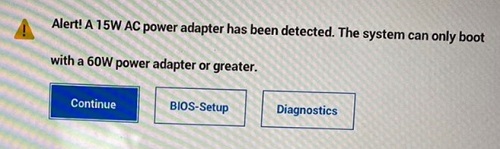
Alert! A 4W AC power adapter has been detected. The system can only boot when a 60W power adapter or greater.
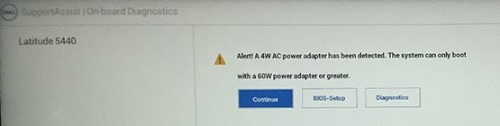

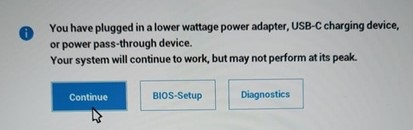
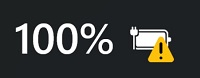
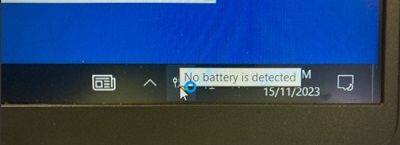
如果您使用的是 Windows 10,请打开任何应用程序(如 Microsoft Word 或 Microsoft PowerPoint),您可能会看到消息“未检测到电池”。当您将计算机置于空闲状态 10 到 30 分钟时,您也可能会看到此消息。
具有影响 BIOS 版本的受影响平台:
- Latitude 5340— BIOS 1.5.0/1.6.0/1.7.1
- Latitude 5440 — BIOS 1.5.0/1.6.0/1.8.1
- Latitude 5540 — BIOS 1.5.0/1.6.0/1.7.1
- Latitude 7340 — BIOS 1.5.0/1.6.0/1.8.1
- Latitude 7440— BIOS 1.5.0/1.6.0/1.8.1
- Latitude 7640— BIOS 1.5.0/1.6.0/1.8.1
- Latitude 9440 二合一电脑— BIOS 1.3.2/1.4.1/1.6.0
- Precision 3480 — BIOS 1.5.0/1.6.0/1.8.1
- Precision 3580 — BIOS 1.5.0/1.6.0/1.7.1
- Precision 3581 — BIOS 1.5.0/1.6.0/1.7.1
受影响的坞站:
- 戴尔坞站 WD19
- 戴尔坞站 - WD19S
- Dell Thunderbolt 坞站 - WD19TB
- 戴尔 Thunderbolt 坞站 - WD19TBS
- 戴尔高性能坞站 - WD19DC
- 戴尔高性能坞站 - WD19DCS
原因
无可用的原因信息。
解决方案
更新到最新版本的 BIOS 可解决此问题。要下载并安装 BIOS,请参阅 BIOS 更新指南。
- Latitude 5340— BIOS 1.10.0 或更高版本
- Latitude 5440— BIOS 1.12.0 或更高版本
- Latitude 5540— BIOS 1.10.1 或更高版本
- Latitude 7340— BIOS 1.11.0 或更高版本
- Latitude 7440— BIOS 1.12.0 或更高版本
- Latitude 7640— BIOS 1.12.0 或更高版本
- Latitude 9440 二合一电脑— BIOS 1.8.0 或更高版本
- Precision 3480— BIOS 1.12.0 或更高版本
- Precision 3580— BIOS 1.10.1 或更高版本
- Precision 3581- BIOS 1.10.1 或更高版本
受影响的产品
Dell Dock WD19, Dell Performance Dock - WD19DC, Dell Performance Dock – WD19DCS, Dell Dock – WD19S, Dell Thunderbolt Dock - WD19TB, Dell Thunderbolt Dock – WD19TBS, Latitude 5340, Latitude 7340, Latitude 5440, Latitude 7440, Latitude 9440 2-in-1
, Latitude 5540, Latitude 7640, Precision 3480, Precision 3580, Precision 3581
...
文章属性
文章编号: 000216629
文章类型: Solution
上次修改时间: 18 5月 2026
版本: 16
从其他戴尔用户那里查找问题的答案
支持服务
检查您的设备是否在支持服务涵盖的范围内。