Data Domain Virtual Edition License Activation
摘要: This article provides step-by-step instructions and directions for Customers, Partners, and Internal users processing License Activation for the Data Domain Virtual Edition (DDVE) from the Dell Digital Locker (DDL) and Software Licensing Central (SLC) ...
本文适用于
本文不适用于
本文并非针对某种特定的产品。
本文并非包含所有产品版本。
说明
Pre-requisite:
External users who require access to the DELL Digital Locker or the Software Licensing Central (SLC) should register for a Support Account on Dell Support. And, Internal users who require access to the Software Licensing Central (SLC) should submit a MyAccess Ticket Internally.
Instructions:
Users can access the Licensing Entitlements from the DELL Digital Locker using the Sales Order Number or the Purchase Order Number referenced on the Customer Facing Object (CFO) Letter or the License Authorization Code (LAC) Letter.
Alternatively, registered End-user Licensing Site Coordinators, Partners, and Internal user's can directly access the Licensing Entitlements from Software Licensing Centra (SLC) using the Sales Order Number, the Purchase Order Number, or the License Authorization Code (LAC) referenced on the Customer Facing Object (CFO) Letter or the License Authorization Code (LAC) Letter.
Note: Orders which involved a Value Added Reseller (VAR) may also include a unique 'Registration Code' for the User to redeem during the Order Registration Process.
Sample of the Customer Facing Object (CFO) Letter

Initiating License Activation from the DELL Digital Locker:
- Begin by signing into your DELL Digital Locker using your registered User Account Details:
Dell Digital Locker (DDL) functionalities are now exclusively available through the My Account portal. Users will no longer access a separate DDL portal.
Users will be redirected to an interim information page explaining the migration.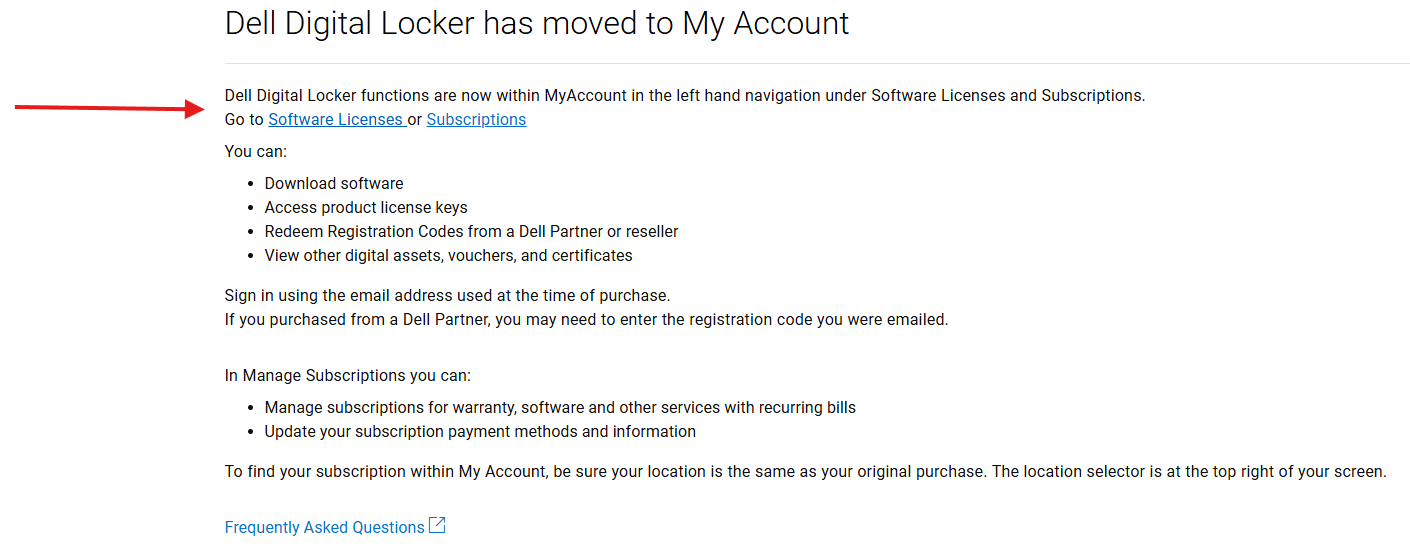
- Upon successfully signing in, navigate to the 'Software licenses' section of 'My Account'. Search the Order Number referenced on the Customer Facing Object (CFO) letter or the License Authorization Code (LAC) letter to retrieve the Licensing Entitlements associated with the Order:

Note: If the search query does not bring up any Results, check the Status of the Registration Code referenced on the Customer Facing Object (CFO) letter, and if the Registration Code is unredeemed, complete the Registration Process under the 'Order Registration' Quick link.

Engage the World-Wide Licensing Support Team for further assistance if continuing to experience Issues with the Registration Process.
- Once the order has been registered, the user can view it on the Software licenses home page within 'MyAccount'. The User will select the product required and click the 'Actions' tab and click 'Activate
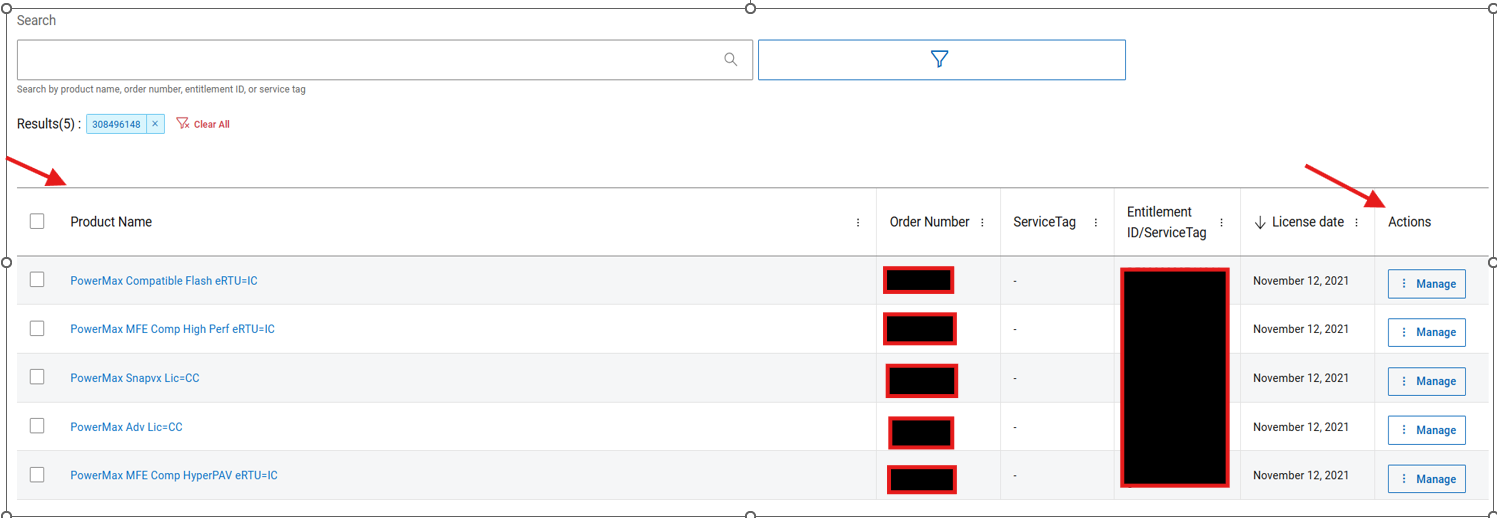
-
The 'Activate Now' deep-link embedded should redirect the user to the Software Licensing Central (SLC) 'Activate' page
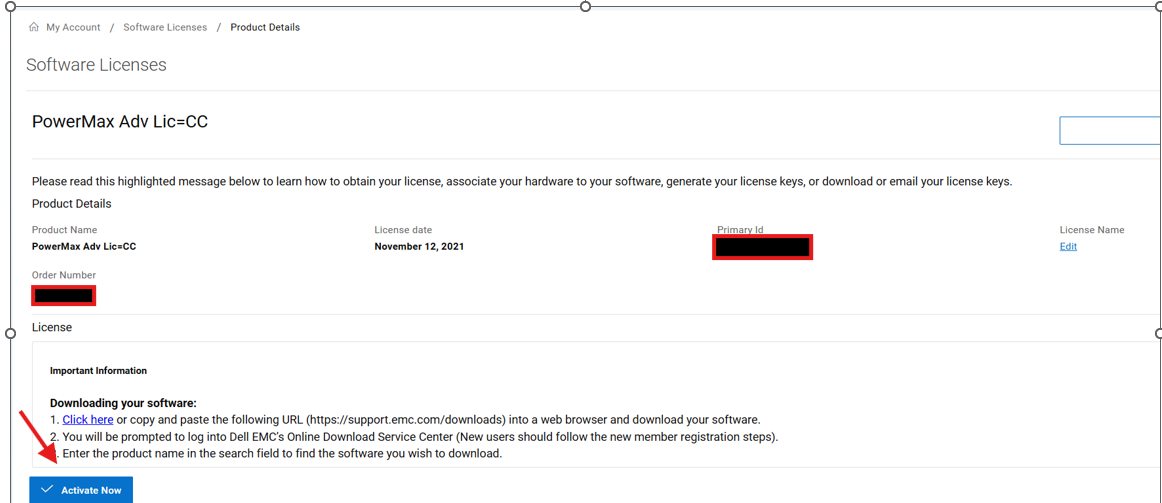
Here, the user is required to select the Entitlements available for activation.

- On the Proceeding Pages, the user is required to select a 'Machine Name' for the Activation. Here, the user can either select an existing Machine Name by using the 'Search Machines' section to locate and assign the Activation. Or, the user can choose to 'Add a New Machine' Name as shown in the image below to assign the Activation.

- On the Next Page, the user is required to specify the License 'Quantity', preferred 'Activation Type', 'Data Domain Virtual Edition (DDVE)' Version the Licenses are intended for and the 'Locking ID' to be assigned to the License.
Note:
- Upon Installing the Data Domain Virtual Edition (DDVE) Software Image; users can locate the Data Domain Virtual Edition (DDVE) Node Locking ID (for Un-Served Activations) and the Host Name and IP Address (for Served Activations) by following the Instructions on this Data Domain Virtual Edition Machine FAQ Page.
- UN-SERVED Activation - Un-Served License Activations are limited to a maximum Capacity of 256 TB per Machine and Un-Served licenses are activated to the Data Domain Virtual Edition (DDVE) Node Locking ID. Instructions for locating the Node Locking ID can be found under the Data Domain Virtual Edition Machine FAQ
- SERVED Activation - Served License Activations are intended for Large and Dynamic Environments and this type of activation requires a License Server. Served licenses are activated to the Host Name and IP Address of the License Server. Instructions for locating the Host Name and IP Address can be found under the Data Domain Virtual Edition Machine FAQ
Example of UN-SERVED Activation:

Example of SERVED Activation:

- On the Next Page the User can review the Transaction before proceeding with the Activation, which should then generate the License File for the Transaction and a copy of the File would also be delivered to the User.


Initiating License Activation from the Software Licensing Central
- Alternatively, Internal users or Partners and registered End-Users (who have been listed as Licensing Site Coordinators) can also log in directly to process the Activation from Software Licensing Central (SLC) by selecting the 'Activate' option under the 'Activate' Tab.
On this Page, the user can retrieve available Licensing Entitlements by searching the License Authorization Code (LAC) or Sales Order as shown in the image below.

Note: If the user experiences any Issues with the Activation Process, then engage the World-Wide Licensing Support Team for further assistance (Instructions outlined below)
- Contact Dell Technologies Technical Support to use the Live Chat feature between the hours of 12:00 AM EST Monday - 11:59 PM EST Friday or to use the Online Support Feature.
- Contact Dell Live Support by calling 001-800-782-4362 - mention "licensing"
See the list of Phones Numbers by country or region, CUSTOMER SUPPORT CENTERS.
受影响的产品
Data Domain Virtual Edition文章属性
文章编号: 000225655
文章类型: How To
上次修改时间: 25 6月 2025
版本: 3
从其他戴尔用户那里查找问题的答案
支持服务
检查您的设备是否在支持服务涵盖的范围内。