NVIDIA RTX Desktop Manager holder skrivebordet åpent
摘要: Denne artikkelen inneholder informasjon om problemet NVIDIA RTX desktop manager nyopprettet Desktop kan ikke lukkes.
本文适用于
本文不适用于
本文并非针对某种特定的产品。
本文并非包含所有产品版本。
症状
Dell-datamaskiner med NVIDIA separat GPU kan oppleve at NVIDIA RTX Desktop Manager ikke kan lukke det nyopprettede skrivebordet.
- Åpne NVIDIA RTX Desktop Manager og klikk på ENABLE RTX DESKTOP MANAGER. Programmet oppretter skrivebord 1 som standard.
- Klikk på knappen Nytt skrivebord for å opprette et nytt skrivebord.
- Klikk på X-ikonet øverst til høyre på skrivebord 2 , men finn ut at det ikke kan lukkes.
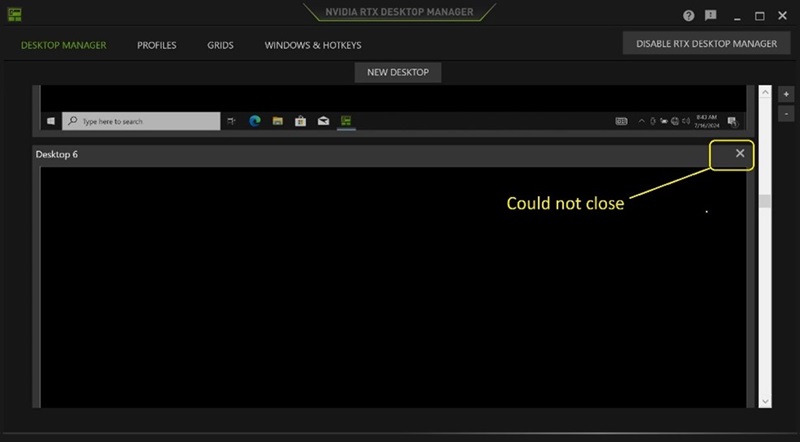
(Figur 1 – NVIDIA RTX Desktop Manager)
Berørte plattformer:
- Precision 7780
- Precision 7680
- Precision 7770
- Precision 7670
- Precision 7560
- Precision 7760
- Precision 7550
- Precision 7750
- Precision 7540
- Precision 7740
- Precision 7530
- Precision 7730
- Precision 7520
- Precision 7720
- Precision 5480
- Precision 5490
- Latitude 3490
- Latitude 3480
- Latitude 3470
- Latitude 3550
- Latitude 3530
- Latitude 3520
原因
Ikke relevant
解决方案
Du kan løse problemet ved å oppdatere NVIDIA Graphic Drive Rtil versjon 552.84 eller nyere på datamaskinen. Hvis du vil laste ned og installere driveren, kan du se Laste ned og installere Dell-drivere.
受影响的产品
Dell Latitude 3480/3488, Latitude 3490, Latitude 3520, Latitude 3530, Latitude 3550, Latitude 3470, Precision 5480, Precision 5490, Precision 7520, Precision 7530, Precision 7540, Precision 7550, Precision 7560, Precision 7670, Precision 7680
, Precision 7720, Precision 7730, Precision 7740, Precision 7750, Precision 7760, Precision 7770, Precision 7780
...
文章属性
文章编号: 000227614
文章类型: Solution
上次修改时间: 21 5月 2026
版本: 3
从其他戴尔用户那里查找问题的答案
支持服务
检查您的设备是否在支持服务涵盖的范围内。