Avamar: VM image backups fail with "No Proxy" because vCenter proxy is powered off
摘要: Avamar VM image backups fail with "No Proxy" because the proxy is powered off in vCenter.
本文章適用於
本文章不適用於
本文無關於任何特定產品。
本文未識別所有產品版本。
症狀
The Activity Monitor in the Avamar UI shows 'No Proxy'.
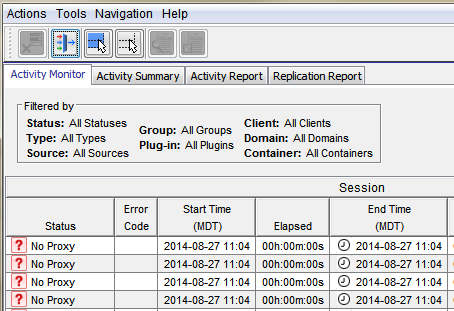
On-demand VMware Image backup fails with the following:
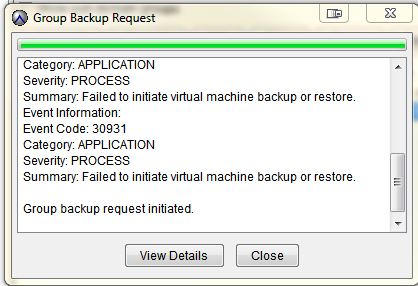
Category: APPLICATION
Severity: PROCESS
Summary: Failed to initiate virtual machine backup or restore.
Event Information:
Event Code: 30931
Category: APPLICATION
Severity: PROCESS
Summary: Failed to initiate virtual machine backup or restore.
If a group backup request is initiated.
原因
The proxy is powered off in vCenter.
解析度
- Open vCenter and check if the proxy is powered off.
- If the proxy is powered off, power on the proxy.
其他資訊
The following articles discuss issues which have the same generic "No Proxy" error.
- Avamar VM image backups fail with "No Proxy" because no proxy servers are configured to protect the datastore holding the client’s VMDKs
- Avamar VM image backups fails with "No Proxy" error due to an interruption to the vCenter connection
- Avamar VM image backups fails with "No Proxy" error due to the VM not having any hard disks
- Avamar VM image backups fails with "No Proxy" error due to the proxy being powered off in vCenter
- Avamar VM image backups fail with "No Proxy" error due to proxies not resolving in DNS
受影響的產品
Avamar產品
Avamar文章屬性
文章編號: 000033569
文章類型: Solution
上次修改時間: 05 2月 2025
版本: 4
向其他 Dell 使用者尋求您問題的答案
支援服務
檢查您的裝置是否在支援服務的涵蓋範圍內。