Dell Unity: Får ikke tilgang til Unity-administrasjonsgrensesnittet ved hjelp av https://FQDN eller https://ip.address (kan korrigeres av brukeren)
摘要: Får ikke tilgang til Unity-administrasjonsgrensesnittet ved hjelp av https://FQDN eller https://ip.address Tilgang til Unity finner sted ved hjelp av https://FQDN/?casHome=LOCAL og https://ip.address/?casHome=LOCAL ...
本文章適用於
本文章不適用於
本文無關於任何特定產品。
本文未識別所有產品版本。
症狀
Tilgang til Administrasjonsgrensesnittet for Unity ved hjelp av https://FQDN eller https://ip.address
Access to Unity finner sted ved hjelp av https://FQDN/?casHome=LOCAL og https://ip.address/?casHome=LOCAL
Access to Unity finner sted ved hjelp av https://FQDN/?casHome=LOCAL og https://ip.address/?casHome=LOCAL
原因
Unisphere Central er aktivert på Unity selv om Unisphere Central ikke brukes.
解析度
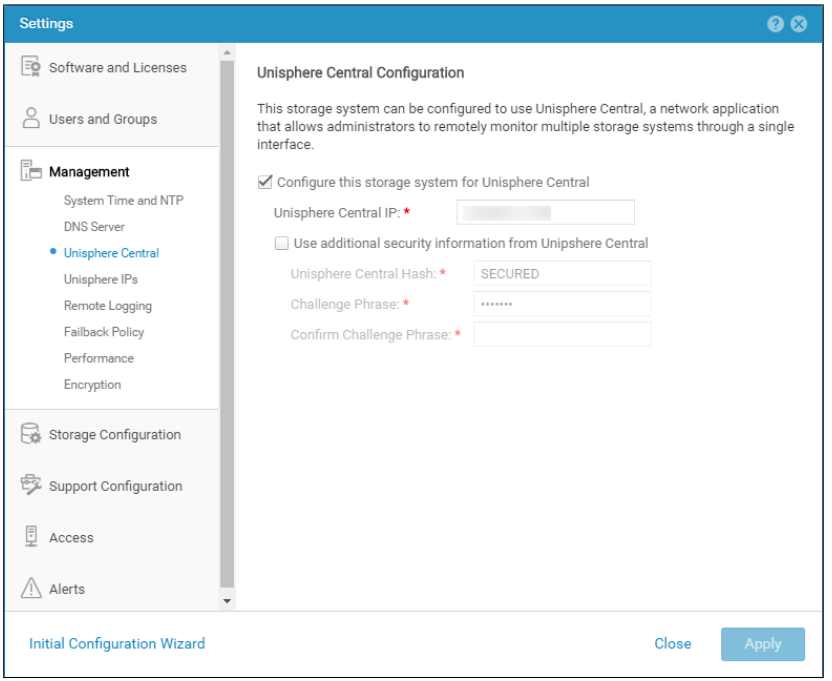
Kontroller bare "Configure this storage system for Unisphere Central" (Konfigurer dette lagringssystemet for Unisphere Central) hvis Unisphere Central er i bruk. Hvis den ikke er det, fjerner du kontrollen som aktiverer Unisphere Central.
受影響的產品
Dell EMC Unity文章屬性
文章編號: 000205133
文章類型: Solution
上次修改時間: 12 12月 2025
版本: 5
向其他 Dell 使用者尋求您問題的答案
支援服務
檢查您的裝置是否在支援服務的涵蓋範圍內。