Dell Unity: 无法使用 https://FQDN 或 https://ip.address 访问 Unity 管理界面(用户可更正)
摘要: 无法使用 https://FQDN 或 https://ip.address 访问 Unity 管理界面 使用 https://FQDN/?casHome=LOCAL 和 https://ip.address/?casHome=LOCAL 访问 Unity
本文章適用於
本文章不適用於
本文無關於任何特定產品。
本文未識別所有產品版本。
症狀
无法使用 https://FQDN 访问 Unity 管理界面或 https://ip.address
使用 https://FQDN/?casHome=LOCAL 和 https://ip.address/?casHome=LOCAL 访问 Unity
使用 https://FQDN/?casHome=LOCAL 和 https://ip.address/?casHome=LOCAL 访问 Unity
原因
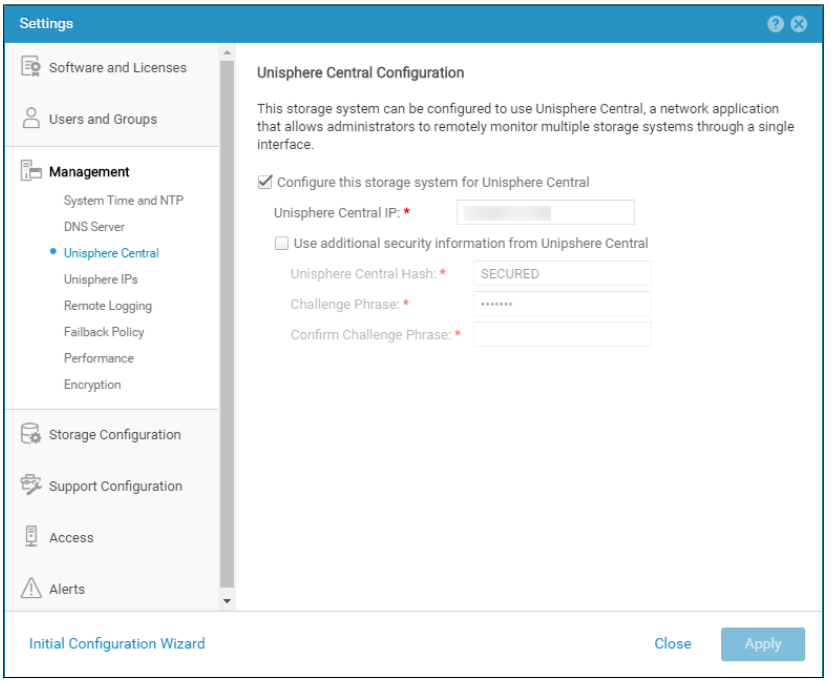
即使未使用 Unisphere Central,也会在 Unity 上启用 Unisphere Central。
解析度
仅当 Unisphere Central 正在使用时,才选中“Configure this storage system for Unisphere Central”。如果不是,请删除启用 Unisphere Central 的检查。
受影響的產品
Dell EMC Unity文章屬性
文章編號: 000205133
文章類型: Solution
上次修改時間: 12 12月 2025
版本: 5
向其他 Dell 使用者尋求您問題的答案
支援服務
檢查您的裝置是否在支援服務的涵蓋範圍內。