Isilon: How to find the serial number label on an Isilon A100 accelerator node
摘要: Introduction The serial number label on an Isilon A100 acceleration node is in a different location than the serial number labels on other Isilon nodes. This article describes how to find the serial number label. ...
本文章適用於
本文章不適用於
本文無關於任何特定產品。
本文未識別所有產品版本。
說明
Procedure
The serial number is printed on a blue label inside the node chassis, as indicated by the following image: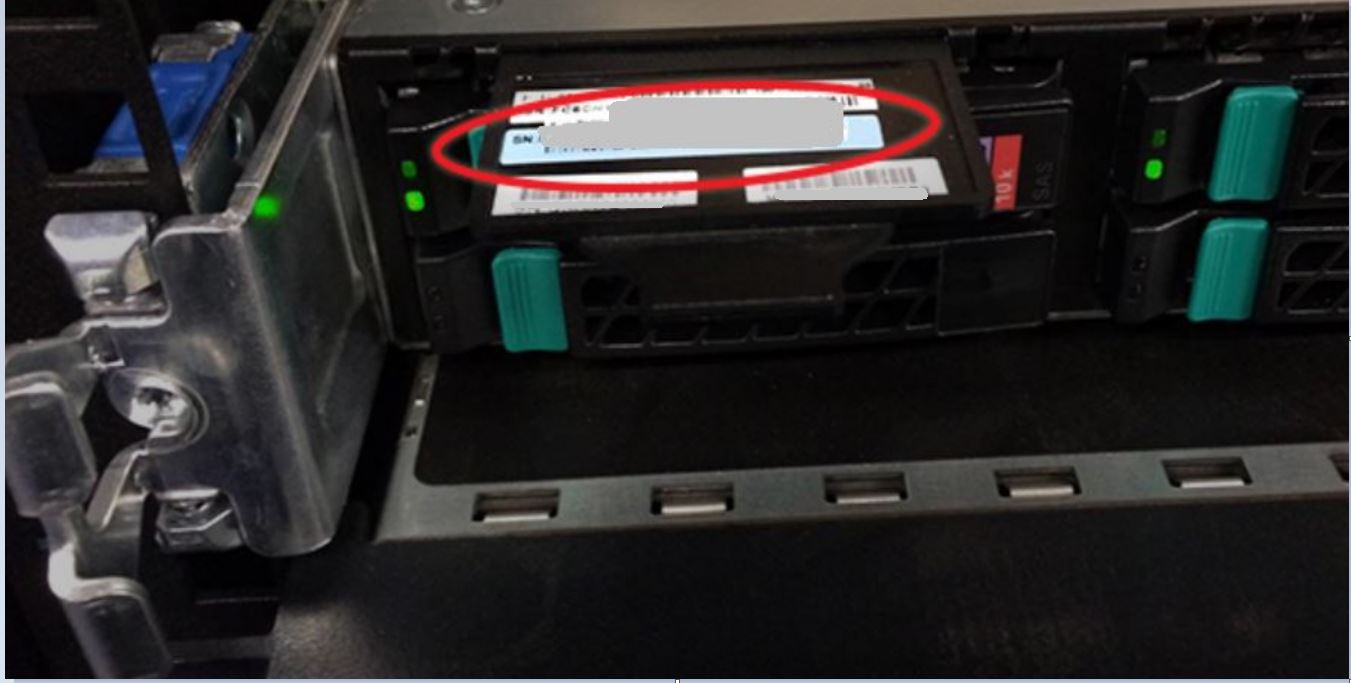
To retrieve the serial number from the chassis:
- Remove the face plate:
- Press both latches inward and to the center simultaneously.
- Pull the face plate off straight toward you while keeping the latches pushed in.
- Locate the black plastic tab sticking out of the chassis at the top-left corner, directly above the leftmost boot drive.
- Pull the tab out to expose the blue serial number label. The serial number starts with "FC6IS" and followed by nine digits.
- When you are done, push the label tab back into the chassis.
- Reinstall the face plate by carefully lining it up with the mount points and then pressing it onto the chassis until it clicks into place.
NOTE
To view the serial number using the OneFS web administration interface or the command-line interface, see PowerScale: Isilon: How to find serial numbers for PowerScale/Isilon nodes. | Dell US
To view a demonstration of this procedure, see the following video.
受影響的產品
Isilon產品
Isilon, Isilon A100文章屬性
文章編號: 000020342
文章類型: How To
上次修改時間: 14 10月 2022
版本: 3
向其他 Dell 使用者尋求您問題的答案
支援服務
檢查您的裝置是否在支援服務的涵蓋範圍內。