NetWorker: Client can override settings that does not apply to schedule if the level is set to skip at action level
摘要: The action property "Client Can Override" has been set but does not apply if the action schedule is set to skip.
本文章適用於
本文章不適用於
本文無關於任何特定產品。
本文未識別所有產品版本。
症狀
The Policy->Workflow->Action contains a client override option. Client override is enabled, showing "Client Can Override."

When Client Can Override is enabled, the Client resource values for Schedule, Pool, Retention policy, and Storage Node attributes override the equivalent Action resource attributes.
原因
NetWorker is working by design. If the NetWorker policy action schedule is set to Skip backup level, the Client can Override option is not honored.
解析度
For NetWorker to consider the Client Can Override option, change the action schedule to a different level.
If the client should be skipped, define the skip level schedule at client properties.
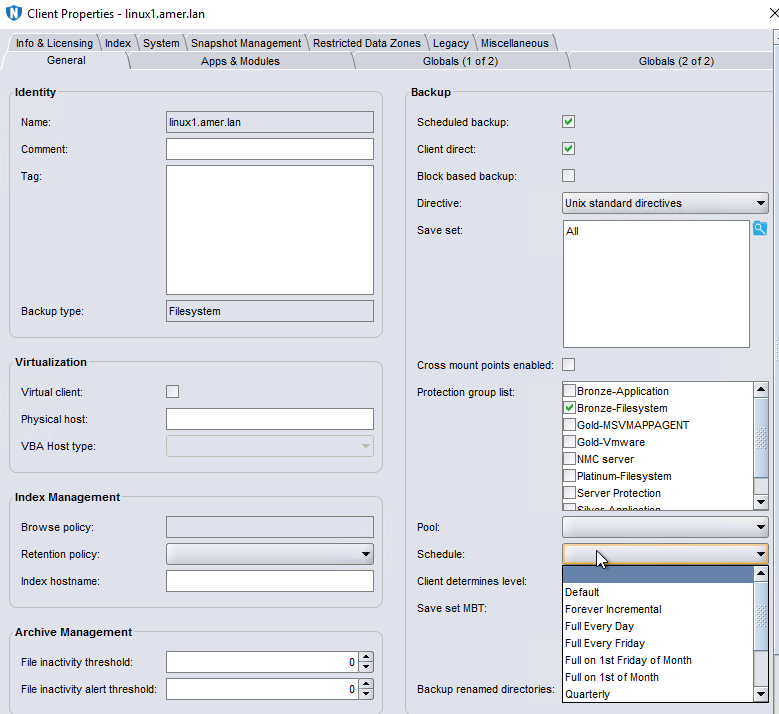
There are some default schedules defined. Custom schedules can be created under Protection->Schedules. Once created the scheduled is listed as an option in the Schedule drop-down in the client properties.
其他資訊
Client Overrides and scheduling is detailed further in the NetWorker Administration Guide, available through: https://www.dell.com/support/home/product-support/product/networker/docs
受影響的產品
NetWorker產品
NetWorker Family, NetWorker Series文章屬性
文章編號: 000032150
文章類型: Solution
上次修改時間: 14 3月 2025
版本: 4
向其他 Dell 使用者尋求您問題的答案
支援服務
檢查您的裝置是否在支援服務的涵蓋範圍內。