ECS: Unable to delete empty CAS-enabled bucket - Error 1013 (HTTP: 400): Bad request body. Bucket {} is not empty
摘要: Unable to delete a CAS enabled bucket even though all the clips in the bucket have been deleted.
本文章適用於
本文章不適用於
本文無關於任何特定產品。
本文未識別所有產品版本。
症狀
- Unable to delete an empty CAS-enabled bucket
- Error 1013 (HTTP: 400): Bad request body. Bucket {} is not empty.
- ECS CAS: No mechanism to sweep or purge reflection Clips.
- ECS CAS: Reflection Clips preventing CAS bucket from being deleted.

原因
- A CAS object consists of one clip, and one or more blobs.
- The clip contains the object metadata, while the blobs contain the object itself.
- When a CAS object is deleted, both the clip and the blob are deleted, and a reflection is created instead.
- The reflection contains metadata about the object which was deleted, and is treated as an object in the bucket even if they are not listed.
- Starting from ECS 3.2, a new feature called "Reflection Expiration" was introduced to CAS buckets.
- Reflection Expiration enables the ECS to expire (remove/delete) the reflections in the bucket after a certain time of their creation.
- If Reflection Expiration is not enabled on the bucket, then the reflections created will remain in the bucket indefinitely. This makes it impossible to delete the bucket as it is not technically empty.
解析度
Reflection Expiration must be enabled on the CAS bucket, in order for the bucket to be properly emptied and then successfully deleted.
- Open the ECS UI.
- Go To "Manage" on the left pane.
- Select "Buckets".
- Choose the namespace where the bucket is configured.
- In the table, under "Actions", click "Edit Bucket" on the bucket which cannot be deleted.
- Click the "Required" option at the top
- Enable "Reflection Expiration" by pressing "On" and then choosing a value for "Reflection Age".
The Reflection Age is the time that the reflection stays in the bucket upon creation (when the object is deleted) before it gets removed.
The minimum value for "Reflection Age" is 1 day. - Click "Save" to preserve the changes.
- Wait until the time configured in "Reflection Age" has passed before trying to delete the bucket again.
- If the issue persists, open a Service Request with ECS support.
Before: 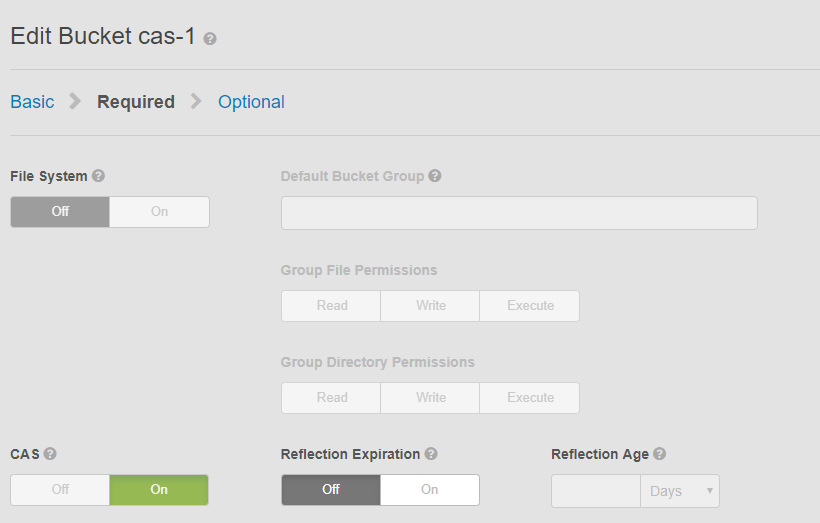
After:
受影響的產品
ECS Appliance產品
ECS Appliance, ECS Appliance Hardware Gen1 U-Series, ECS Appliance Software without Encryption, Elastic Cloud Storage文章屬性
文章編號: 000044827
文章類型: Solution
上次修改時間: 29 10月 2025
版本: 4
向其他 Dell 使用者尋求您問題的答案
支援服務
檢查您的裝置是否在支援服務的涵蓋範圍內。