Dell Unity:儲存處理器在使用者介面中顯示為重新開機,但在 CLI 中未顯示,且沒有故障的 LED (使用者可修正)
摘要: 本文說明為何 Unisphere 使用者介面在處於正常模式時,可能會顯示 SP 已降級並正在重新開機。
本文章適用於
本文章不適用於
本文無關於任何特定產品。
本文未識別所有產品版本。
症狀
小型可插拔 (SFP) 在記錄中顯示為遺失一次,之後顯示為良好。
如果 SFP 有一點灰塵或未完全插入連接埠
,則已知不會偵測到。這是效能下降的常見因素,因為它會導致持續斷開連接,甚至可能是作為慢速耗盡設備的原因。
在 Unisphere 使用者介面中,儲存處理器會在「系統」 > 、「服務」 > 、「服務作業」中顯示為重新開機且處於降級狀態。
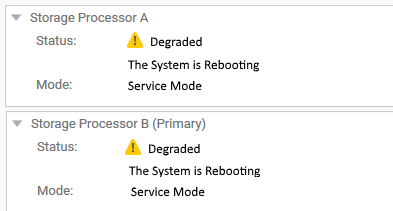
但在使用 CLI 的 SSH 終端機中,兩個 SP 都處於正常模式。
到目前為止,已在 Unity OE 版本 4.5.1.0.5.001 中出現此問題。
例:
service@CKMxxxxxxxx spa:~/user# svc_diag
======== Now executing basic state ========
* System Serial Number is: CKMxxxxxxx
* System Model Number is: Unity 500
* System Friendly Host Name is: CKMxxxxxxxx
* Current Software version: c4dev_PIE_3786R-4.5.1.0.5.001.1552025209-GNOSIS_RETAIL
* Unisphere IP address(es): xx.xxx.xxx.xx xxxx::xxx:xxxx:xxxx:xxxx
* SSH Enabled: true
* FIPS mode: Disabled
* Boot Mode: Normal Mode
* Post Faults:  0x0000
* Backend Faults:       0x0000
* Boot Faults:  0x0000
* Rescue Reason:        0x0000
* Rescue reason for code 0x0000 - No faults detected.
* SP Service Hint Code: <None>
原因
安裝新的 I/O 模組時,就會發生此特殊情況。
由於 SFP 不理想,因此無法完成提交,因此暫時禁用了與運行狀況相關的操作(類似於升級期間發生的情況)。
由於健康狀況輪詢已停用,系統無法識別儲存處理器的正確狀態,並回報先前的已知狀態「正在重新開機」。
若要確認這是同一問題,請驗證下列記錄: /var/tmp/ptm/ptm.log/EMC/C4Core/log/c4_safe_ktrace.log
在 SSH 終端機或分級服務資料收集記錄中執行命令,即可即時看到這種情況:
命令/日誌 #1:
預期輸出:
cat /var/tmp/ptm/ptm.log
預期輸出:
=====================================Tasks=====================================
10:56 [ 16/22 ]  Core reboot sp if required (local)                  10 minutes
Start at: Thu May 23 10:56:19 2019
Complete at: Thu May 23 10:56:19 2019
===============================================================================
10:56 [ 17/22 ]  Core start c4 (local)                                5 minutes
Start at: Thu May 23 10:56:19 2019
Task Manager was terminated unexpectedly with signal <TERM>
.... <there might be a few extra lines here > ....
Previous failure detected. Not auto-restarting.
命令/日誌 #2:
並尋找與 SFP 或夾層相關的事件。
我們可以看到在安裝新的 I/O 模組時發生了錯誤:
less /EMC/C4Core/log/c4_safe_ktrace.log
並尋找與 SFP 或夾層相關的事件。
我們可以看到在安裝新的 I/O 模組時發生了錯誤:
c4_safe_ktrace   INFO OBJ 3 RP:MEZZ(SP: 0, Slot: 0): fbe_base_env_send_resume_prom_read_async_cmd entry.
c4_safe_ktrace   INFO OBJ 3 RP:MEZZ(SP: 0, Slot: 0): Read async completed, workItem 0x7f2486432760, resumeStatus DEVICE_NOT_VALID_FOR_PLATFO
c4_safe_ktrace   INFO OBJ 3 100C0 : ModMgmt: CLEAR enclFaultLedReason Mezzanine RP Fault. <<<====== Fault detected in Root Port (RP)
..........
c4_safe_ktrace   INFO OBJ 3 100C0 : fbe_module_mgmt_check_module_state, SPB Mezzanine 0, state:ENABLED, substate:GOOD
c4_safe_ktrace   INFO OBJ 3 100C0 : fbe_module_mgmt_check_port_state Setting SPB Mezzanine 0, Port 0, state ENABLED, substate GOOD
c4_safe_ktrace   INFO OBJ 3 100C0 : fbe_module_mgmt_check_port_state Setting SPB Mezzanine 0, Port 1, state MISSING, substate MISS_SFP <<<=== SFP not detected
c4_safe_ktrace   INFO OBJ 3 100C0 : fbe_module_mgmt_check_port_state Setting SPB Mezzanine 0, Port 2, state ENABLED, substate GOOD
c4_safe_ktrace   INFO OBJ 3 100C0 : fbe_module_mgmt_check_port_state Setting SPB Mezzanine 0, Port 3, state ENABLED, substate GOOD
c4_safe_ktrace   INFO OBJ 3 100C0 : fbe_module_mgmt_check_port_state Setting SPB Mezzanine 0, Port 4, state ENABLED, substate GOOD
c4_safe_ktrace   INFO OBJ 3 100C0 : fbe_module_mgmt_check_port_state Setting SPB Mezzanine 0, Port 5, state ENABLED, substate GOOD
解析度
若要解決此問題,請使用下列命令重新提交 I/O 模組,因為它們最初會失敗。
便條:這些命令不需要 root,但需要健全的陣列,因此在執行之前,請確認您的陣列已完全正常運行,如下所示:
Command #1:
uemcli -no /sys/general healthcheck -output csv -detail
輸出範例:
#1 (非最佳) - 在解決顯示的錯誤之前請勿繼續)。
"Error code"
"Warning: One or more asynchronous replication sessions, or one or more NAS Server or file system synchronous replication sessions, exist. This could cause problems during upgrade. Pause the replication sessions on the production array prior to starting the upgrade and resume them after completing the upgrade. [Warning Code: platform::check_replication_health_4]"
"Warning: One or more NAS servers may not be in a healthy state. You can continue with the upgrade, but it is recommended that you record the error code and contact your service provider. [Warning Code: dm::check_nas_servers_health_3]"
Operation completed successfully.
注意:它確實提到「升級」,因為這是在執行無中斷升級(NDU)之前使用的命令。但是,之所以會顯示這些訊息,是因為陣列 (兩個 SP) 都必須重新開機。
命令 #2 也可能需要重新開機,因此必須通過此執行狀況檢查,且沒有任何 [錯誤代碼:]。
[警告] 可以忽略,但命令 #2 提示符會顯示訊息
"Do you still want to continue," 然後輸入「Yes」但是,Dell 支援部門建議先解決執行狀況檢查中的所有警告和錯誤,然後再繼續。
若要重新啟動儲存處理器,請依照 KB Dell Unity 中概述的步驟操作:如何重新開機儲存處理器 (使用者可修正)
#2 (最佳) - 您可以前往命令 #2
"Error code"
Operation completed successfully.
命令 #2:
svc_change_hw_config -e
預期輸出:
service@CKMxxxxxxxx spa:~/user# svc_change_hw_config -e
Checking if both SPs are in Normal mode...OK
INFO:    Beginning eSLIC or CNA Hardware Upgrade...
WARNING: This operation will cause several reboots to occur on the Storage Processors.
WARNING: Do NOT proceed further if the user is unaware of this downtime!
==============================System Information===============================
Task Manager Command:            /opt/ptm/task_mgr.pl
Starts at:                       Sat Oct  5 10:03:47 2019
Dual SP:                         Yes
SP:                              b
Platform:                        OBERON
Original Primary:                Yes
Model:                           Unity xxx
Serial Number:                   xxxxxxxxxxxxx
Total number of attempts:        0
===============================================================================

==========================Time Estimate for All Tasks==========================
Task name [ 22 tasks in total ]                      Estimated     Status
                                                           Time(Minutes)
  1         Slic wait for system ready slic (local)         3
  2      Core run pre upgrade health checks (local)         2
  3         ESLIC check eslic configuration (local)         1
  4                  Core enable auto start (local)         0
  5                Core clear boot counters (local)         0
  6               Core clear boot counters (remote)         0
  7                 Core force vdms off sp (remote)         2
  8                  ESLIC set esp boolean (remote)         1
  9                 Core disable quickboot (remote)         1
 10         Core reboot peer sp if required (local)        10
 11                          Core start c4 (remote)         5
 12              Core wait for system ready on peer         3
 13                  Core force vdms off sp (local)         2
 14                   ESLIC set esp boolean (local)         1
 15                  Core disable quickboot (local)         1
 16              Core reboot sp if required (local)        10
 17                           Core start c4 (local)         5
 18              Core wait for system ready (local)         3
 19         ESLIC final configuration check (local)         1
 20                           Core clean up (local)         0
 21                      Core clean up peer (local)         0
 22                 Core disable auto start (local)         0

===============================================================================

=========================Estimated Time for Services ==========================
Current Time:                                      10:03
Estimated Time when eSLIC will be complete:      10:52
===============================================================================
Do you wish to continue [ yes or no ]? >
輸入「yes」並按下「Return」鍵後,您應該會看到以下輸出:
=====================================Tasks=====================================
20:41 [ 17/22 ]  Core start c4 (local)                                5 minutes
===============================================================================
20:41 [ 18/22 ]  Core wait for system ready (local)                   3 minutes
===============================================================================
20:41 [ 19/22 ]  ESLIC final configuration check (local)             30 seconds
===============================================================================
20:41 [ 20/22 ]  Core clean up (local)                                5 seconds
===============================================================================
20:41 [ 21/22 ]  Core clean up peer (local)                           5 seconds
===============================================================================
20:41 [ 22/22 ]  Core disable auto start (local)                      5 seconds
===============================================================================
===================================SUMMARY=====================================
Status:                   Success
Actual Time Spent:        16452 minutes
Total Number of attempts: 1
Log File:                 /var/tmp/ptm/ptm.log
=====================================END=======================================
這些也會登入
/EMC/backend/log_shared/EMCSystemLogFile.log:
Platform_Basic      30018 [NOTICE] Audit: Service user executed the following service script command: svc_change_hw_config -e
IOModule            30010 [INFO] User: Starting the hardware configuration commit operation
Platform_Basic      30018 [NOTICE] Audit: Service user executed the following service script command: svc_dc -pbc udoctor
IOModule            30014 [INFO] User: Completed task <17> of <22> (Restarting services)
IOModule            30014 [INFO] User: Completed task <18> of <22> (Waiting for system ready state)
IOModule            30014 [INFO] User: Completed task <19> of <22> (Checking if upgrade complete)
IOModule            30014 [INFO] User: Completed task <20> of <22> (Cleaning up)
IOModule            30014 [INFO] User: Completed task <21> of <22> (Cleaning up)
IOModule            30014 [INFO] User: Completed task <22> of <22> (Disabling automatic restart)
IOModule            30011 [NOTICE] User: The hardware configuration has been successfully committed
Health              6044f [INFO] User: Storage Processor SP A is operating normally
Health              6044f [INFO] User: Storage Processor SP B is operating normally
顯示上述輸出後,重新整理 Unisphere 使用者介面,查看狀態是否已變更回正常 (預期)。
如果沒有,請聯絡 Dell 技術支援部門並參考本文。
注意:有關此命令的詳細資訊,請參閱文件 Dell EMC Unity™ 系列服務命令技術備註, 位於 https://www.dell.com/support/home/en-us
其他資訊
注意:也可能是幣式電池損壞,導致 UI 中出現 SP 重新開機誤報問題。
請參閱 KB 000069296 Dell Unity:儲存處理器上的幣式電池 (Dell 可修正)
受影響的產品
Dell Unity 300, Dell EMC Unity Family產品
Dell EMC Unity 300F, Dell EMC Unity 350F, Dell EMC Unity 400, Dell EMC Unity 400F, Dell EMC Unity 450F, Dell EMC Unity 500, Dell EMC Unity 500F, Dell EMC Unity 550F, Dell EMC Unity 600, Dell EMC Unity 600F, Dell EMC Unity 650F
, Dell EMC Unity Family |Dell EMC Unity All Flash, Dell EMC Unity Family, Dell EMC Unity Hybrid
...
文章屬性
文章編號: 000056107
文章類型: Solution
上次修改時間: 04 12月 2025
版本: 6
向其他 Dell 使用者尋求您問題的答案
支援服務
檢查您的裝置是否在支援服務的涵蓋範圍內。