How to Identify the CrowdStrike Falcon Sensor Version
摘要: Learn to identify the CrowdStrike Falcon Sensor version for issue solutions, process changes, or system requirements. Follow the steps for Windows, Mac, or Linux.
本文章適用於
本文章不適用於
本文無關於任何特定產品。
本文未識別所有產品版本。
症狀
Knowing the CrowdStrike Falcon Sensor version allows you to:
- Identify known issues
- Understand process changes
- Understand system requirements
Affected Products:
- CrowdStrike Falcon Sensor
Affected Operating Systems:
- Windows
- Mac
- Linux
原因
Not applicable
解析度
For instructions about how to identify the CrowdStrike Falcon Sensor version, click on Windows, Mac, or Linux.
Note:
- The CrowdStrike Falcon Sensor must be installed before identifying the version. For information about the installation process, reference How to Install CrowdStrike Falcon Sensor.
- For more information about checking the CrowdStrike Falcon Sensor, reference https://supportportal.crowdstrike.com/s/article/Checking-Falcon-Sensor-Version-Locally
.
Windows
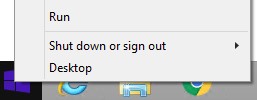
- Right-click the Windows start menu, and then click Run.
- In the Run UI, type
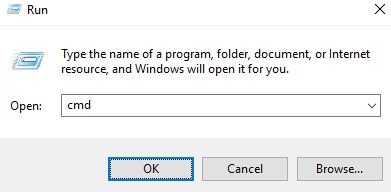
cmd, and then press OK.
- In Command Prompt, type
"C:\Program Files\CrowdStrike\CSSensorSettings.exe" –versionand then press Enter.

- Record the Version. In the example, 7.04.17605.0 is the Version.

Note: The Version of your sensor may differ from the above screenshot.
Mac
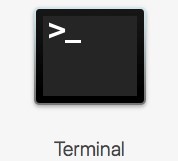
- Locate and then double-click Terminal.
- In Terminal, type
sysctl cs.versionand then press Enter.

- Record the version. In the example, the version is 4.18.8013.0.

Note: The Version of your sensor may differ from the above screenshot.
Linux
- On the targeted endpoint, open Terminal.

- In Terminal, type
sudo /opt/CrowdStrike/falconctl -g --versionand then press Enter.

- Populate the sudo account Password and then press Enter.
- Record the version. In the example, 4.20.6602.0 is the version.

Note: The Version of your sensor may differ from the above screenshot.
To contact support, reference Dell Data Security International Support Phone Numbers.
Go to TechDirect to generate a technical support request online.
For additional insights and resources, join the Dell Security Community Forum.
受影響的產品
CrowdStrike文章屬性
文章編號: 000126120
文章類型: Solution
上次修改時間: 26 1月 2024
版本: 21
向其他 Dell 使用者尋求您問題的答案
支援服務
檢查您的裝置是否在支援服務的涵蓋範圍內。