Dell Data Security Server Administration Console에 액세스하는 방법
摘要: Dell Data Security 또는 Dell Data Protection Server 관리 콘솔은 다음 지침에 따라 액세스할 수 있습니다.
本文章適用於
本文章不適用於
本文無關於任何特定產品。
本文未識別所有產品版本。
症狀
Dell Data Security(이전의 Dell Data Protection)를 사용하려면 다음을 관리하기 위한 관리 콘솔이 필요합니다.
- 정책
- 보고서
- 암호화 키
영향을 받는 제품:
- Dell Security Management Server
- Dell Data Protection | Enterprise Edition Server
- Dell Security Management Server Virtual
- Dell Data Protection | Virtual Edition
영향을 받는 버전:
- v8.0 이상
原因
해당 사항 없음
解析度
관리 콘솔에 액세스하는 특정 단계를 보려면 해당 제품 버전을 클릭하십시오. 버전을 관리하는 방법에 대한 자세한 내용은 Dell Data Security/Dell Data Protection Server 버전 식별 방법을 참조하십시오.
- 웹 브라우저를 열고 https://servername.company.com:8443/webui로 이동합니다.

참고:
- 예제 FQDN(Fully Qualified Domain Name)은 해당 환경의 서버에 따라 다릅니다.
- 포트 8443은 사용자 환경의 관리 콘솔 포트와 다를 수 있습니다.
- 관리 콘솔에 로그인합니다.
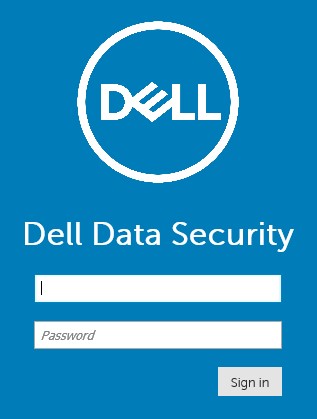
참고:
- 버전 11.4 이상에서 Google Authenticator 또는 이메일 MFA(Multi-Factor Authentication)가 사용자에 대해 구성된 경우 사용자에게 OTP(One Time Password)를 입력하라는 메시지가 표시됩니다.
- MFA 구성에 대한 자세한 내용은 Dell Security Management Server 관리 콘솔에서 다단계 인증을 관리하는 방법을 참조하십시오.
- Windows 탐색기에서 다음으로 이동합니다.
- Dell Data Protection | Enterprise Edition 서버:
C:\Program Files\Dell\Enterprise Edition - 끝점:
C:\Program Files\Dell\Virtual Edition
- Dell Data Protection | Enterprise Edition 서버:
참고:
- 엔드포인트 액세스를 위해서는 Dell Data Protection | Virtual Edition 미디어에서 관리 콘솔(이전의 Remote Management Console)을 설치해야 합니다.
- 설치 단계는 Dell Data Protection Remote Management Console 설치 방법을 참조하십시오.
- 두 번 클릭
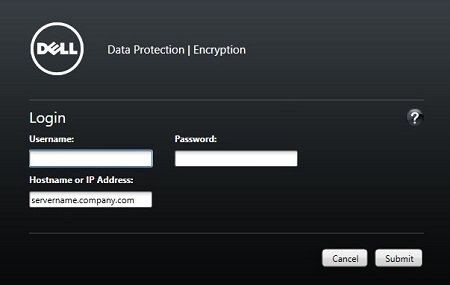
Credant.Console.

- 자격 증명을 제출하여 관리자 콘솔에 로그인합니다.
지원 부서에 문의하려면 Dell Data Security 국제 지원 전화번호를 참조하십시오.
온라인으로 기술 지원 요청을 생성하려면 TechDirect로 이동하십시오.
추가 정보 및 리소스를 보려면 Dell 보안 커뮤니티 포럼에 참여하십시오.
其他資訊
影片
受影響的產品
Dell Encryption文章屬性
文章編號: 000126852
文章類型: Solution
上次修改時間: 16 11月 2023
版本: 15
向其他 Dell 使用者尋求您問題的答案
支援服務
檢查您的裝置是否在支援服務的涵蓋範圍內。