Manual Mobile Broadband Activation Assistance
摘要: This article provides information about how to obtain the mobile broadband card International Mobile Equipment Identity (IMEI) number for activation.
本文章適用於
本文章不適用於
本文無關於任何特定產品。
本文未識別所有產品版本。
症狀
原因
No cause information is available.
解析度
IMEI Number
To manually activate, Mobile Broadband (MMB) or Wireless Wide Area Network (WWAN) cards you must obtain the International Mobile Equipment Identity (IMEI) number for the card. Below are instructions to obtain the IMEI number with the use of the Command Prompt.
- For Windows 10, press the Windows + X keys. Click Command Prompt (Admin) to open in Administrator mode.
Command Prompt Options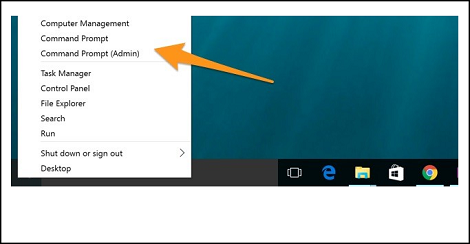
- To find the device information for a device on your local system, use the following command in the Command Prompt:
netsh mbn show interface
Press the Enter key.
netsh mbn show interface Command.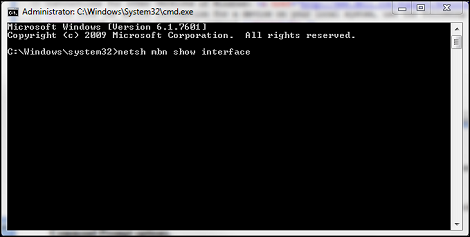
- The device id is the IMEI number.
Command Prompt Device ID.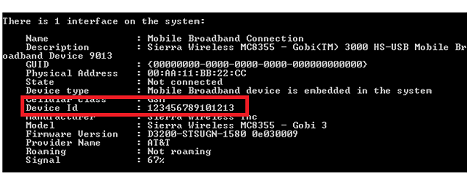
If the WWAN Service is disabled, a message displays in the Command Prompt: "Mobile Broadband Service (wwansvc) is not running."
(wwansvc) Not Running
Option 1 to start the service:
- Activate the service with a Command Prompt command.
- Open Command Prompt again and type:
net start wwanSvc
Press the Enter key.
Option 2 to start the service:
- Activate the service in the Services menu.
- Open Command Prompt again and type:
services.msc
Press the Enter key. - Find "WWAN AutoConfig."
WWAN AutoConfig Service
- Double-click the WWAN Service entry and it should open the WWAN Service general tab.
WWAN Service General Tab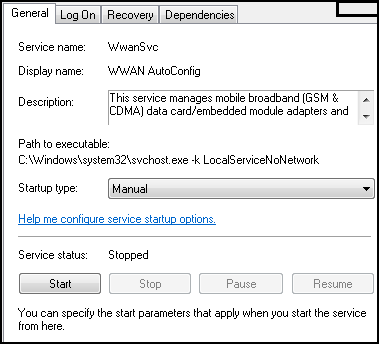
- Change the Startup Type to: Automatic.
- Click the Start Button.
- Once the service successfully starts, retry the "
netsh mbn show interface" from the command prompt to capture the IMEI number.
Note: Without the IMEI number, the activation cannot occur. The next option (not recommended as it may introduce further complications) is to open the battery and system cover to find the IMEI number sticker.
You can now contact your carrier (Verizon, T-Mobile, AT&T, so forth) to activate the card.
受影響的產品
Dell Wireless 5505-Vodafone Mobile Broadband (3G HSDPA) Mini-Card, Dell Wireless 55XX-Cingular Mobile Broadband (3G HSDPA) Mini-Card, Dell Wireless 57XX-Sprint Mobile Broadband (CDMA EV-DO) Mini-Card
, Dell Wireless 57XX-TELUS Mobile Broadband (CDMA EV-DO) Mini-Card, Dell Wireless 57XX-Verizon Mobile Broadband (CDMA EV-DO) Mini-Card
...
文章屬性
文章編號: 000130127
文章類型: Solution
上次修改時間: 11 11月 2025
版本: 7
向其他 Dell 使用者尋求您問題的答案
支援服務
檢查您的裝置是否在支援服務的涵蓋範圍內。