EQLXPerf not started
摘要: The service EQLXPerf not starting in operation system.
本文章適用於
本文章不適用於
本文無關於任何特定產品。
本文未識別所有產品版本。
症狀
Service EQLXPerf not starting and generating Event ID: 1023 in system event Logs in Operation System.
Trying to start it manually, this error will be displayed after a few seconds:
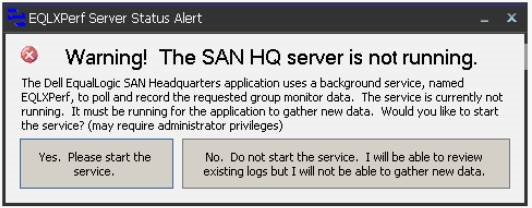
In the Operating System Event Logs, the event ID: 1023 is recorded. There is already a listener on IP endpoint 0.0.0.0:8000.

Trying to start it manually, this error will be displayed after a few seconds:
In the Operating System Event Logs, the event ID: 1023 is recorded. There is already a listener on IP endpoint 0.0.0.0:8000.
解析度
Use the Command netstat -an in prompt to verify the ports and programs running.

After, search in the archive for 0.0.0.0:8000 and verify the state.
If the state is LISTENING, another application is already using this port.
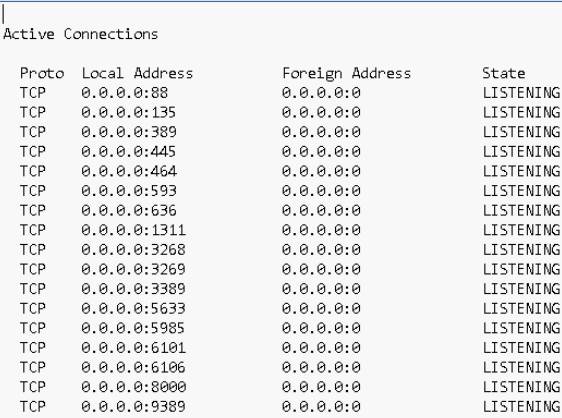
In this case we must change the port of San HeadQuarters or the application that is using port 8000.
To change the port in San Headquarters access the option:
Settings -> Server Settings.
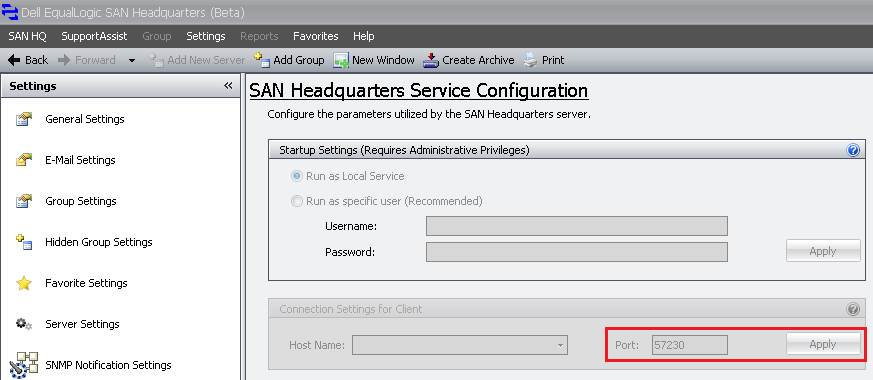
After changing the port, start the EQLXPerf service in the Operatig System.
After, search in the archive for 0.0.0.0:8000 and verify the state.
If the state is LISTENING, another application is already using this port.
In this case we must change the port of San HeadQuarters or the application that is using port 8000.
To change the port in San Headquarters access the option:
Settings -> Server Settings.
After changing the port, start the EQLXPerf service in the Operatig System.
受影響的產品
Legacy Storage Models文章屬性
文章編號: 000136708
文章類型: Solution
上次修改時間: 10 4月 2021
版本: 3
向其他 Dell 使用者尋求您問題的答案
支援服務
檢查您的裝置是否在支援服務的涵蓋範圍內。