MD Series: Setup IP Address and Password on ME3xxx controllers with serial
摘要: This article details how to set an IP address or change the Administrator Password on MD3xxx storage with a serial connection.
本文章適用於
本文章不適用於
本文無關於任何特定產品。
本文未識別所有產品版本。
說明
Serial connection programs like PuTTY are required for the following steps. The below steps are shown using PuTTY as that is the software used by Support, and is widely used.
PuTTY is an open source SSH and telnet client, developed for the Windows platform. The software can be downloaded here.
- Connect with the Serial-Cable from the Host or Client to one of the Controllers
- Open a Terminal Session with PuTTY
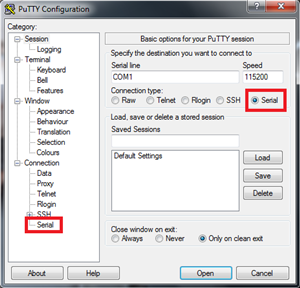
- Choose Serial as Connection Type and click in the menu on the left side to change more settings
- Set the following parameters in the Options controlling local serial lines:
-
Bits per second: 9600 Data bits: 8 Parity: none Stop bits: 1 Flow control: none 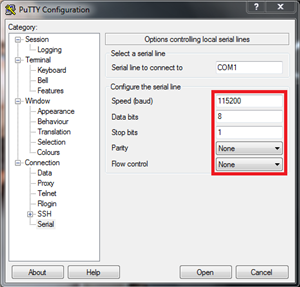
-
- Click Session
- Give the connection a name
- Click Save for future use
- Click Open and a console window opens
- Press CTRL + Break simultaneously
- Now press SHIFT + S simultaneously to enter the Service menu
- When asked for a password, type "
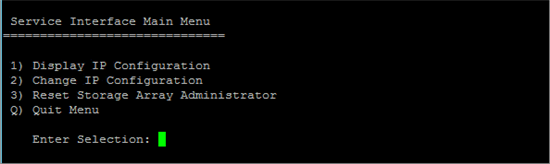
supportDell" and press Enter - The Service Interface Main Menu displays
- This Menu provides options to display and change the IP Address of the Controller connected with the serial cable
- Changing the IP Address causes the controller to restart in order to implement the changes.
- The Menu also provides the option to reset the Administrator Password of the Storage Array
受影響的產品
PowerVault MD3000, PowerVault MD3000i, PowerVault MD3200, PowerVault MD3200i, PowerVault MD3220, PowerVault MD3220i, PowerVault MD3260, PowerVault MD3260i, PowerVault MD3400, PowerVault MD3420, PowerVault MD3460, PowerVault MD3600F
, PowerVault MD3600i, PowerVault MD3620F, PowerVault MD3620i, PowerVault MD3660f, PowerVault MD3660i, PowerVault MD3800f, PowerVault MD3800i, PowerVault MD3820f, PowerVault MD3820i, PowerVault MD3860f, PowerVault MD3860i
...
文章屬性
文章編號: 000143466
文章類型: How To
上次修改時間: 05 9月 2025
版本: 5
向其他 Dell 使用者尋求您問題的答案
支援服務
檢查您的裝置是否在支援服務的涵蓋範圍內。