Alienware Update, Dell Update et Dell Command Update ne peuvent pas rechercher les mises à jour
摘要: Informations sur les erreurs de mise à jour lors de l’utilisation d’Alienware Update, Dell Update ou Dell Command Update.
本文章適用於
本文章不適用於
本文無關於任何特定產品。
本文未識別所有產品版本。
症狀
Après avoir cliqué sur « Check for Updates » dans Alienware Update, Dell Update ou Dell Command Update, le message « Impossible de récupérer les informations d’inventaire de l’ordinateur » s’affiche. Voici un exemple de message :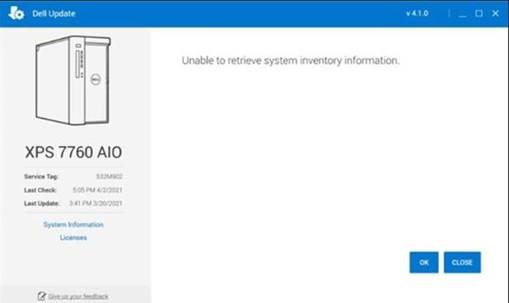
原因
Cela se produit parce qu’un composant intégral du logiciel rencontre un problème lors de l’exécution d’une analyse de l’ordinateur.
解析度
Dell Update Recovery Utility
Pour résoudre ce problème, installez et exécutez Dell Update Recovery Utility. Cette opération doit être effectuée sur chaque ordinateur concerné qui reçoit ce message.
受影響的產品
Alienware Update, Alienware, Dell All-in-One, Dell Pro All-in-One, Dell Pro Max Micro, Dell Pro Max Slim, Dell Pro Max Tower, Dell Pro Micro, Dell Pro Slim, Dell Pro Tower, Dell Slim, Dell Tower, Inspiron, OptiPlex, Vostro, XPS, G Series, G Series
, Alienware, Dell Plus, Dell Pro, Dell Pro Max, Dell Pro Plus, Dell Pro Premium, Inspiron, Latitude, Dell Pro Rugged, Vostro, XPS, Fixed Workstations, Mobile Workstations, Dell Command | Update, Dell Pro Max Micro XE FCM2250, Dell Pro Max Slim XE FCS1250, Dell Pro Max Tower T2 XE FCT2250, Dell Pro Max 16 XE MC16250, Dell Pro Micro Plus XE QBM1250, Dell Pro Slim Plus XE5 QBS1250, Dell Pro Tower Plus XE5 QBT1250, Dell Update
...
文章屬性
文章編號: 000185515
文章類型: Solution
上次修改時間: 15 5月 2025
版本: 4
向其他 Dell 使用者尋求您問題的答案
支援服務
檢查您的裝置是否在支援服務的涵蓋範圍內。