PowerEdge: How to generate a vSphere Tanzu Diagnostic Support Bundle and Log Locations
摘要: This article describes how to gather the necessary log files to troubleshoot a vSphere Tanzu issue.
本文章適用於
本文章不適用於
本文無關於任何特定產品。
本文未識別所有產品版本。
說明
The vSphere Tanzu support bundle includes the following files:
- vCenter Server support bundle (vc-support)
- Support bundle for each control plane VM
- kube_instance_detail.txt file
Generating a vSphere Tanzu Support Bundle
- Log in to the vSphere HTML5 client
- Click Workload Management
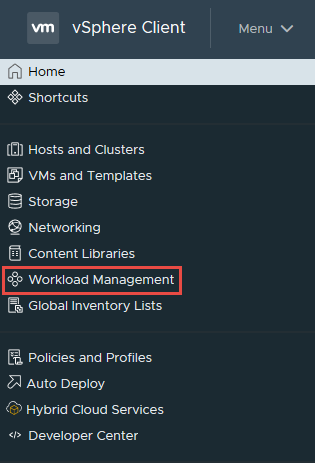
- On the Workload Management page, click Clusters
- Select the radial dial next to the cluster that you are needing logs from
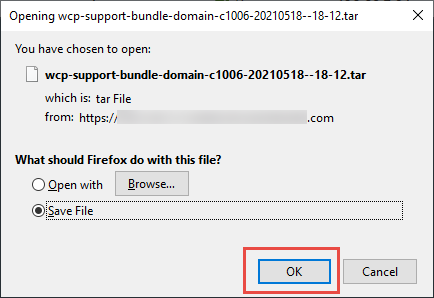
- Click Export Logs

- Choose where you would like them saved on your workstation and click OK
Log Locations Helpful for Troubleshooting vSphere Tanzu Issues
vCenter:
/var/log/vmware/wcp/wcpsvc.logMain vSphere Tanzu service log
Interfaces with the control plane VMs
/var/log/vmware/wcp/nsxd.logNsxd service used to interface with NSX-T Data Center
/var/log/vmware/content-library/cls.logContent Library Service
Used with Harbor and Tanzu Kubernetes Grid (TKG) cluster deployments
ESXi:
/var/log/spherelet.logSpherelet component log (logs API transactions from Kubernetes)
/var/log/hostd.logESXi hostd component log
Control Plane:
/var/log/vmware-imc/configure-wcp.logInitial configuration of the control plane VM
/var/log/vmware-imc/toolsDeployPkg.logCustomization of the control plane VM
其他資訊
受影響的產品
C Series, HS Series, Modular Infrastructure, Rack Servers, Tower Servers, XE Servers, XR Servers, OEM Server Solutions, VMware ESXi 7.x, VMware ESXi 8.x, VMware OEM Products with ProSupport文章屬性
文章編號: 000187022
文章類型: How To
上次修改時間: 12 11月 2025
版本: 4
向其他 Dell 使用者尋求您問題的答案
支援服務
檢查您的裝置是否在支援服務的涵蓋範圍內。