PowerEdge: How to Enable Nested Virtualization with AMD EPYC Processors Running Windows Server 2022
摘要: How to guide to enable nested virtualization on Dell Technologies PowerEdge platforms with AMD EPYC processors running the Windows Server 2022 operating system.
本文章適用於
本文章不適用於
本文無關於任何特定產品。
本文未識別所有產品版本。
說明
Nested virtualization is a feature that allows running a Hyper-V inside a Hyper-V virtual machine (VM).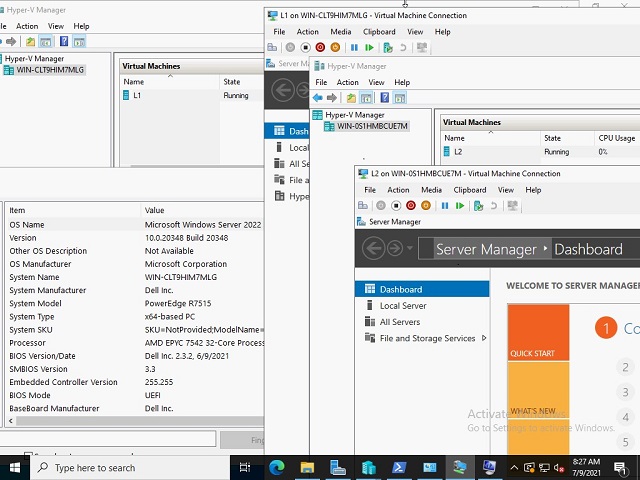
Guidelines and limitations:
- AMD first-generation EPYC or newer processor
- Microsoft guest OS version that is greater or equal to the host OS version (19636) or newer
- Currently third-party virtualization support is not available
- VM configuration version 9.3 or greater
To Configure Nested Virtualization:
- Create a VM on the Host OS
- With the VM in the OFF state, enable nested virtualization for the virtual machine with the following PowerShell command:
Set-VMProcessor -VMName <VMName> -ExposeVirtualizationExtensions $true
- Start the Virtual Machine
- Install Hyper-V on the VM, see Install Hyper-V
- Create a VM on the first (L1) level virtual machine created above
- In order for network packets to be routed through two virtual switches, MAC address spoofing must be enabled on the first (L1) level of the virtual switch. This is completed with the following PowerShell command:
Get-VMNetworkAdapter -VMName | Set-VMNetworkAdapter -MacAddressSpoofing On

References
受影響的產品
Microsoft Windows Server 2022, Microsoft Windows Server 2025, PowerEdge R6415, PowerEdge R6515, PowerEdge R6525, PowerEdge R7415, PowerEdge R7425, PowerEdge R7515, PowerEdge R7525產品
PowerEdge R7615, PowerEdge R7625文章屬性
文章編號: 000191321
文章類型: How To
上次修改時間: 21 10月 2025
版本: 4
向其他 Dell 使用者尋求您問題的答案
支援服務
檢查您的裝置是否在支援服務的涵蓋範圍內。