How to Configure a Gateway MAC Address in Dell Networking Enterprise SONiC MF-CLI
摘要: This article explains how to set gateway MAC address in Dell Networking Enterprise SONiC.
本文章適用於
本文章不適用於
本文無關於任何特定產品。
本文未識別所有產品版本。
說明
Dell Enterprise SONiC Gateway MAC Address
By default, an MC-LAG switch and its peer use the active peer's system MAC address as the gateway MAC address in L3 interfaces. To use a common configurable gateway MAC address for the L3 VLAN interfaces in which the peer link is a VLAN member, configure an MC-LAG gateway MAC address.
NOTE: On the VLAN interfaces configured with mclag-separate-ip, the VLANs take MAC address different from configured mclag gateway-mac (the mclag-separate-ip configuration takes precedence over the mclag gateway-mac).
Index
Configuration Syntax
Explanation
Effect of mclag-separate-ip on Configured Gateway Mac Address
Configuration Syntax
Configuration |
Explanation |
|---|---|
Admin@SONIC:~$ sonic-cli |
Enter SONiC CLI |
SONiC# configure terminal |
Enter configuration terminal. |
SONIC(config)# mclag gateway-mac <Mac address> |
Configure gateway MAC address. |
NOTE: The gateway MAC address cannot be a zero, multicast, or broadcast MAC address.
NOTE: Ensure that the address is not confused with the Anycast MAC address.
Explanation
Below we explain with the topology.
Figure 1: Sample MC-LAG Topology
Sample Configuration
Let us configure 66:22:33:44:55:66 as mclag gateway-mac in both MC-LAG peers.
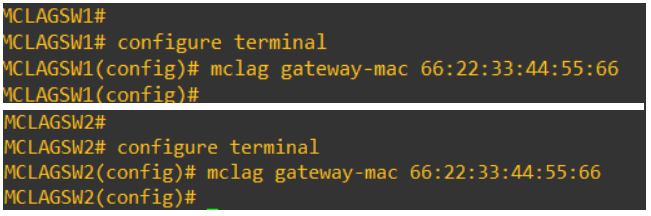
Figure 2: Configure MC-LAG MAC
We can see from a downstream switch, that the MAC address of VLAN 25 and VLAN 50 is 66:22:33:44:55:66.

Figure 3: Screenshot of show ip arp command
Effect of mclag-separate-ip on Configured Gateway Mac Address
On the VLAN interfaces configured with mclag-separate-ip, the VLANs take MAC address different from the configured mclag gateway-mac.Consider that we are configuring mclag-separate-ip on VLAN 25.

Figure 4: Screenshot of show interface VLAN 25 in MCLAGSW1

Figure 5: Screenshot of show interface VLAN 25 in MCLAGSW2
VLAN 50 on both switches does not have mclag-separate-ip configured.

Figure 6: Screenshot of show interface of VLAN 50 in MCLAGSW1 not having switch configured

Figure 7: Screenshot of show interface of VLAN 50 in MCLAGSW2 not having switch configured
We can see that the MAC address of VLAN 25 on both mclag peers changed and is not the configured gateway MAC anymore. However, MAC address VLAN 50 is still the configured gateway MAC address.
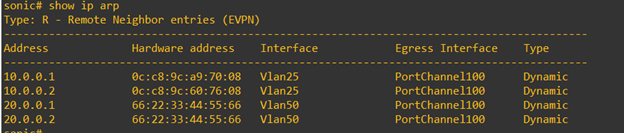
Figure 8: Screenshot of show ip arp with results
受影響的產品
Enterprise SONiC Distribution, PowerSwitch S6000 ON, PowerSwitch E3200-ON Series, Dell EMC Networking N3200-ON, PowerSwitch S5232F-ON, PowerSwitch S5248F-ON, PowerSwitch S5296F-ON, PowerSwitch S6100-ON, PowerSwitch Z9100-ON, PowerSwitch Z9264F-ON
, PowerSwitch Z9332F-ON
...
文章屬性
文章編號: 000191547
文章類型: How To
上次修改時間: 06 7月 2023
版本: 7
向其他 Dell 使用者尋求您問題的答案
支援服務
檢查您的裝置是否在支援服務的涵蓋範圍內。