AppSync: Uploading .xml license file in UI receives error: Adding the license failed due to "Invalid license file"
摘要: Uploading .xml license file in UI receives error: Adding the license failed due to "Invalid license file".
本文章適用於
本文章不適用於
本文無關於任何特定產品。
本文未識別所有產品版本。
症狀
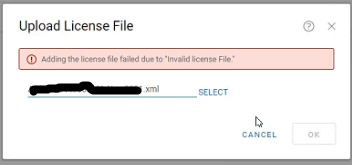
In AppSync UI, when uploading .xml license in Settings > License > Upload, receive an error:
Adding the license failed due to "Invalid license file"
原因
The first scenario seen was the entire <lockingID> section was missing from the license file.
There should be a lockingID section like the following:
<LockingIds>

	<LockingId>

		<LockingIdCode>HOSTID</LockingIdCode>

		<LockingIdValue>value</LockingIdValue>

	</LockingId>

</LockingIds>
The second scenario seen was the LockingIdCode being inappropriately found to be XIOD like so:
<LockingId>

	<LockingIdCode>XIOID</LockingIdCode>
When it should be HOSTID
<LockingId>

	<LockingIdCode>HOSTID</LockingIdCode>
解析度
The internal licensing generation mechanism is updated to ensure the Locking ID section is populated.
A new license is needed. Obtain a new license from the licensing team.
其他資訊
AppSync 4.2 and later supports XML type licenses.
受影響的產品
AppSync文章屬性
文章編號: 000193800
文章類型: Solution
上次修改時間: 10 9月 2025
版本: 4
向其他 Dell 使用者尋求您問題的答案
支援服務
檢查您的裝置是否在支援服務的涵蓋範圍內。