How To Enable or Disable Windows Virtualization on Dell Systems
摘要: Learn how to enable or disable virtualization in Windows 10, including how to turn off virtualization, enable Virtual Machine Platform, and troubleshoot BIOS settings for virtualization. ...
本文章適用於
本文章不適用於
本文無關於任何特定產品。
本文未識別所有產品版本。
說明
Enable or Disable Windows Virtualization:
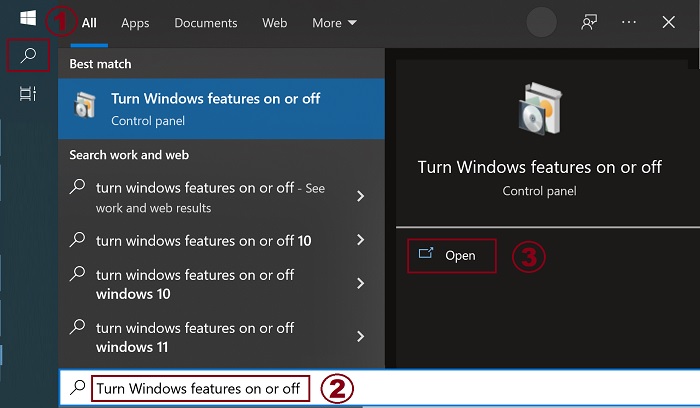
- Launch the Windows Features tool:
- Click the Search icon.
- Type Turn Windows features on or off in the search field.
- Click Open.
- Check (or clear) the Virtual Machine Platform and Windows Hypervisor Platform options.
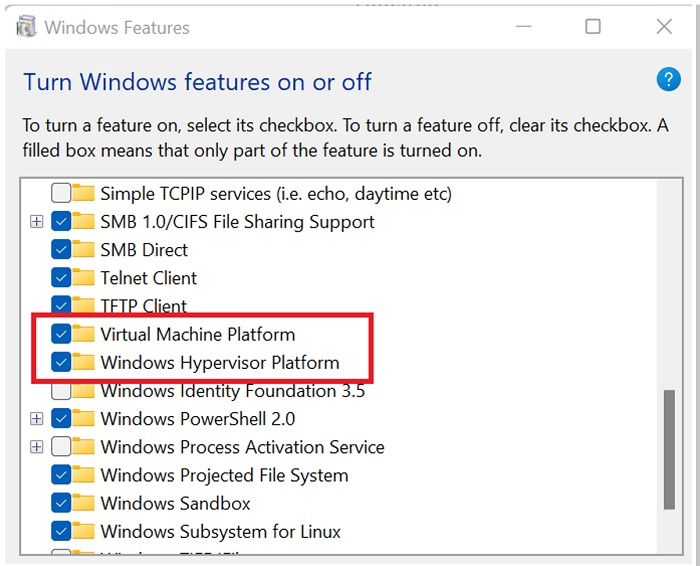
- Click OK.
- Windows adds the required VMP dependencies and asks to reboot.
其他資訊
受影響的產品
Desktops & All-in-Ones, Dell All-in-One, Dell Pro Max Micro, Dell Pro Max Slim, Dell Pro Max Tower, Dell Pro Micro, Dell Pro Slim, Dell Pro Tower, Dell Slim, Dell Tower, Laptops, Dell Plus, Dell Pro, Dell Pro Max, Dell Pro Plus, Dell Pro Premium
, Dell Pro Rugged, Workstations
...
文章屬性
文章編號: 000195980
文章類型: How To
上次修改時間: 14 7月 2025
版本: 10
向其他 Dell 使用者尋求您問題的答案
支援服務
檢查您的裝置是否在支援服務的涵蓋範圍內。