PowerEdge: Microsoft SQL Server Error Log
摘要: The Microsoft SQL Server Error Log reports events on Microsoft SQL Server activity. Database version information, startup events, shutdown events, database activity, and error events are found in the Microsoft SQL Server Error Log. ...
本文章適用於
本文章不適用於
本文無關於任何特定產品。
本文未識別所有產品版本。
症狀
SQL Server service events like service start failures and databases failing to come online can occur anytime with Microsoft SQL Server. The SQL Server Error Log may provide valuable information required to troubleshoot and resolve services and database failures.
原因
Many different types of causes can result in SQL Server service and database failure events requiring the inspection of the SQL Server Error Log to resolve the issue.
解析度
- The SQL Server Error Log is accessed in multiple ways. One way is in SQL Server Management Studio (SSMS). Under the Server instance tree in the left column of SSMS, it can be opened in the "SQL Server Logs" section under the "Management" container.
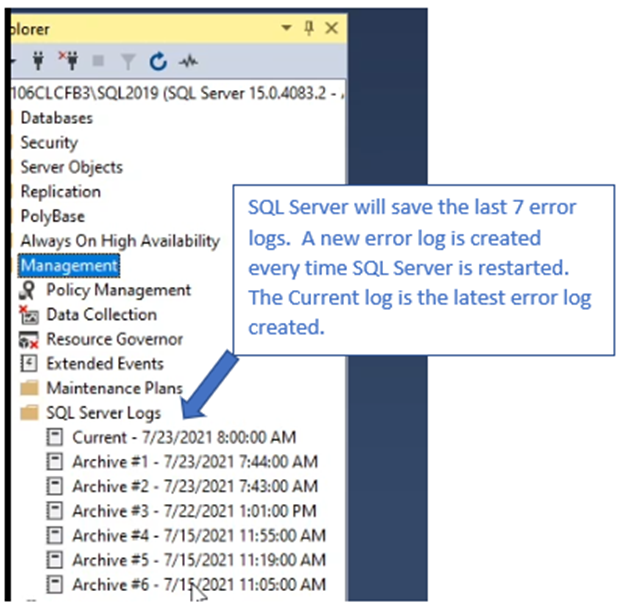
Figure 1: Screenshot of SQL Server Management Studio Location of SQL Server Logs
- In the Error Log, general SQL Server instance information is found such as edition and version number. Other items such as Authentication mode, location of Error Log, SQL Server service account, and startup parameters are also included.
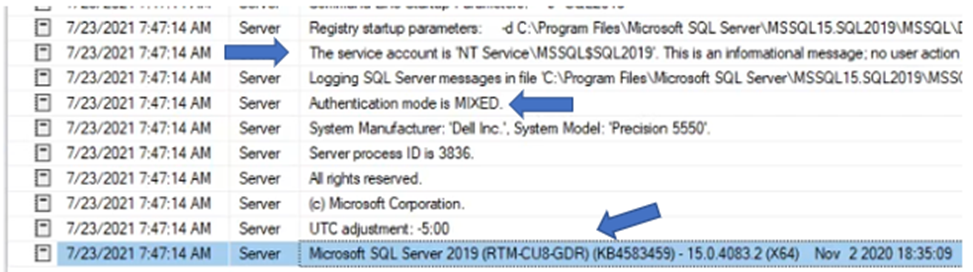
Figure 2: Screenshot of General SQL Server Instance Information
- The amount of physical server memory and number of server cores is also seen in the Log.
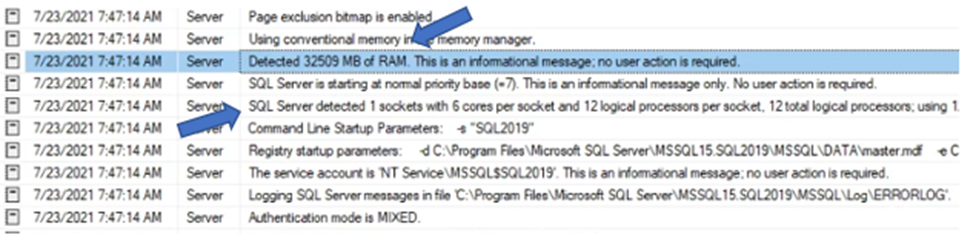
Figure 3: Screenshot of Physical Server Memory and Number of Server Cores
- Database online status is reported as databases are brought online.
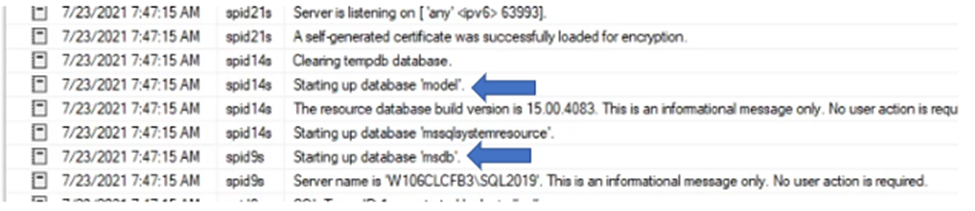
Figure 4: Screenshot of Database Online Status
- Error reporting is the most valuable factor of SQL Error Log functionality. The error in the screenshot below is related to the database files for the "Model" database missing when SQL Server starts up.
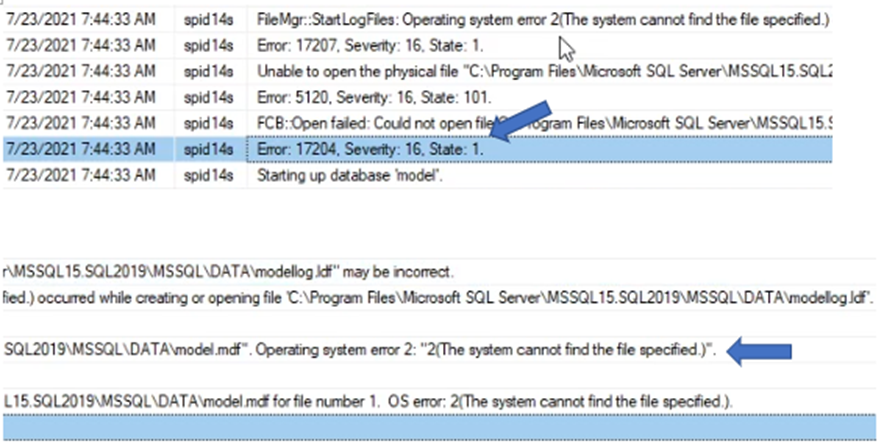
Figure 5: Screenshot of Error Reporting
- When an error entry in the Error Log is seen, we should see a message in the Server Application event log. Finding the event log message is an important step in the troubleshooting process as it might supply more information about the condition resulting in the errors found in both logs.
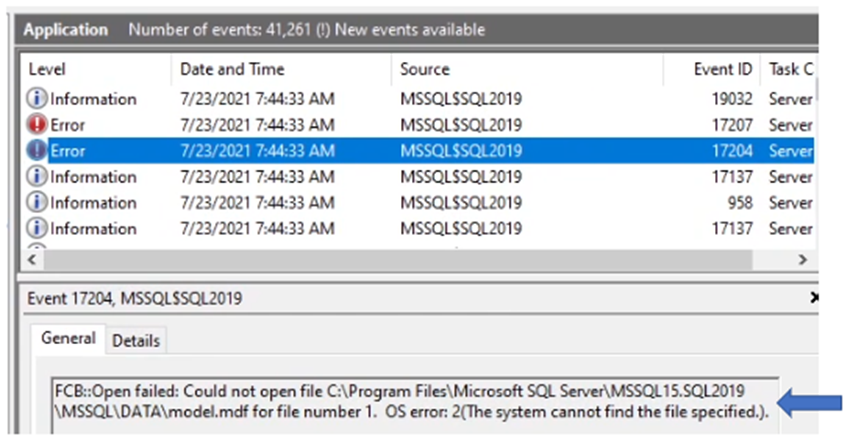
Figure 6: Screenshot of Error Entry in the Error Log
- The SQL Server Error Log is also accessed by going to the directory location holding the Error Logs. The directory location may be in a different location based on the location of the SQL Server application binary files.

Figure 7: Screenshot of SQL Server Error Log
- Another method of locating the Error Log and seeing the default location of the SQL Server instance database ".MDF" (database) and ."LDF" (Log) files are by using the "Sql Server Configuration Manager" tool. When viewing the properties of the "SQL Server Services," select the "Startup Parameters" section. We see the file locations for Error and Database files. The location of the SQL Server Error log may also be changed from here.
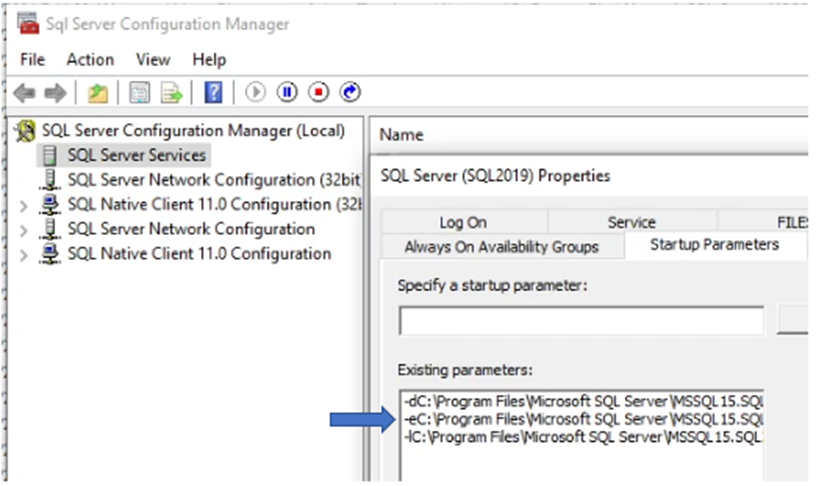
Figure 8: Screenshot of Startup Parameters Section
其他資訊
View this video:
受影響的產品
Dell Quickstart Data Warehouse Appliance, Microsoft Windows Server 2016, Microsoft Windows Server 2019, Microsoft Windows Server 2022, Prosupport for Microsoft Software文章屬性
文章編號: 000200766
文章類型: Solution
上次修改時間: 05 9月 2025
版本: 12
向其他 Dell 使用者尋求您問題的答案
支援服務
檢查您的裝置是否在支援服務的涵蓋範圍內。