AppSync: In AppSync UI customer was unable to set the logging mode to debug as Apply button stayed disabled when debug option was selected.
摘要: In AppSync UI customer was unable to set the logging level to debug as Apply button stayed disabled when debug option was selected.
本文章適用於
本文章不適用於
本文無關於任何特定產品。
本文未識別所有產品版本。
症狀
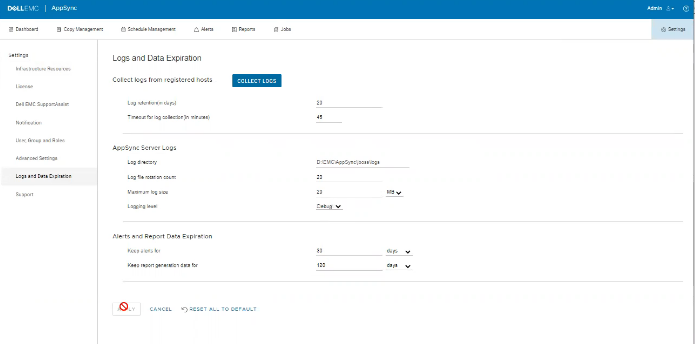
No errors in the logs but the issue can be observed on the UI as shown in the below.
原因
The Issue is because customer on the same screen, had set "Timeout for log collection(in minutes)" option value to 45 which is invalid.
解析度
Set The value for "Timeout for log collection(in minutes)" option to a valid value of 90 and 120.
其他資訊
AppSync 4.5 will not allow an invalid value for "Timeout for log collection(in minutes)."
Valid values can be from 90 to 120.
Valid values can be from 90 to 120.
受影響的產品
AppSync, AppSync文章屬性
文章編號: 000203604
文章類型: Solution
上次修改時間: 09 9月 2025
版本: 8
向其他 Dell 使用者尋求您問題的答案
支援服務
檢查您的裝置是否在支援服務的涵蓋範圍內。