Adding VLANs to Unified Computing System Manager when updating service profile templates and vNIC templates are in use
摘要: Addition of VLANs to Unified Computing System (UCS) Manager when using updating service profile templates and vNIC templates.
本文章適用於
本文章不適用於
本文無關於任何特定產品。
本文未識別所有產品版本。
說明
Facts:
Cisco UCS Manager
Solution:
- Create the VLAN as specified in the existing guide. (LAN > LAN Cloud > VLANs > right click and select Create VLANs).

Figure 1: Create VLAN
- After VLAN creation, select the service profile to add the VLAN to.
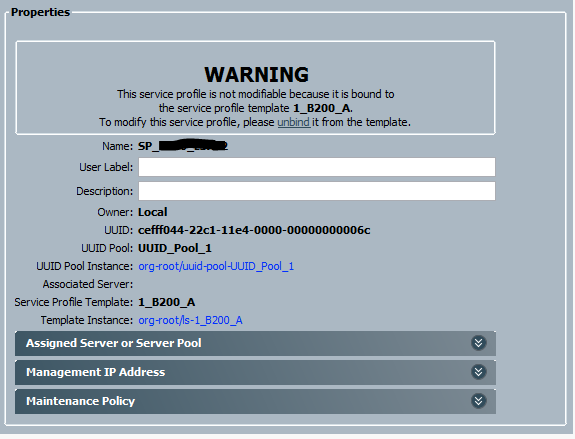
Figure 2: Service Profile Warning Message
- Above, the service profile named SP_xxx is linked to service profile template 1_B200_A. Click the highlighted name of the service profile template to open it.

Figure 3: Service Profile Template Properties
- The service profile template is of type Updating, meaning all service profiles bound to it automatically update with any changes made to the template.
- From the tabs on top of the window, select Network.
- Select a vNIC and click the Modify button.
- In the Modify vNIC window, notice that the vNIC is using a vNIC template. Take note of the vNIC template in use and repeat this process for any other vNICs within the service profile template which you want to add the VLAN to.
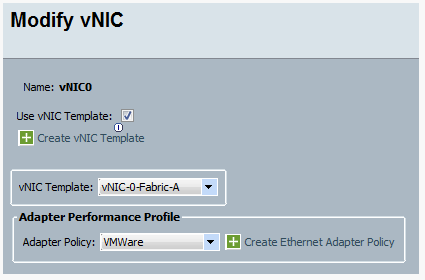
Figure 4: Modify vNIC Template
- Return to the main UCS Manager window and select the LAN tab. Expand the Policies menu > the root organization, and then expand vNIC Templates.

Figure 5: Expand vNIC Template Tree
- Select the vNIC template you want to modify and on the Actions menu on the right, click Modify VLANs.
- Within the Modify VLANs window, place a check in the box next to the VLAN you want to add.
- Click OK to save and close the window.
- As shown below, the VLAN changes are propagated to the service profiles which are bound to the service profile template.

Figure 6: Changes Propagated to Service Profile Template
- Complete the rest of the Adding VLANs to the Vblock Guide to add the VLAN to the Nexus 5K and Nexus 1K.
其他資訊
受影響的產品
Switches文章屬性
文章編號: 000205564
文章類型: How To
上次修改時間: 24 1月 2023
版本: 3
向其他 Dell 使用者尋求您問題的答案
支援服務
檢查您的裝置是否在支援服務的涵蓋範圍內。