Dell Unity: How to connect to Unity XT platforms over serial connection
摘要: Unity XT arrays (excluding XT 380/380F) have a micro serial port in the back that can be used for a direct connection into each SP.
本文章適用於
本文章不適用於
本文無關於任何特定產品。
本文未識別所有產品版本。
說明
Unity XT arrays (excluding XT 380/380F) have a micro serial port in the back that can be used for a direct connection into the SP. This type of connection can be used instead of IPMI. However both cannot be used simultaneously.
A Micro DB-9 serial cable can be used to connect a computer directly to an SP.
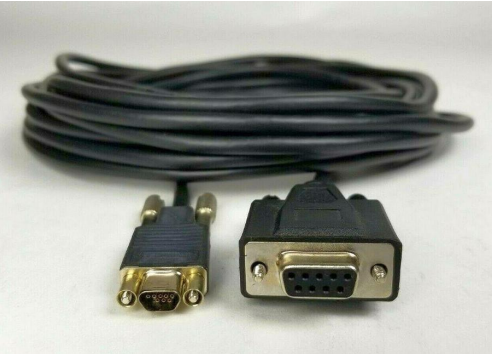
For computers that do not have a serial port a USB to DB-9 serial adapter cable can be used alongside the Micro DB-9 serial cable.

Location of serial port on each SP

Once the serial port is connected on the array open a terminal, select serial connection. Before connecting adjust the speed to 115200.
Note: Verify what COM represents the physical serial connection. Sometimes a different COM port is selected by default.

In the event strange output in the terminal is seen, turn the flow control off.

Once the putty session is opened, a login screen should be seen.

A Micro DB-9 serial cable can be used to connect a computer directly to an SP.
For computers that do not have a serial port a USB to DB-9 serial adapter cable can be used alongside the Micro DB-9 serial cable.
Location of serial port on each SP
Once the serial port is connected on the array open a terminal, select serial connection. Before connecting adjust the speed to 115200.
Note: Verify what COM represents the physical serial connection. Sometimes a different COM port is selected by default.
In the event strange output in the terminal is seen, turn the flow control off.
Once the putty session is opened, a login screen should be seen.
受影響的產品
Dell EMC Unity XT 480, Dell EMC Unity XT 480F, Dell EMC Unity XT 680, Dell EMC Unity XT 680F, Dell EMC Unity XT 880, Dell EMC Unity XT 880F文章屬性
文章編號: 000208170
文章類型: How To
上次修改時間: 28 8月 2023
版本: 1
向其他 Dell 使用者尋求您問題的答案
支援服務
檢查您的裝置是否在支援服務的涵蓋範圍內。