NVP vProxy:(故障診斷指南)備份失敗,並顯示「NSR VMware Proxy 不適用於資料存放區」
摘要: 這是一般疑難排解 KB,旨在協助您瞭解執行 vProxy 備份時,發生「NSR VMware Proxy is not available for datastores」錯誤的可能原因。
本文章適用於
本文章不適用於
本文無關於任何特定產品。
本文未識別所有產品版本。
說明
在使用 NetWorker VMware Protection (NVP) vProxy 應用裝置執行 VM 備份期間,一或多個 VM 的 VM 備份會失敗,並顯示錯誤:

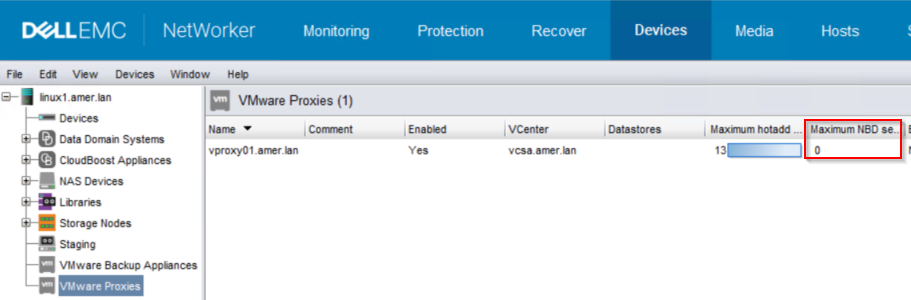
vProxy 是否已啟用 NBD 會話 (NBD 會話預設為 0 (停用)):
《NetWorker VMware Integration Guide》包含有關傳輸模式建議、要求和限制的更多詳細資料:HTTPs://www.dell.com/support/home/product-support/product/networker/docs
IDE 磁片
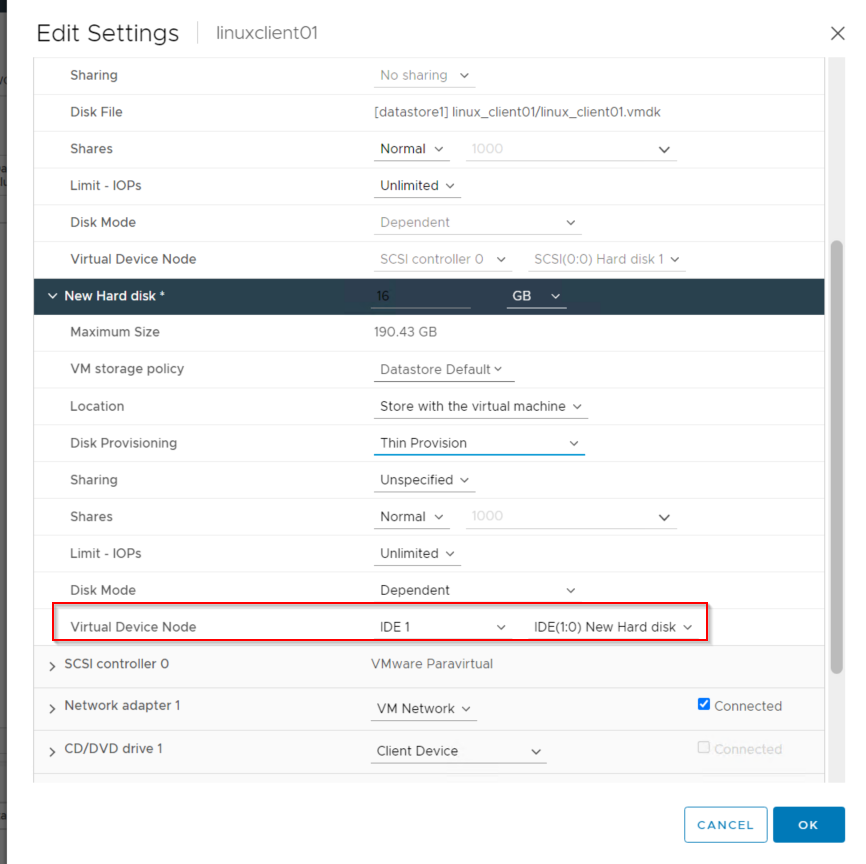
若未發現任何資料存放區問題,請檢查故障的 VM,查看它們是否已設定為使用 IDE 磁片。這可在 vSphere 的 VM 設定中看到:
NSR VMware proxy is not available for datastores (DATASTORE_NAME) in vCenter 'VCENTER_NAME'. 在 NMC Monitoring (NMC 監控) 視窗中查看失敗的備份動作詳細資料時,會發現此錯誤。
或在 NetWorker 伺服器的備份動作記錄中:
出現此錯誤的原因有多種。以下詳細說明幾個常見原因及其解決方式。
root@linux1:~# nsr_render_log /nsr/logs/policy/Gold/VMware/Backup_235896.raw | grep -i error
164882 02/07/2023 09:44:11 AM  3 5 0 1296803648 11621 0 linux1.amer.lan nsrvproxy_save NSR error Unable to process VM 'linuxclient01': NSR VMware proxy is not available for datastores (datastore1) in vCenter 'vcsa.amer.lan'. Check if it is enabled.
164546 02/07/2023 09:44:11 AM  3 5 0 1296803648 11621 0 linux1.amer.lan nsrvproxy_save NSR error linuxclient01: Backup failed.
164882 02/07/2023 09:44:11 AM  3 5 0 1296803648 11621 0 linux1.amer.lan nsrvproxy_save NSR error Unable to process VM 'winclient02': NSR VMware proxy is not available for datastores (datastore1) in vCenter 'vcsa.amer.lan'. Check if it is enabled.
164546 02/07/2023 09:44:11 AM  3 5 0 1296803648 11621 0 linux1.amer.lan nsrvproxy_save NSR error winclient02: Backup failed.
164882 02/07/2023 09:44:45 AM  3 5 0 1296803648 11621 0 linux1.amer.lan nsrvproxy_save NSR error Unable to process VM 'linuxclient01': NSR VMware proxy is not available for datastores (datastore1) in vCenter 'vcsa.amer.lan'. Check if it is enabled.
164546 02/07/2023 09:44:45 AM  3 5 0 1296803648 11621 0 linux1.amer.lan nsrvproxy_save NSR error linuxclient01: Backup failed.
164882 02/07/2023 09:44:45 AM  3 5 0 1296803648 11621 0 linux1.amer.lan nsrvproxy_save NSR error Unable to process VM 'winclient02': NSR VMware proxy is not available for datastores (datastore1) in vCenter 'vcsa.amer.lan'. Check if it is enabled.
164546 02/07/2023 09:44:45 AM  3 5 0 1296803648 11621 0 linux1.amer.lan nsrvproxy_save NSR error winclient02: Backup failed.
vProxy 可用性:
vProxy 狀態:是否有啟用用於備份的 vProxy?
root@linux1:~# nsradmin
NetWorker administration program.
Use the "help" command for help, "visual" for full-screen mode.
nsradmin> show enabled; name
nsradmin> print type: nsr vmware proxy
                        name: vproxy01.amer.lan;
                     enabled: Yes;
或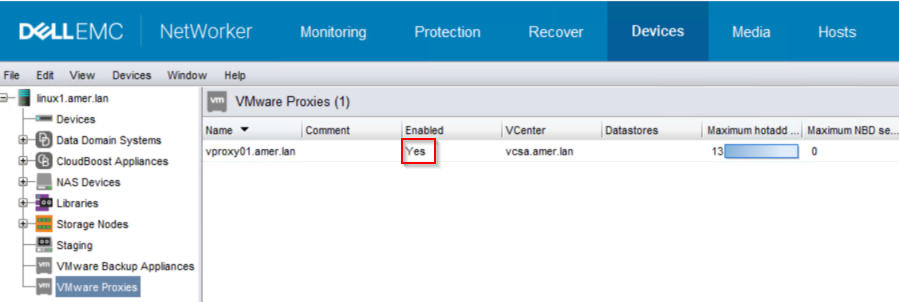
如果 vProxy 顯示「已啟用」「否」,請設為「已啟用」。您可以從 NMC 完成:
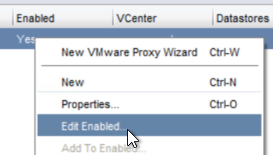
或 nsradmin:
nsradmin> . type: nsr vmware proxy; name: vproxy01.amer.lan
Current query set
nsradmin> update enabled: Yes
                     enabled: Yes;
Update? y
updated resource id 141.0.147.119.0.0.0.0.114.88.175.99.192.168.7.101(28)
nsradmin>
如果 vProxy 未進入「Enabled」狀態:
- 查驗 vProxy 和 NetWorker 伺服器之間的埠 9090 通訊 (雙向):
- vProxy: curl -v NW_SERVERNAME:9090
- NetWorker 伺服器: nsrports -t VPROXY_NAME -p 9090
- 嘗試手動重新註冊 vProxy:HTTPs://www.dell.com/support/kbdoc/000156072
VMware 組態:
您可以使用網路區塊裝置 (NBD) 方法來測試 Hotadd 是否發生問題,以執行 VM 備份。vProxy 是否已啟用 NBD 會話 (NBD 會話預設為 0 (停用)):
如果已啟用 NBD 會話,請將 NBD 會話設定為比對 hotadd:
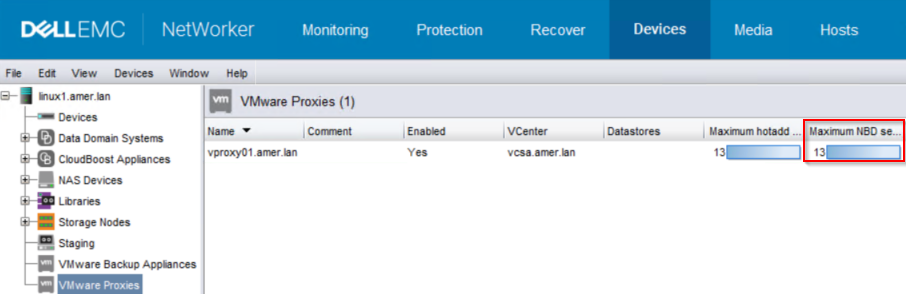
或:
root@linux1:~# nsradmin
NetWorker administration program.
Use the "help" command for help, "visual" for full-screen mode.
nsradmin> show name; maximum NBD sessions
nsradmin> . type: nsr vmware proxy; name: vproxy01.amer.lan
Current query set
nsradmin> update maximum NBD sessions: 13
        maximum NBD sessions: 13;
Update? y
updated resource id 141.0.147.119.0.0.0.0.114.88.175.99.192.168.7.101(31)
nsradmin> print
                        name: vproxy01.amer.lan;
        maximum NBD sessions: 13;
再次執行備份。如果備份成功,這表示 vProxy 無法透過 HotAdd 連線至 VM 檔案;但是,vProxy 可以使用網路區塊裝置 (NBD) 透過管理網路連線至 VM。
請參閱 ProxyHC 範例的「Additional Information」欄位,以檢查 Hotadd 連線能力。
如果 NBD 備份成功,及/或 ProxyHC 回報使用 Hotadd 存取虛擬機器時發生問題,請執行下列步驟:請注意:
- 回報錯誤的特定 VM。
- 錯誤中指定了哪些資料存放區。
- 錯誤中回報 vCenter 名稱。
- 備份/回報錯誤所使用的 vProxy 應用裝置。
1.登入執行備份之 vCenter 的 vSphere Web 用戶端。
2.移至「Inventory」並移至「VM」和「範本」。
3.前往 (或搜尋) vProxy VM,在摘要標籤中記下 vProxy 所在 ESXi 主機:
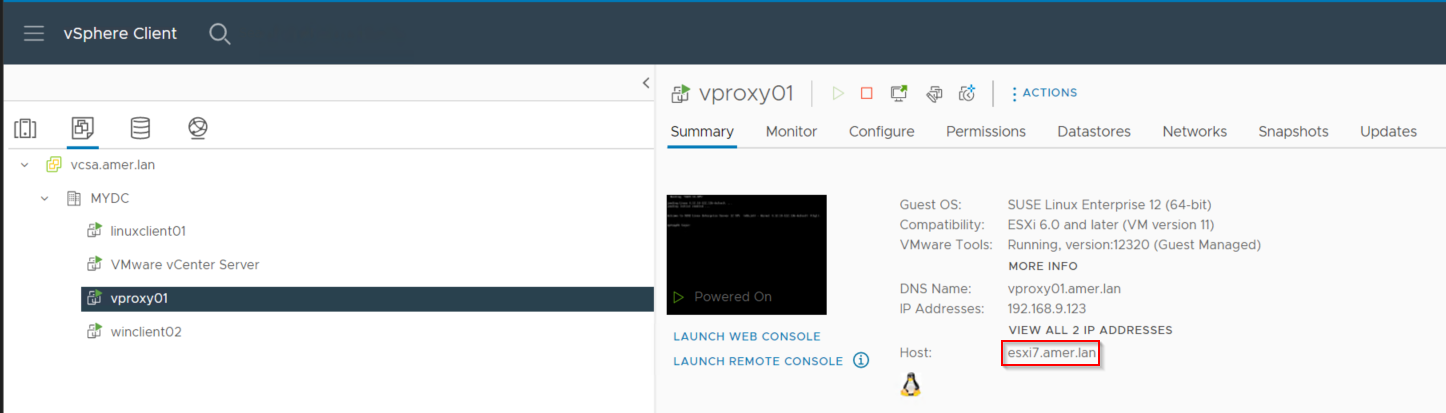
4.前往「Hosts and Clusters」標籤,選取 vProxy 所在 ESXi 主機,然後按一下「資料存放區」:
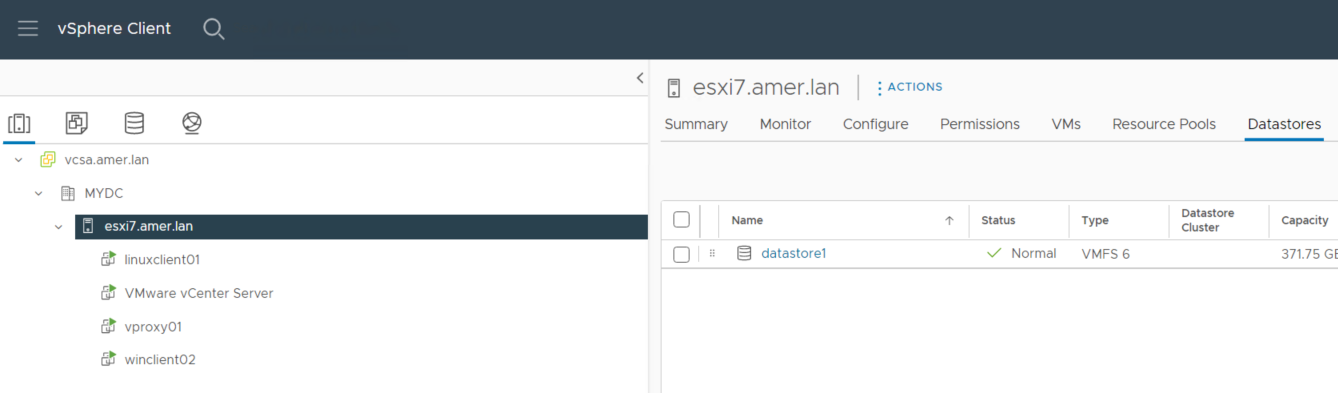
這會列出 vProxy 所在的 ESXi 主機可看見的 VMware 資料存放區。如果在備份錯誤「NSR VMware Proxy is not available for datastores (DATASTORE_NAME)」中傳回的資料存放區未顯示在清單中,則 vProxy 無法透過 hotadd 存取 VM 檔案。若要支援 HotAdd,vProxy 必須部署在具有 VM 資料存放區路徑的 ESXi 主機上。同樣地,也可以使用相同的程式來查看 VM 所在的 ESXi 主機,然後查看該 ESXi 主機的資料存放區,如果我們看不到 vProxy 所在的資料存放區,則 vProxy 與 VM 之間沒有跨資料存放區的路徑。
可能的解決方案包括:
- VMware vSphere vMotion vProxy 應用裝置至 ESXi 主機,該主機有權存取 VM 備份所需的所有資料存放區。
- 設定 vProxy 所在的 ESXi 主機,以便存取 VM 所在的 VMware 資料存放區。
- 在連接至唯一資料存放區之 ESXi 主機上部署 vProxy 應用裝置 (已部署 vProxi 時無法透過主機存取)。
上述組態變更必須由 VMware 系統管理員執行,而非 NetWorker 支援。如果無法進行組態變更,讓 Hotadd 正常運作,則必須使用 NBD。
《NetWorker VMware Integration Guide》包含有關傳輸模式建議、要求和限制的更多詳細資料:HTTPs://www.dell.com/support/home/product-support/product/networker/docs
IDE 磁片
若未發現任何資料存放區問題,請檢查故障的 VM,查看它們是否已設定為使用 IDE 磁片。這可在 vSphere 的 VM 設定中看到:
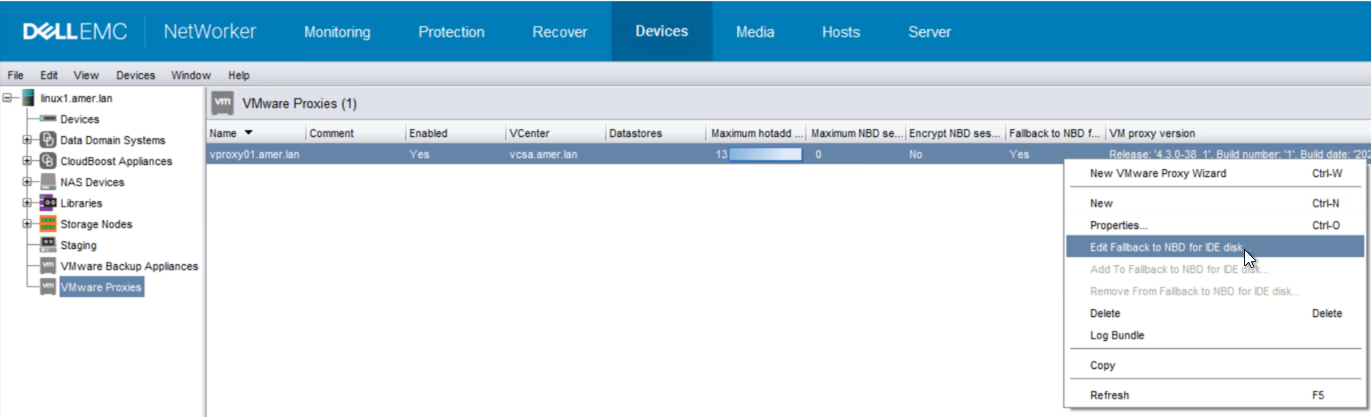
IDE 磁片不支援 hotadd,vProxy 應用裝置必須設定為允許「回復至 NBD for IDE 磁片」:
如果 NBD 會話設為零,可以啟用此設定,但工作流程包含具有 IDE 磁片的 VM。只有具有 IDE 磁片的 VM 會使用 NBD 進行備份;所有其他具有 SCSI 磁片的 VM 將透過 hotadd 進行備份。不建議使用 IDE 磁片部署虛擬機器,應盡可能使用 ISCSI 磁片。
其他資訊
您也可以使用 ProxyHC 來驗證 Hotadd 連線能力:HTTPs://www.dell.com/support/kbdoc/000022590
vproxy01:~ # ./ProxyHC hotadd
Info: Checking OS account status -------> Passed
Info: Checking configuration files
        Info: Proxy is registered to: linux1.amer.lan
        Info: Proxy version is: 4.3.0-38
Info: Checking OS
        Info: Checking attached disks -------> Passed
        Info: Checking disk usage -------> Passed
        Info: Checking memory usage -------> Passed
Info: Checking connectivity
        Info: Checking primary NIC ------->  192.168.9.123
        Info: Testing ping to gateway 192.168.7.100 -------> Passed
        Info: Testing ping to DNS 192.168.10.100 -------> Passed
        Info: Testing ping to DNS 192.168.7.100 -------> Passed
        Info: Testing ping to DNS 192.168.9.100 -------> Passed
        Info: Checking DNS response
        Info: Testing name lookup for linux1.amer.lan -------> Passed
        Info: Testing name lookup for vcsa.amer.lan -------> Passed
Info: Checking package details
        Info: Checking vProxy package version -------> Found version 4.3.0
        Info: Verifying vProxy package -------> command returned error
Info: Checking service state
        Info: Checking status for vbackupd -------> Passed
        Info: Checking status for vflragent -------> Passed
        Info: Checking status for vflrd -------> Passed
        Info: Checking status for vkpod -------> Passed
        Info: Checking status for vrapid -------> Passed
        Info: Checking status for vrecoverd -------> Passed
        Info: Checking status for vsessionsd -------> Passed
Info: Checking engine logs
        Info: Checking vsessionsd engine log -------> Passed
        Info: Checking vrapid engine log -------> Passed
        Info: Checking vrecoverd engine log -------> Passed
        Info: Checking vbackupd engine log -------> Found 2 failed sessions
        Info: Checking vkpod engine log -------> Passed
        Info: Checking vflragent engine log -------> Passed
        Info: Checking vflrd engine log -------> Passed
Info: Checking vCenter access
        Please specify vCenter USER name for vcsa.amer.lan: bkupadmin@amer.lan
        Please provide vCenter server password:
        Info: Validating vCenter server connectivity -------> Passed
Info: Checking for hotadd access
        Please provide DNS name of VM(as shown in vSphere): linuxclient01.amer.lan
        Info: Looking for vProxy VM -------> Passed
        Info: Checking vCenter user permissions
        Info: Looking for user permissions to root object -------> Failed
        Info: Validating datacenter match -------> Passed
        Info: Looking for IDE disks -------> Passed
        Info: Checking virtual hardware version -------> Passed
        Info: Looking for independent disk -------> Passed
        Info: Checking datastore access -------> Passed
        Info: Checking entity names -------> Passed
受影響的產品
NetWorker產品
NetWorker Family, NetWorker Series文章屬性
文章編號: 000208393
文章類型: How To
上次修改時間: 15 1月 2026
版本: 6
向其他 Dell 使用者尋求您問題的答案
支援服務
檢查您的裝置是否在支援服務的涵蓋範圍內。