Dell Unity: One reason for Replication status to be Unknown (User Correctable)
摘要: This KB describes one of the causes of the Unknown status of Replication.
本文章適用於
本文章不適用於
本文無關於任何特定產品。
本文未識別所有產品版本。
症狀
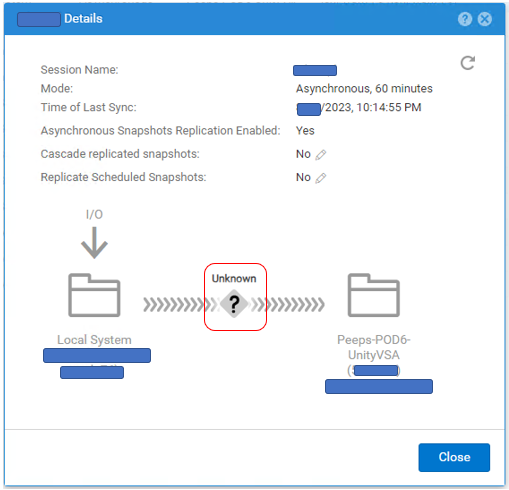
Replication Status is shown as Unknown.

# uemcli -no /prot/rep/session -name XXXXXXXXXX show
1:    ID                   = 1717986919XX_VIRT1615KVBXXX_0000_1717986919XX_VIRT2213XBSXXX_0000
      Name                 = XXXXXXXXXX
      Session type         = file
      Synchronization type = auto
      RPO                  = 1h 00m
      Sync State           = idle
      Health state         = Unknown (0)
      Operational status   = Unknown (0x0)
      Time of last sync    = 2023-MM-DD 02:14:55
      Sync status          =
      Element pairs        = N/A
原因
This event occurs when the following two conditions are met.
(1) User Snapshot is set to Replication.
(2) User Snapshot has reached its maximum on the Destination side and a new Snapshot cannot be created.
(1) User Snapshot is set to Replication.
(2) User Snapshot has reached its maximum on the Destination side and a new Snapshot cannot be created.
解析度
If the problem is due to the number of snapshots, follow the steps below to improve the Replication status.
(1) Delete unnecessary Snapshots on the Destination side.
(2) Pause and resume Replication.
(1) Delete unnecessary Snapshots on the Destination side.
(2) Pause and resume Replication.
其他資訊
- The maximum number of snapshots that can be created is described in Support Matrix.
https://elabnavigator.dell.com/vault/pdf/EMC_Unity_ESSM.pdf
Example:

- The maximum number of snapshots and the current number of snapshots for Unity can be checked with the following command.
svc_storagecheck --list |grep "CheckpointSnaps"
Example output:
https://elabnavigator.dell.com/vault/pdf/EMC_Unity_ESSM.pdf
Example:
- The maximum number of snapshots and the current number of snapshots for Unity can be checked with the following command.
svc_storagecheck --list |grep "CheckpointSnaps"
Example output:
svc_storagecheck --list |grep "CheckpointSnaps"
MaxCheckpointSnaps                 : 500
CountCheckpointSnaps               : 500
受影響的產品
Dell EMC Unity, Dell EMC Unity 300F, Dell EMC Unity 350F, Dell EMC Unity 400, Dell EMC Unity 400F, Dell EMC Unity 450F, Dell EMC Unity 500, Dell EMC Unity 500F, Dell EMC Unity 550F, Dell EMC Unity 600產品
Dell Unity 450F DC, Dell Unity 300, Dell Unity 300 DC, Dell Unity 350F DC, Dell EMC Unity XT 380, Dell EMC Unity XT 380F, Dell Unity 400 DC, Dell EMC Unity XT 480, Dell EMC Unity XT 480F, Dell EMC Unity 600F, Dell EMC Unity 650F
, Dell EMC Unity XT 680, Dell EMC Unity XT 680F, Dell EMC Unity XT 880, Dell EMC Unity XT 880F, Dell EMC Unity Family |Dell EMC Unity All Flash, Dell EMC Unity Family, Dell EMC Unity Hybrid, Dell Unity Operating Environment (OE), Dell EMC UnityVSA Professional Edition/Unity Cloud Edition
...
文章屬性
文章編號: 000216468
文章類型: Solution
上次修改時間: 26 10月 2023
版本: 4
向其他 Dell 使用者尋求您問題的答案
支援服務
檢查您的裝置是否在支援服務的涵蓋範圍內。