NVIDIA RTX Desktop Manager mantiene aperto il desktop
摘要: Questo articolo fornisce informazioni sul problema relativo al desktop appena creato di NVIDIA RTX Desktop Manager che non può essere chiuso.
本文章適用於
本文章不適用於
本文無關於任何特定產品。
本文未識別所有產品版本。
症狀
Nei computer Dell con GPU dedicata NVIDIA potrebbe verificarsi un problema in cui NVIDIA RTX Desktop Manager non riesce a chiudere il desktop appena creato.
- Aprire NVIDIA RTX Desktop Manager e cliccare su ENABLE RTX DESKTOP MANAGER, L'APPLICAZIONE CREA IL DESKTOP 1 COME IMPOSTAZIONE PREDEFINITA.
- Cliccare sul pulsante New Desktop per creare un secondo desktop.
- Fai clic sull'icona X nell'angolo in alto a destra di Desktop 2 ma scopri che non può essere chiuso.
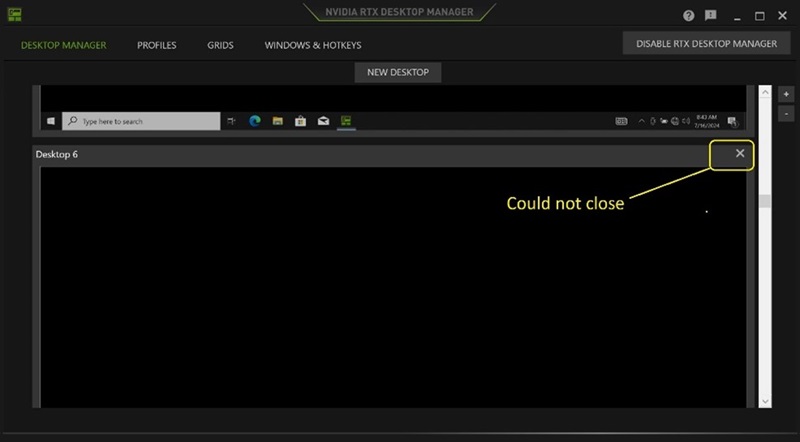
(Figura 1 . NVIDIA RTX Desktop Manager)
Piattaforme interessate:
- Precision 7780
- Precision 7680
- Precision 7770
- Precision 7670
- Precision 7560
- Precision 7760
- Precision 7550
- Precision 7750
- Precision 7540
- Precision 7740
- Precision 7530
- Precision 7730
- Precision 7520
- Precision 7720
- Precision 5480
- Precision 5490
- Latitude 3490
- Latitude 3480
- Latitude 3470
- Latitude 3550
- Latitude 3530
- Latitude 3520
原因
N/D
解析度
L'aggiornamento dell'unità grafica NVIDIAR alla versione 552.84 o successiva sul computer risolve il problema. Per scaricare e installare il driver, consultare Come scaricare e installare i driver Dell.
受影響的產品
Dell Latitude 3480/3488, Latitude 3490, Latitude 3520, Latitude 3530, Latitude 3550, Latitude 3470, Precision 5480, Precision 5490, Precision 7520, Precision 7530, Precision 7540, Precision 7550, Precision 7560, Precision 7670, Precision 7680
, Precision 7720, Precision 7730, Precision 7740, Precision 7750, Precision 7760, Precision 7770, Precision 7780
...
文章屬性
文章編號: 000227614
文章類型: Solution
上次修改時間: 24 4月 2025
版本: 2
向其他 Dell 使用者尋求您問題的答案
支援服務
檢查您的裝置是否在支援服務的涵蓋範圍內。