Dell Optimizer Version 6.x Purchased Apps Information
摘要: This article provides information about accessing and using Purchased Apps in Dell Optimizer (DO) version 6.x.
本文章適用於
本文章不適用於
本文無關於任何特定產品。
本文未識別所有產品版本。
症狀
Dell is adding a Purchased Apps module within DO 6.x as the new software download utility and is replacing the legacy Dell Digital Delivery (DDD) software.
Note: There are system compatibility limitations with Dell ARM processor systems from September 2024 and later.
Alienware systems are not compatible with Dell Optimizer. Software that was purchased but not preinstalled can be conveniently accessed and downloaded through Dell Digital Delivery or My Dell Account.
Alienware systems are not compatible with Dell Optimizer. Software that was purchased but not preinstalled can be conveniently accessed and downloaded through Dell Digital Delivery or My Dell Account.
原因
Dell decided to shift from DDD to DO 6.x with Purchased Apps.
解析度
Dell Optimizer 6.x
Dell Purchased Apps enables Users to download and install software that was purchased with their Dell computer.
Dell Optimizer 6.x is already installed on any Dell Windows computer that is shipped from the factory. The software must be reinstalled if the Windows Operating System (OS) is reinstalled.
Key Differences with Dell Optimizer 6.x:
- Integration of Purchased Apps: Dell Optimizer 6.x now includes the "Purchased Apps" module, allowing Users to access and download purchased software directly within the software.
- Simplified Software Download Process: Dell Optimizer 6.x streamlines the software download process, making it easier for Users to find and download the software they need.
- Enhanced User Experience: Dell Optimizer 6.x provides a more intuitive and User-friendly interface, making it easier for users to navigate and find the software they need.
More information is available in the following article: Transition to the new Dell Optimizer
Warning: Software that is purchased independently of a Dell platform is available through Dell Digital Locker and not through Dell Optimizer.
- There are system compatibility limitations with Dell ARM processor systems from September 2024 and later.
- Dell Optimizer 6.x will progressively be compatible with older computers.
Accessing Purchased Apps
- Launch the Dell Optimizer 6.x application.
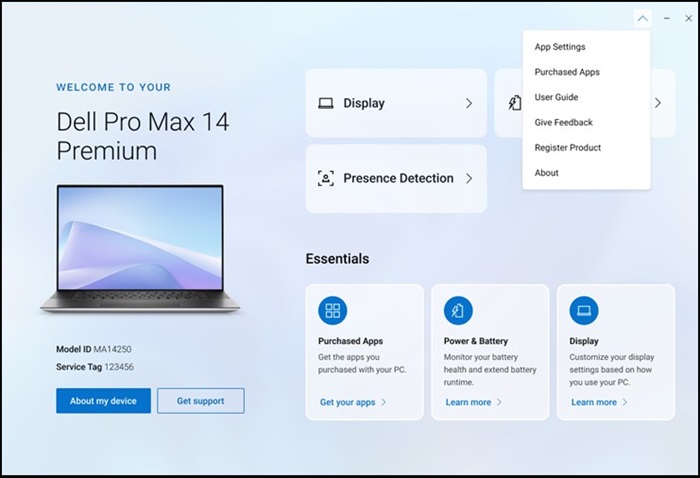
- Select Purchased Apps from the dropdown menu.

- Selecting Install All will start installing the entire list.

You can also choose to install them one at a time.
Upon completion, the selected software is visible as "Installed."
How to Troubleshoot the Purchased Apps Module in Dell Optimizer 6.x
受影響的產品
Alienware, Dell All-in-One, Dell Pro All-in-One, Alienware, Dell Laptops, Dell Plus, Dell Pro, Dell Optimizer, Dell Pro Max 16 XE MC16250產品
Dell Pro Max Micro, Dell Pro Max Slim, Dell Pro Max Tower, Dell Pro Micro, Dell Pro Slim, Dell Pro Tower, Dell Slim, Dell Tower, Inspiron, OptiPlex, Vostro, XPS, G Series, G Series, Dell Pro Max, Dell Pro Plus, Dell Pro Premium, Inspiron, Latitude
, Dell Pro Rugged, Vostro, XPS, Fixed Workstations, Mobile Workstations, Dell Pro Max Micro XE FCM2250, Dell Pro Max Slim XE FCS1250, Dell Pro Max Tower T2 XE FCT2250, Dell Pro Slim Plus XE5 QBS1250, Dell Pro Tower Plus XE5 QBT1250
...
文章屬性
文章編號: 000270498
文章類型: Solution
上次修改時間: 18 8月 2025
版本: 4
向其他 Dell 使用者尋求您問題的答案
支援服務
檢查您的裝置是否在支援服務的涵蓋範圍內。