How to Assign an Initial Company Administrator
摘要: This article explains how to assign an Initial Company Administrator.
本文章適用於
本文章不適用於
本文無關於任何特定產品。
本文未識別所有產品版本。
說明
If you created a service request, it will be processed as soon as possible.
If you need to assign a company administrator, create a service request online. Do not start a chat to assign a company administrator.
Company administrator overview:
Infrastructure and enterprise customers are required to define administrators within their organization online at Dell Support. Organizations with fewer than five employees need to identify at least one company administrator. Organizations with five or more employees need to identify at least three company administrators.
The company administrator role in Dell Support gives applicable users a centralized view of company and contact information affiliated with your organization. Company administrators have full capabilities for managing company profile settings, sites, and contacts for their respective organizations.
For more information on the company administrator role, visit Company Administration - View and Manage Sites & Contacts | Dell US.
How to assign a company administrator:
1. Sign-in to the Manage Company Information area of the online support site.
2. Review the contact list for your organization and decide which users will have a company administrator assignment.
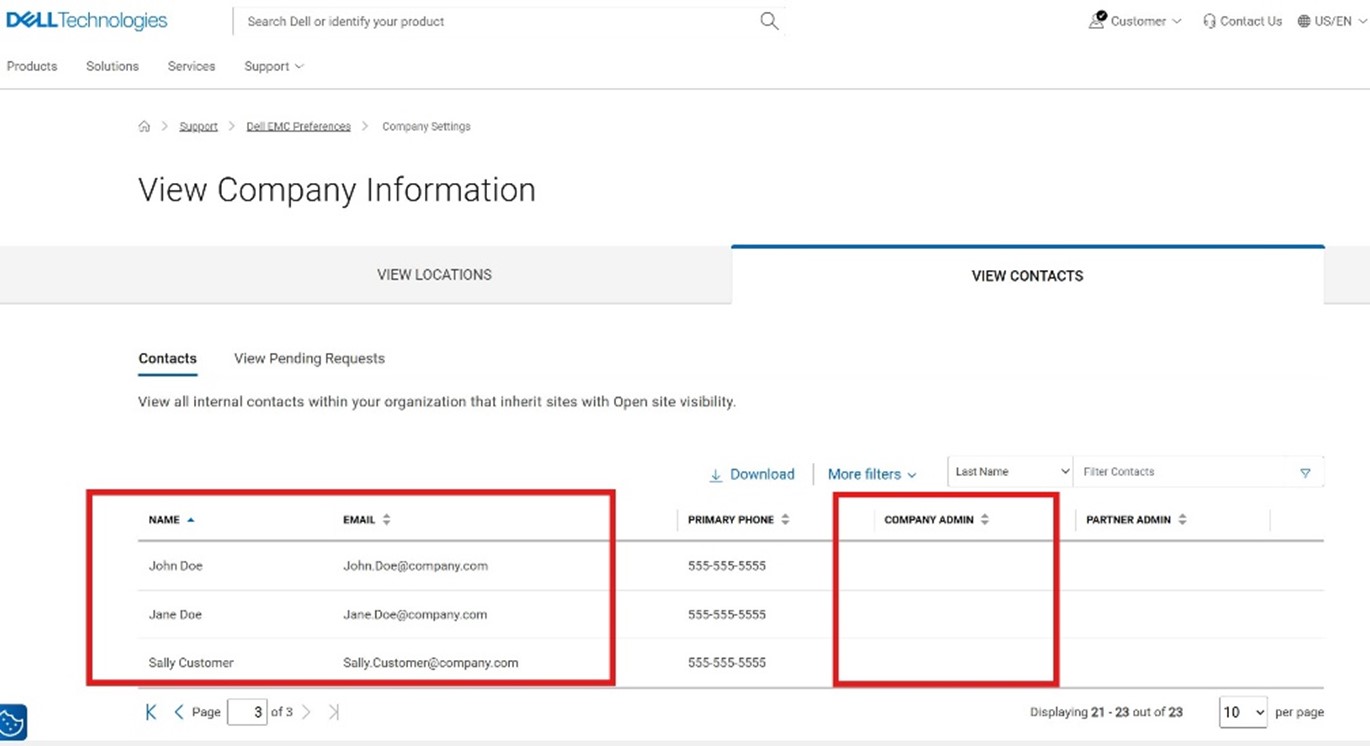
3. Submit a service request via the Administrative Support page.
- Select Enterprise Online Account Help

- Open the Tell Us More menu and select Account Access Issues then select your location.

- In the expanded section, select Create Service Request.

- Provide the names and emails from the reviewed list of contacts for company administrator role assignment. You can assign yourself or a different contact.
Reach out to your business account manager or sign in with your credentials to contact Administrative Support for further assistance.
受影響的產品
Data Erase產品
VxBlock and Vblock Systems, CloudLink SecureVM, Enterprise Hybrid Cloud, AX Nodes, PowerFlex rack, VxRail, Container Storage Modules Family, AppSync, Avamar, MirrorView, NetWorker Family, SourceOne, Data Domain, Cloud Tiering Appliance, OptiPlex
, NVMe over Fabrics, PowerPath, PowerSwitch, Datacenter Scalable Solutions, Lifecycle Controllers, Secure Connect Gateway, Virtualization Solutions, Dell EMC Microsoft Storage Spaces Direct Ready Nodes, APEX, Dell EMC vSAN Ready Nodes, NativeEdge Solutions, Atmos, Disk Library, ECS, metro node, ObjectScale, PowerMax, PowerScale, ScaleIO, VMAX, VPLEX, XtremIO, PowerStore, PowerVault, Dell EMC Unity, VNX/VNXe, Ansible Modules, EMCRemote, Storage Integrator, RecoverPoint, Storage Replication Adapter (SRA), Virtual Storage Integrator (VSI), Connectrix, Data Protection Suite Series, Integrated Data Protection Appliance Family, Symmetrix, VMware
...
文章屬性
文章編號: 000374134
文章類型: How To
上次修改時間: 14 11月 2025
版本: 7
向其他 Dell 使用者尋求您問題的答案
支援服務
檢查您的裝置是否在支援服務的涵蓋範圍內。