iSM Install Button Removed from iDRAC GUI Starting with Version 7.20.60.50
摘要: Starting with iDRAC version 7.20.60.50, the Integrated Dell Remote Access Controller (iDRAC) GUI no longer includes the iSM Install button on the iSM setup page. This change reflects the deprecation of the feature that previously allowed installation of iDRAC Service Module (iSM) via iDRAC. ...
本文章適用於
本文章不適用於
本文無關於任何特定產品。
本文未識別所有產品版本。
症狀
After upgrading to iDRAC version 7.20.60.50, the iSM Install button is no longer visible on the iSM setup page within the iDRAC GUI. 
Previous iDRAC versions display the iSM Install button on the iSM setup page as shown below. 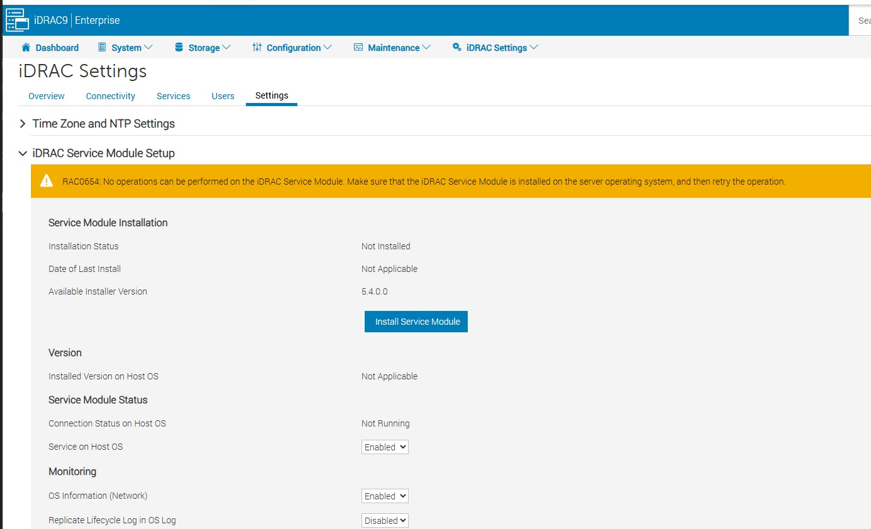
原因
The development team has deprecated the functionality that utilizes the iDRAC storage partition to store the iSM DUP package. This change applies starting with iDRAC firmware version 7.20.60.50 and later. The feature is no longer supported in these versions.
解析度
Use alternative installation methods for iSM:
-
- Operating System-based installation:
- For Linux environments, use the Dell Linux Repository:
- For Windows environments, use OS DUP or package manager.
- Remote deployment tools:
- OpenManage Enterprise or other supported management solutions.
- Operating System-based installation:
Review existing scripts or automation to ensure compatibility with updated iDRAC versions.
受影響的產品
iDRAC10 - 1.20.xx Series, iDRAC9 - 7.xx Series產品
iDRAC9文章屬性
文章編號: 000396891
文章類型: Solution
上次修改時間: 27 11月 2025
版本: 1
向其他 Dell 使用者尋求您問題的答案
支援服務
檢查您的裝置是否在支援服務的涵蓋範圍內。