PowerFlex 4.8: Upgrade fails with error: No package matching 'java-17-amazon-corretto-devel'
摘要: PowerFlex software upgrade (gateway) is failing due to missing Java 17 package for CentOS 7 storage nodes in compliance bundle (IC or RCM).
本文章適用於
本文章不適用於
本文無關於任何特定產品。
本文未識別所有產品版本。
症狀
Update job is failing with following error message:
The <node> failed to configure whille running the task, "Install Corretto": No package matching java-17-amazon-corretto-devel' found available, installed or updated
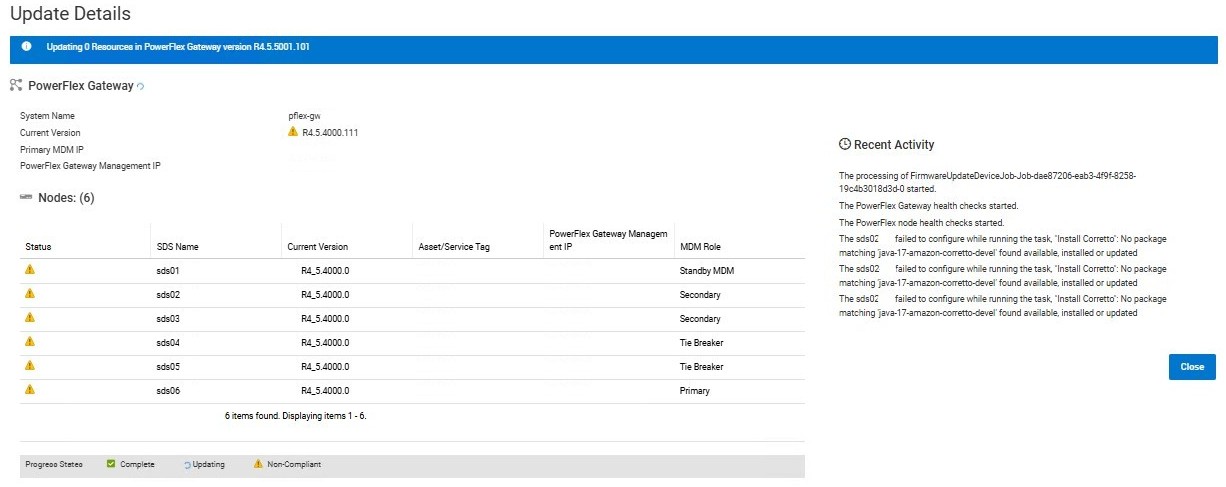
Conditions:
- CentOS 7 storage nodes
- PowerFlex Appliance or Rack
- IC 48.378.01 or 48.383.01
- RCM 3.7.8.1 or 3.8.3.1
PowerFlex Manager generates event:
code=70020063, name=FIRMWARE_UPDATE_FAILED., description=The firmware update for device block-legacy-gateway failed., severity=MAJOR, category=AUDIT, details={msgcode=VXFM00233, service_tag=block-legacy-gateway}
原因
Compliance bundle is missing a package in its catalog for nodes running CentOS 7 (el7).
Java 17 is a prerequisite for running ActiveMQ on MDM nodes in this PowerFlex core release (4.5.5.1).
解析度
A new RCM/IC bundle should be released soon with the missing package (as on 14/01/2026).
Two possible workarounds until fix is available:
- First upgrade to previous revision (IC 48.378.00 or 48.383.00 / RCM 3.7.8.0 or 3.8.3.0), then upgrade to target revision.
- Manually install missing package on all storage nodes, then refresh inventory and retry upgrade.
Manual installation of Java 17 on CentOS 7:
- Download package from corretto repository (GitHub):
wget "https://corretto.aws/downloads/resources/17.0.15.6.1/java-17-amazon-corretto-devel-17.0.15.6-1.x86_64.rpm" - Install package on each SO nodes:
sudo yum localinstall ./java-17-amazon-corretto-devel-17.0.15.6-1.x86_64.rpm
產品
PowerFlex rack, PowerFlex Appliance, PowerFlex appliance Intelligent Catalog Software, PowerFlex rack RCM Software文章屬性
文章編號: 000415930
文章類型: Solution
上次修改時間: 23 1月 2026
版本: 2
向其他 Dell 使用者尋求您問題的答案
支援服務
檢查您的裝置是否在支援服務的涵蓋範圍內。