Upcoming Retirement of Microsoft Teams Third-Party API Integration for Dell Collaboration Keyboards
Summary: This article provides the information about Microsoft Teams third-party Application Programming Interface (API) integration retirement.
This article applies to
This article does not apply to
This article is not tied to any specific product.
Not all product versions are identified in this article.
Symptoms
Microsoft will retire the Microsoft Teams third party API integration on June 30, 2026. This change affects devices that rely on the API to enable collaboration functions—including the Dell Pro Premium Collaboration Keyboard KB900 and the Dell Pro 5 Wired Silent Collaboration Keyboard KB525C.
These keyboards use Microsoft Teams' third‑party API to activate collaboration touch controls and dedicated collaboration keys (mute or unmute, camera on or off, screen share, chat) during a Teams meeting. These features operate only when the Microsoft Teams desktop application API is enabled.
What This Means After June 30, 2026
When Microsoft retires this API:
- Collaboration touch controls and dedicated collaboration keys no longer function during a Microsoft Teams meeting.
- Collaboration touch controls and dedicated collaboration keys still function during a Zoom meeting.
- All other keyboard functions remain fully operational and unaffected.
- All other keyboard functions remain fully operational and unaffected.
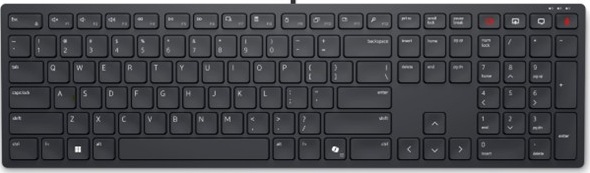
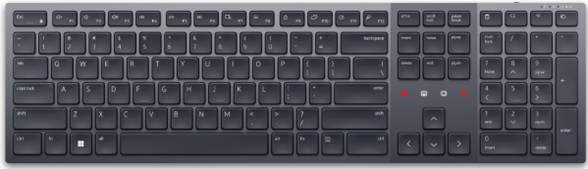
Affected Products:
Dell Pro Premium Collaboration Keyboard KB900Dell Pro Premium Collaboration Keyboard and Mouse KM900Dell Pro Silent Collaboration Wired Keyboard KB525C
Affected Operating Systems:
- Windows
Affected Software:
- Dell Display and Peripheral Manager (DDPM) version 2.3.0.x
Cause
Microsoft will retire the Microsoft Teams third party API integration on June 30, 2026.
Resolution
Note: Starting with version 2.3.0.x, Dell Display and Peripheral Manager (DDPM) no longer supports Microsoft Teams collaboration touch controls or dedicated keys.
This impact is limited strictly to Teams-specific API-enabled controls; it does not affect typing, shortcuts, or general keyboard performance.
Recommended Alternative: Use Keyboard Shortcuts.
If you require collaboration functions during a Teams meeting, you can continue to perform these actions by assigning these shortcuts to programmable keys through Dell Display & Peripheral Manager (DDPM) for quick access.
Camera on/off → Ctrl+Shift+O
Mic on/off → Ctrl+Shift+M
Share Screen → Ctrl+Shift+E
Note: These shortcuts only work when the Teams meeting window is the active (in-focus) window.
Browse this article translated languages page as below links:
Affected Products
Dell Pro 5 Wired Silent Collaboration Keyboard KB525C, Dell Pro Premium Collaboration Keyboard KB900, Dell Pro Premium Collaboration Keyboard and Mouse KM900Article Properties
Article Number: 000438619
Article Type: Solution
Last Modified: 12 Aug 2026
Version: 9
Find answers to your questions from other Dell users
Support Services
Check if your device is covered by Support Services.