Unsolved

1 Rookie

 • 

1 Message

2088

May 10th, 2021 11:00

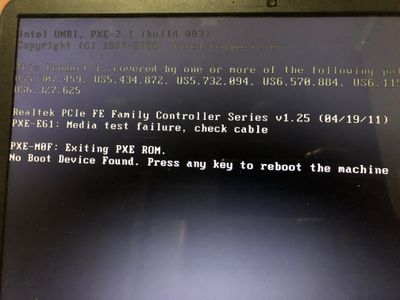
No boot device found

DD45FDD7-CF42-4D46-AD9E-9AF44A543D4E.jpeg

0DAEF36D-A02E-4950-9B54-09AB51C74513.jpeg

Hello, i am using an inspiron 3521, facing an issue.. it shows no boot device found. Can you please give me some advice, to solve this matter

10 Elder

 • 

30.2K Posts

May 10th, 2021 12:00

Go into setup (F2 at powerup).  If the drive does not show there,

Unplug the system, disconnect or remove the battery and hold the power button for 30 sec.  Disconnect and reconnect the drive from the system.

Check again - if the drive still does not show, it's toast - you need a new, 2.5" SATA drive -- better option is a solid state drive rather than another hard drive.

If the drive does show, run a full diagnostic on it - if if fails, replace it;  if it passes, reload the OS.

F12 at powerup to get to the diagnostics.


7 Technologist

 • 

6.1K Posts

May 10th, 2021 14:00

Hi @Binur  F2, BIOS MAIN detects your 1TB HDD. Go to BIOS BOOT to confirm or enable boot order includes HDD in the list, usually first entry. Go to BIOS EXIT, save these changes and exit BIOS. 

If no boot device found problem not fixed, create and then insert bootable USB, visit BIOS BOOT and put USB at top of boot list. Go to BIOS EXIT to save these changes and exit BIOS. When system starts using bootable USB, visit Windows 10 Disk Management to check or enable OS(C:) partition C drive allocation. 

Inspiron 3521 has one SATA 2.5" storage bay, if replacing this drive, get a 2.5" dual M.2 SATA caddy and M.2 2280 SATA card preinstalled with Windows 10 x64. Dell Support for Inspiron 3521, Drivers & Downloads are available for Windows 10 x64. 

No Events found!

Top