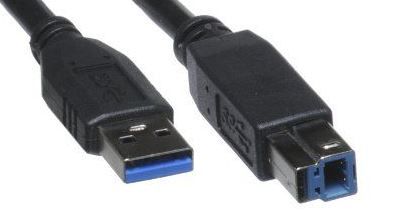
What does the USB 3.0 upstream cable (enables the USB ports on the monitor) look like? I'm trying to set up monitor on new computer and need to find it.
@Myoho What exact display model do you have? And does your system only have USB-C ports or do you also have USB-A "regular USB" ports you can plug into? That will allow people to let you know what type of cable you need.
On 4-19-21 7:04 PM Myoho had posted this thread on the P2418HT. Based on that we can presume that this thread is also about the P2418HT. Edits made to titles.
Myoho,
All of the P2418HT documents are here. Open the P2418HT User's Guide to pages 5/6 to see pictures of the provided cables.


DELL-Cares
Moderator
•
27.6K Posts
•
148 Points
0
April 19th, 2021 18:00
Hi,
I have replied to you from a private message.
-Gautam.
jphughan
11 Legend
•
14K Posts
•
79.9K Points
0
April 19th, 2021 20:00
@Myoho What exact display model do you have? And does your system only have USB-C ports or do you also have USB-A "regular USB" ports you can plug into? That will allow people to let you know what type of cable you need.
DELL-Chris M
Community Manager
•
56.9K Posts
•
232.1K Points
1
April 20th, 2021 06:00
On 4-19-21 7:04 PM Myoho had posted this thread on the P2418HT. Based on that we can presume that this thread is also about the P2418HT. Edits made to titles.
Myoho,
All of the P2418HT documents are here. Open the P2418HT User's Guide to pages 5/6 to see pictures of the provided cables.
The USB 3.0 upstream cable is USB A to USB B =