


1 Rookie
•
8 Posts
2
386
July 23rd, 2024 11:01
KB740 keyboard randomly switches bluetooth connection and will sometimes enter long strings of the same character
Several people in the office use the keyboard KB740 via Bluetooth. I get reports from them where at random the keyboard will switch between the bluetooth connections (it has two) or that it switches to try to use the USB dongle connection (which isn't used so is physically under the battery cover).
What they also report from time to time is that when typing the keyboard will sometimes seemingly hold down the last key they pressed - its not physically held down but it will automatically enter a very long row of the same character.
We use Dell laptops running Windows 11 and have the Dell Peripheral Manager installed so the firmware is kept up to date.
If it was just one person I may suspect a faulty keyboard or something they are doing - but I get this reported by several people. I've also experienced it.
Dell_keyboard_user54
1 Rookie
•
2 Posts
1
November 9th, 2025 21:16
Dear All KB700 keyboard users,
I think I found a solution, quite accidentally, to be honest.
The solution I found was posted originally on reddit.com. I send you a description that solved my case – I do a quote, as the solution is not mine:
"
If you're on Windows 11 and also dealing with this, the fix is easy:
Open Device Manager
Expand the "Bluetooth" entry & find your adapter (e.g. "MediaTek Bluetooth Adapter")

Right-click on your adapter (e.g. "MediaTek Bluetooth Adapter") select "Properties" and click the "Power Management" tab
De-select "Allow the computer to turn off this device to save power" & click "OK"
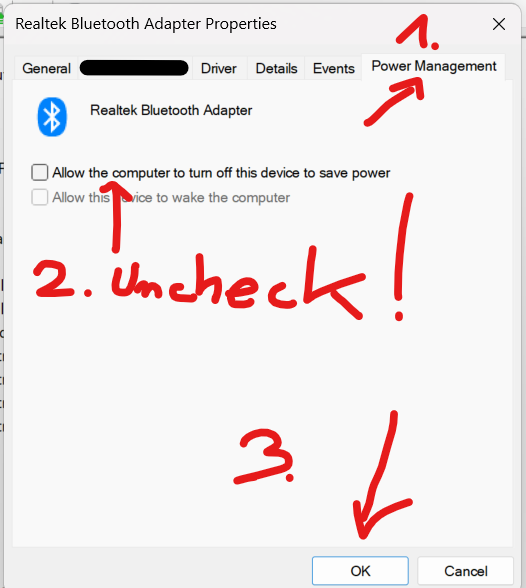
"
- Maybe a PC restart is needed after that, but it fixed the issue for me.
- For corporate PCs, maybe an IT admin intervention might be needed to enter Device manager's Bluetooth device properties and making a change inside.
The whole post is available with this link:
https://www.reddit.com/r/ZephyrusG14/comments/xa7co7/fixed_bluetooth_devices_randomly_disconnect_and/
I am using my keyboard KB700 with this setting switched off (I mean, with the "Allow the computer to turn off this device to save power" disabled) and NO ISSUES after unchecking this!!!
It seems that unintenionally, Microsoft's Windows 11 "save energy" policy accidentally caused a lot of issues with wireless keyboards.... Well, now you know!
I hope that helps!
Best regards,
Jasper
Dell_keyboard_user54
1 Rookie
•
2 Posts
0
December 7th, 2024 21:29
Dear Dell Support Team,
I have exactly the same issue with my KB700 Dell Wireless keyboard. Exactly the same system Windows 11, Dell Peripheral Manager up to date, system up to date. Sometimes it just switches from the Bluetooth connection to USB dongle connection without any particular reason. This switch also causes this one keyboard button being "virtually" held and it just produces a string o the same characters. Turning off and on the device helps sometimes for more time, sometimes it appears after 5-10 minutes once again.
Could you please assist?
Best regards,
Jasper
iansays1
1 Rookie
•
5 Posts
1
February 25th, 2025 22:35
I have this problem, also on a KB700. Battery is 95%, and Keyboard randomly switches from BT direct connect setting #2 (paired directly with my XPS 13) to the USB nub, setting #1 (and the nub is inside the mouse case that is also paired direct on #2 to laptop. When it happens, which is several times a day, the last key to be pressed before the switch is seemingly long pressed, and I can only regain control and stop the continuous keypress by tapping the BT selllllllllllllllllllllllllllllllllllllllllllllllllllllllllllllllllllllllllllll (just happened!) selection button at the far upper right of the keyboard to set it back to 'slot' 2. It happens a LOT when I'm pressing the L key. So much so that I wonder if there's some kind of key-combination I'm not aware of to programmatically switch to slot 1. I'm trying a Dell Peripheral firmware update now and will update if that fixes it.
Paul Francis
1 Rookie
•
8 Posts
1
February 27th, 2025 08:13
I see less of the issue where a key sticks and I get a long line of the same character, but the issue where the BT / USB dongle selection changes at random still occurs.
iansays1
1 Rookie
•
5 Posts
1
May 4th, 2025 18:28
This is still happening as of 5.4.25.
The only way I've found to mitigate it is to take the BT nub out of the mouse case and put it in a USB port on my dock. That way, when it randomly switches to BT setting #2, I only miss a few characters when typing. This only works when connected to the dock of course.
gsprit
1 Rookie
•
1 Message
1
May 19th, 2025 12:28
This is happening to me as well. Changes to the dongle n1 device, and it randomldy keeps a key pressed which is very annoying. anybody knows how to fix?
iansays1
1 Rookie
•
5 Posts
1
June 12th, 2025 17:05
This is still happening as of 6.12.25. Happens a dozen times a day. Crazy that there's no fix for this.
Iandoz
1 Rookie
•
1 Message
1
July 23rd, 2025 01:44
Purchased 2 of these a couple of weeks ago and they are both doing this. All firmware and drivers updated. Terribly disappointing. Will attempt to return them and get a different brand.
GeoffCh
1 Rookie
•
2 Posts
1
September 15th, 2025 10:03
I have had the same problem on two of these keyboards: Bluetooth connection dropping out (it randomly switches from connection mode 2 to mode 1 without any action being taken by me) and sometimes a key repeating many times.
I bought a KB700 a few years ago which developed these problems. Thinking it was an issue with that particular keyboard I bought another in January of this year which is now doing exactly the same thing. Running diagnostics the battery is at 95% and firmware etc is all up to date.
So my conclusion is that there is a systemic issue with Dell keyboards which has been around for at least three years and which has not been fixed.
@DELL - please note. If you'd like my keyboard back to run some tests on it you'd be most welcome. I'm going to have to buy another (non Dell) keyboard to replace this one.
Rosec2
1 Rookie
•
5 Posts
1
October 6th, 2025 07:40
I'm experiencing this same issue - plus my keyboard is randomly changing channel dozens of times every day. I've had it a long time and it's getting worse and worse.
GeoffCh
1 Rookie
•
2 Posts
1
November 10th, 2025 08:37
Hi Jasper - many thanks for this tip. I've just changed that setting and started re-using my Dell keyboard that was having problems. Will advise in a few days whether it has worked for me.
For other interested readers - on my laptop the relevant driver is "Intel Wireless Bluetooth" - not Realtek.
Geoff
Rosec2
1 Rookie
•
5 Posts
0
November 10th, 2025 08:45
Thanks Jasper (and Geoff for the tip on 'intel wireless bluetooth').
Have also given this a go and will be hoping it works!