


Unsolved
1 Rookie
•
3 Posts
2
11284
February 4th, 2022 11:00
High Memory usage for MaxxAudio Pro by Waves – Speaker and Microphone Audio Control and Nx 3D Sound
Hi,
I have a Precision 3561 laptop with Windows 11 Pro 21H2 and connected with a WD19TBS docking station.
I've noticed that always WavesSvc64.exe uses approximately 1,6GB from my 32GB of total RAM.
I've reinstall the audio drivers from DELL support site and the problem persists.
Does anyone know how to resolve it?
Thanks
No Events found!
Jeff Budz
13 Posts
0
February 10th, 2022 07:00
Just updated Windows 10 to version 21H2 on my XPS15, when the update finished and system rebooted I heard fans ramp up like crazy. Task Manager is showing two waves applications using 25% of my resources. I try opening the waves application and only get a black screen. Seems like this version of windows breaks the Waves. Unfortunately, I know that when you uninstall the Waves the microphone and speakers don't work very well.
DELL-Cares
Moderator
•
27.4K Posts
0
February 10th, 2022 07:00
Hi,
To ensure your privacy and security, we would strongly recommend deleting any tweet with Dell-centric or personally identifiable information (such as Service Tag or phone number). Please Direct Message us with any Dell-centric information, and we will be happy to assist you.
x1n30hp
1 Rookie
•
3 Posts
0
February 10th, 2022 13:00
@Jeff Budz, try to unistall your audio drivers and then re-install them.
Download them form DELL Support site.
If you have done this, then you might have a similar problem with mine.
Finger-crossed for future new audio drivers
gs89
1 Rookie
•
3 Posts
0
July 8th, 2022 01:00
Hello,
I have the same problem:
Should I reinstall the Realtek(R) Audio only within the device manager?
x1n30hp
1 Rookie
•
3 Posts
0
July 8th, 2022 01:00
Hello,
At the time I've written my post, I haven't got any solution.
I've been reached by a support agent from DELL, which told me some steps to follow and the final was to re-format my laptop so they can investigate the issue.
I've not done the last suggestion.
But, I've seen the last 2 or 3 months (I can't remember) that the issue was gone.
The only things I've done is to fully update my system via DELL Command Update and Microsoft Updates.
Hope this helps for you also.
Best regards.
DELL-Jesse L
Moderator
•
17.8K Posts
0
July 27th, 2022 04:00
gs89,
Turn off the WavesSvc64.exe process at startup and other applications .Disabling wave Maxx from startup will not disable the service, the application services will still be running.
ronper
2 Posts
0
December 18th, 2022 07:00
Hello, do I need Realtek and Wavesmaxx running at the same time?
I have disabled both in startup, but my startup is still pretty slow.
Waves is down to .7 mb now.
could there be a conflict between the two?
Precision m4800 win10pro
mkazimoto
1 Rookie
•
2 Posts
0
May 17th, 2024 11:43
In Windows 11, click Start -> Startup Applications:
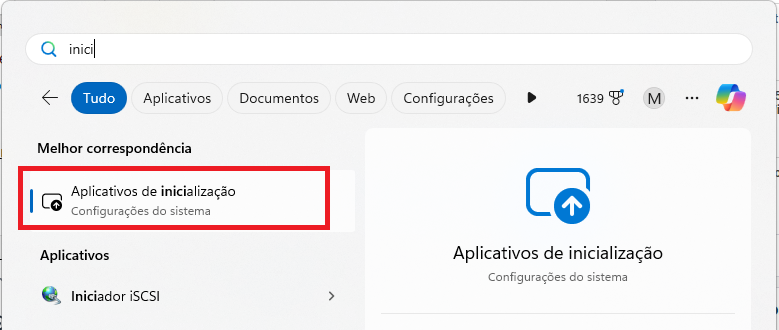
Disable the Wave MaxxAudio service and restart your computer:
(edited)