


1 Rookie
•
12 Posts
13
4461
February 10th, 2024 13:54
Precision 7770 - BIOS 1.18.0 - Overall system performance degradation.
To whom it may concern / can help ...
a few hours ago i did upgraded the BIOS from version 1.16.0 to 1.18.0 and what became instantly noticeably is an overall system performance degradation.
Most worse became playing videos through the MPV Software, during first seconds of playback the video completely freezes, then it does recovers but playback is at times very choppy, with dropped frames and such (according to the stats of the program itself)
Boot-up times are much longer now, which i suspect may be because of the DSAs fixed according to the release notes, but then getting into the Windows's welcome screen everything feels choppy, specially noticeable with the "loading spinner" shown there which isn't smooth any longer.
In the release notes, is mentioned the following:
Fixed the issue where the system works slowly when the CPU utilization is high. This issue occurs when the system is connected to the Dell Performance Dock WD19DC And the battery is fully charged.
Well, i don't have any Dock here, just the laptop and an external monitor, and i have the feeling what i am experiencing might be related to whatever was shipped to fix that.
Furthermore, something very interesting i did noticed, through some Rainmeter widgets i do use to monitor system health and such, is that when the system is "idle" (with background tasks/programs, nothing on the foreground) i see the CPU status as "53° - 4888 Mhz - 61 W" and whenever i start using MPV it does changes to "45° - 399 Mhz - 76 W"
You see... it went from utilizing 4888 Mhz to 399 Mhz (?!)
|
|


If it does help, i am providing below screenshots of some of my BIOS settings which may be related, dunno.
|
|
|

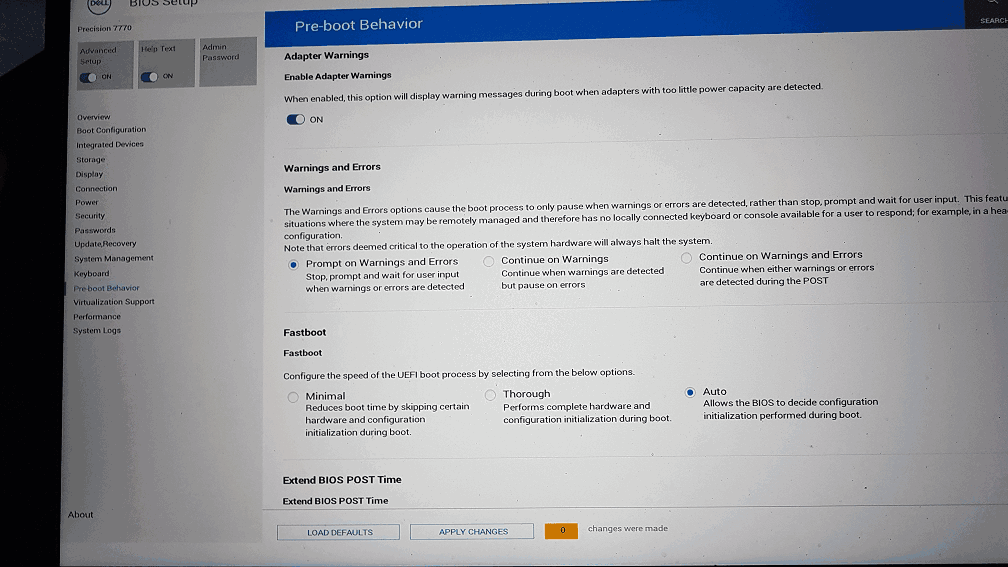

Now the question is, can i downgrade the BIOS back to 1.16.0 with 100% confidence, or could it remotely cause any kind of side-effect doing so ??
szczepanczyk
1 Rookie
•
8 Posts
1
February 19th, 2024 20:09
@Juraj_T I have a deadline unfortunately. Lost whole 2 days on setting up my old Precision M4800, which is working 10 times faster than the current 7770 with 1.18 bios version. I do not find the words how <Profanity deleted. DELL-Admin> I am :|
(edited)
Vipast
1 Rookie
•
21 Posts
2
February 19th, 2024 20:24
Yes, it is ignoring my Battery Settings as well -
Interesting situation - If you turn on HW monitor - you can litterally watch the CHANGE in power states when you plug and unplug the AC connection - you will get a brief second of FULL speed in between the detection and the system setting the power settings of lucidty and full speed between the connection and detection times.
I was playing games last night on it, on battery, (Poor Performance) letting it go down in battery and reconnecting and then charge up (ULTRA poor performance) 25 FPS on low res.. did this for about an hour and half.. and plugged in and un plugged about 10 times, then like a MIRACLE or torture depending on how you look at it, as it only lasted about 5 mins in total. I started getting FULL performance and FULL output / HEAT - I could play again.. but it didn't last long.. and right back to normal.. This is what it looks like when you actually get performance. (Still bad thermals - but that was expected )
This Last picture of the FPS - as actually on the down trend back down to the status quo of 399mhz - but you can see the graph of how it was - It was weird that this even happen - so there is some shenanigans going on here-

So here is the ISSUE with DELL - This is either intentional to address "Concerns" Issues, Thermals, etc .. to mitigate issues - or its GROSS incompetence from DELL. The issue is with DELL as its either an Engineering Design flaw or a Software design flaw, and if you are going to sell High End Workstation laptops for business - your QC has to reflect that- This is the reason companies like Shell oil uses HP and not Dell.. This will probably be my last Dell purchase - It was a toss up of this or a Zbook for me, but it went on sale , and was about $500 less for the same specs but looking back at it now.. HP could have charge $1000 more because their stuff works.
Juraj_T
7 Posts
0
February 19th, 2024 20:41
The whole idea behind Precision line is reliability. I've never had this type of issue with bios on much cheaper (still expensive though top of the line) Razers, MSI Titans, etc.. while this is like 3rd time in 2 years the bios wrought some issues, although this time, the issue is absolute havoc.
Apparently the bios is now almost week old so not exactly swift with remedy either.
What <Profanity deleted. DELL-Admin> nonsense is non-downgrade-able firmware in first place. Stupid corporate safety issue being forced onto all customer types. I swear if this bricks this 8000 Euro laptop I will be more than just bemused.
(edited)
brunooo84
1 Rookie
•
22 Posts
0
February 19th, 2024 22:45
@andyschoe makes sense... I wish everybody contacted dell to have their motherboard replaced. It would cost them a lot of money and I'm sure they would release a new bios in a day.
I think I'll contact them again today and ask to go ahead and replace it.
brunooo84
1 Rookie
•
22 Posts
0
February 19th, 2024 22:49
Has anybody tried to use a 330W AC adaptor yet? This seems to be related to BD PROCHOT... Curious to know if a more powerful adapter would make any difference.
Vipast
1 Rookie
•
21 Posts
0
February 20th, 2024 00:05
Yes, I have tried a 330watt adapter today, no change, 240 watt (default) , same and I had a 180 watt .. no differences. Charging , not charging. No change.
Vipast
1 Rookie
•
21 Posts
0
February 20th, 2024 00:06
@brunooo84 yes I tried 330watt no difference.
brunooo84
1 Rookie
•
22 Posts
0
February 20th, 2024 00:08
@Vipast thanks for confirming!
szczepanczyk
1 Rookie
•
8 Posts
0
February 20th, 2024 00:21
@Dell-Brad L @DELL-Chris M
Can you help us here? Are the engineers informed about this issue?
(edited)
Vipast
1 Rookie
•
21 Posts
0
February 20th, 2024 01:40
I know its probably a long shot - but is anyone running Linux? I may install linux on a 512Nvme I have , and see if I experience the same issue.
brunooo84
1 Rookie
•
22 Posts
1
February 20th, 2024 03:22
@Vipast you'll probably will... I say that because if you enter the bios menu and plug the ac, it will slow down the rendering considerably... Just go to a section with a long list to scroll, unplug ac, try to scroll, then plug it in and do the same. You'll see what I mean. So it's not an OS issue.
Vipast
1 Rookie
•
21 Posts
0
February 20th, 2024 04:34
ok... guys - I need other people to check my findings. When I let the battery drain to about 35% playing games , it runs like the whole time.. then I plug in at 35% - it runs at full speed , then after about 3% battery charge to 38% it drops back down to plugged in again... This happened previously - I tried it again at 35% and its not repeatable. I feel its almost random. They really jacked up this firmware.
(edited)
Vipast
1 Rookie
•
21 Posts
1
February 20th, 2024 04:43
I was able to recreate it again. - It lasted about 3-5mins then went back down to 399mhz
(edited)
Xtr3m3ro
1 Rookie
•
12 Posts
0
February 20th, 2024 05:33
@Vipast Don't bother, I tried LIVE OS and it does the same, as @brunooo84 and in bios with the adapter it works very slowly
BGDaemon
1 Rookie
•
21 Posts
1
February 20th, 2024 12:10
I have 7770 with the same issue after 1.18. I have a case escalated to L3, waiting for more.
Quickest temp fix is to just issue 1.18.1 which enables rollback to 1.16. This is all we want/need. Right now it says downgrade is possible, unless to lower than 1.6.3, but alas - it is not. Right now the workstation is unusable.