

This post is more than 5 years old
1 Rookie
•
4 Posts
2
19411
April 27th, 2018 09:00
Quadro M2000M update on M4800
Hi everybody,
I just bought a brand new quadro M2000M and I discovered only now that it was for HP system so its BIOS is giving me a lot of troubles. I think I have to flash the video card BIOS and put in something compatible with my dell workstation, anyone here has an idea of how can I solve this?
Thank you!
P.S. I already tried to edit the .inf drivers file and I successfully installed two different drivers but the card is still invisible in my workstation BIOS and has a 43 error on win 10.
No Events found!
Paolo Buatti
1 Rookie
•
4 Posts
0
August 27th, 2019 03:00
Paolo Buatti
1 Rookie
•
4 Posts
0
April 27th, 2018 16:00
I partially solved this, flashing a new BIOS in the card and installing the latest drivers with the .inf file modified.
Now I feel like I'm reaching the goal but...the workstation BIOS is still listing only the integrated graphic chip and if I switch off "switchable graphics" I get a blank (but this time with an active black signal) screen. From device manager my nvidia card is "working properly" now but even if I disable from here the graphic chip I still have poor performances and I think that the Quadro isn't working at full load because of some internal strange graphic management.
I'll start debugging again tomorrow, now is time to sleep.
HeyBig
2 Posts
0
September 16th, 2018 09:00
Paolo,
Which BIOS did you flash? Were you able to sort out the performance issues?
I had an M2000M installed in my M4800 on Friday. I am unsure if it is the HP or Dell version. The subvendor ID reported was 1028 (Dell) but when I backed up the vbios ROM with GPU-Z it came out as 13CC or something. I downloaded an NVIDIA driver and modified the inf file to 05CC to match the hardware IDs.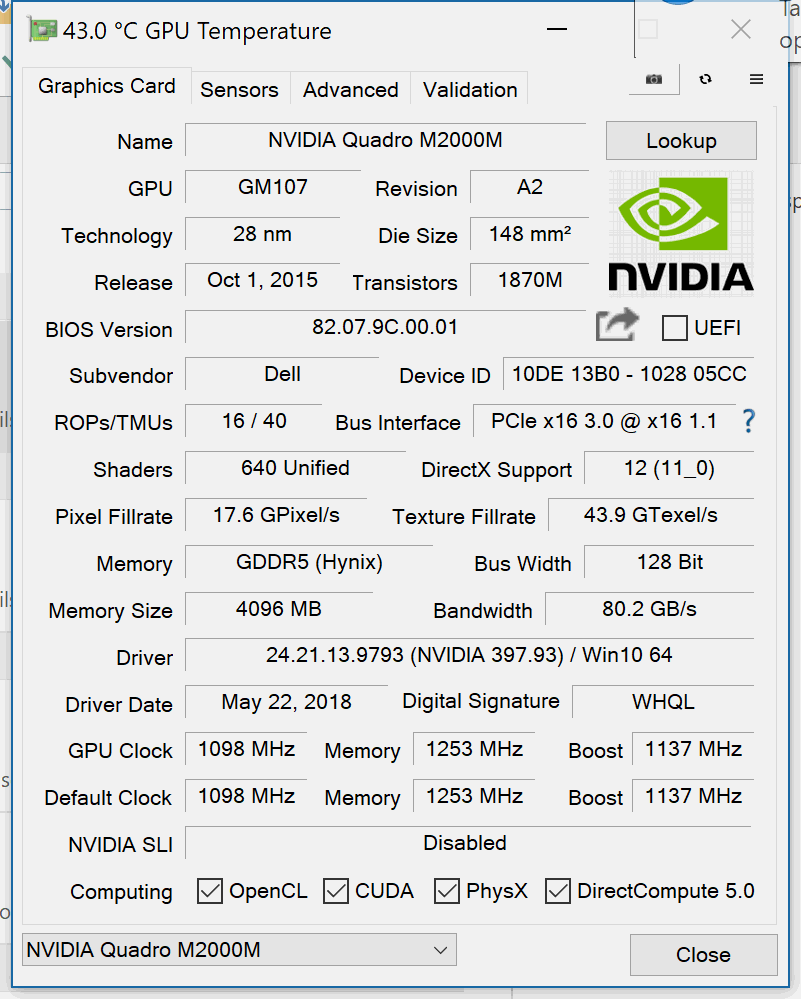 I performed a clean install with unsigned driver and then ran userbenchmark and after removing Tthrottle recorded a reasonable 20% (double the K2100M that I had). nvflash is complaining when I try to reload a modified version (with reduced temperature target). I had various issues re-enabling secure boot and bitlocker but it seems to have settled down with TPM updated. The engineer who fitted it said he had to use a different heatsink bracket and I am getting a lot of fan noise under load (even with tthrottle at 70 degrees) so I am concerned that I may need to have it opened up again.
I seem to have cooling issues with almost every Dell laptop I use. My corporate Latitude 7290 suffered as soon as I ran minikube. The previous client's Inspiron 7560 slowed as soon as I ran anything more than Chrome on the 940mx. I had to completely update the cooling and heatsinks in T5500 and my brother is still using it to heat his flat with a used 750ti and a couple of Xeons despite melting two graphics cards. I'd try an XPS if it had a decent keyboard like the Precisions.
Regards
James
M0CRT
1 Message
0
September 20th, 2018 15:00
Hi James et al
I've just upgraded to a M2000M (HP Bios) in a 8570 Elitebook.
All is working well post an inf driver hack but my OSX partition has a huge graphics messing up compared to the previous K2000 I had.
Any ideas if a BIOS flash would make any sense to attempt to resolve this?
Thanks
Nige
Mapyx
1 Message
0
December 27th, 2018 02:00
Chriskand
1 Message
0
January 23rd, 2019 13:00
Did you made any progress with your problem? Can you help me resolve mine i have the same problem....
Aresin
1 Message
0
March 24th, 2019 15:00
I bought HP version Quadro M2000M for Dell Precision 7520 and luckily it is visible under a BIOS, however, I’m not able to install any NVIDIA driver on Windows 10 backround, NVIDIA installer your hardware does not support this driver software.
I’m not able to use it if I can’t install a driver, please can someone help.
JasonSPogue
1 Message
0
August 26th, 2019 20:00
I'm having the same issues trying to get a Quadro M2000M to work on my Dell M4800. This is my first laptop and the installation was definitely a learning experience. The graphics cards do not appear to indicate that they can only be used for one brand; is this typical?
Has anyone found a solution yet?
Any help would be much appreciated. Thank you!
en11gma
5 Posts
0
November 5th, 2019 09:00
you said if the card isnt branded.
im looking to purchase one off ebay and need to know exactly what im looking for.
was there an overheating issue also?
any info would be great.
i have the Dell M4800 with Intel I7-4800MQ and 16GB ram and the R9 M200X video gpu with 2GB ram.
i want to do the Nvidia M200M if it will work good.
Simkowskiy
1 Message
0
February 1st, 2020 02:00
Good afternoon! There was a problem .. Installed a m2000m video card, in some games it works, in others not .. Why?
hancerlf
1 Message
0
July 25th, 2022 21:00
Hello friend, I hope you are well. I am having the same problem as you when trying to install an nvidia m2000m on my dell 4800, it recognizes it as nvidia m2000m in device manager, but with an error 43, when trying to install the drivers it tells me that a compatible hardware has not been found, gpu z says that the seller is Dell. If it helps you, I mean that a friend could make a m1200m work but had to modify the bios so that it only worked with 2gb vram of the 4gb that the card has, so it could work without problems, do you know how I can do this with mine? or do you have the method to make it work? I would appreciate it
Darksimps
7 Posts
0
January 20th, 2023 17:00
I installed a Quadro m2200m in my Dell m4700. It only went to black screen. I connected an external monitor and it worked. Then I enabled OPTIMUS is BIOS and got my laptop screen working again. I downloaded Nvidia driver 516.25 and just selected which apps I wanted to use the m2200m in the Nvidia settings. There are no overheating issues, but the battery does not last while using the m2200m for games. I can still run everything else on the integrated graphics and the battery does fine. It runs smoothly. You don't have to switch anything after you select the apps for the m2200 they will use it automatically. Just ignore the message in bios when turning on OPTIMUS that says it's only for Windows 97. I'm doing this with windows 10. It makes a great gaming laptop, as long as it's plugged in with the correct charger.
newbie learner
1 Rookie
•
1 Message
•
2 Points
0
October 29th, 2025 05:48
the link website seem to be expired, might we get a new link for it?