
UNSOLVED
Lost M2 SSD after BIOS 2.50.1 update Precision 5820
I have been trying to trouble shoot an M2 drive issue for the past couple of days. It started shortly after updating the BIOS to 2.50.1, the OEM M2 drive stopped booting, and the drive size was not being recognized in the BIOS or windows installed USB. I installed my operating system onto a different drive and noticed the OEM M2 was available in Windows, but not in BIOS or the windows to install. I wanted to roll back the BIOS, but it would seem that Dell has locked out my ability to roll back my BIOS. I tried to use their AI interface to raise my concern, but it seems impossible to enter anything useful into their prompt. I hope I can find some support here. Thank you.
Below is the summery of me working with ChatGTP trying to resolve this issue.
- Dell Precision 5820 Tower
- BIOS 2.50.1 (June 2026)
- Intel VMD/VROC storage
- SK hynix PC801 1 TB NVMe (firmware 51003141)
Problem
After updating to BIOS 2.50.1, the original boot NVMe SSD is no longer usable for boot or Windows installation.
Evidence collected
- BIOS detects the SSD model:
- SK hynix PC801 NVMe
- Does not report the drive capacity.
- Windows 11 USB Setup drive:
- Detects the M2 drive.
- Reports 0 bytes capacity.
- Windows 11 running from a second SSD:
- Detects the drive correctly.
- Reports the full 1 TB capacity.
- HealthStatus = Healthy.
- OperationalStatus = OK.
- FirmwareVersion = 51003141.
- Drive is readable and writable.
- Intel VMD testing:
- Enabled and disabled VMD.
- No change.
- Intel VROC F6 driver:
- Loaded iaVROC.inf.
- Driver accepted.
- No change.
(edited)
0
0
Posted July 20th, 2026 01:46
This is what Google's AI came up with. I'm using copy & paste so hopefully it's not all jumbled.
dell precision 5820 no longer sees m.2 ssd after bios update +5 Access the Dell Technical Support portal for specific downloads, or apply the following fixes to your Dell Precision 5820. A BIOS update often resets the SATA operation mode to default (RAID) or changes Intel VMD settings, hiding M.2 NVMe SSDs.If your SSD isn't showing up, try these steps:Adjust SATA/NVMe Operation:Restart the PC and tap F2 to enter the BIOS.Go to Storage or SATA/NVMe Operation.Change the mode from RAID On to AHCI / NVMe.Click Apply Changes and Exit.Disable Intel VMD (Volume Management Device):Intel VMD controllers can prevent pre-boot environments from recognizing NVMe drives.Go to the System Configuration or Intel VMD section of the BIOS.Select Disable VMD (or Enable VMD Controller - depending on your exact drive and PCIe setup, you may need to toggle this state).Check PCIe FlexBay Profiles:If your M.2 SSD is in the front FlexBay, the controller profile may have been reset.On boot, press F12 and enter Device Configuration to open the MegaRAID controller menu.Navigate to Main Menu -> Controller Management -> Advanced -> Profile Management -> Choose Profile.Ensure the profile is set to 11_PCIe4 (NVMe only) or 13_PD64-PCIe4 (SATA/SAS + NVMe).
I also looked at other threads, but none of them had an accepted solution.
0
0
Posted July 20th, 2026 09:23
Hi
I got nothing new or better to suggest, but I still will...
"Many BIOS updates revert this to RAID, which can hide NVMe from the BIOS device list while Windows still boots with its RAID/VMD driver"
""Windows still sees the drive via its cached driver""
Precision 5820–specific things to verify
Modular FlexBay / NVMe cage:
On 5820 Tower, the front bays can be configured as SATA, SAS, or NVMe. The daughter board in the back of the NVMe/SAS cage can cause “drive not detected” if the connections are loose or the wrong bay type is used. Reseat the M.2 in its caddy and the caddy in the bay; check the rear connector board. dellBIOS version specifics:
You’re on 2.50.1. If this started exactly after that update:Try Load Defaults first.
If that fails, consider downgrading to the previous BIOS (e.g., 2.4.x) via Dell’s BIOS recovery or flashing an older EXE from Dell’s support page, then retest detection. Many users stabilize by rolling back one version when a new BIOS breaks NVMe visibility. dell+1
SSD firmware:
If the drive is detected inconsistently, update the SSD firmware (Samsung, KIOXIA/Toshiba, WD, etc.) using the vendor’s tool from another system or a bootable USB. Some NVMe drives had firmware issues that manifested after motherboard BIOS changes. learn.microsoft+1
Step‑by‑step practical sequence
Power off, unplug, open case.
Reseat the M.2 SSD:
Remove mounting screw, pull SSD out, inspect contacts, reinsert firmly, retighten screw.
Boot → F2 → BIOS:
Load Defaults → Save & Exit.
Reboot → F2 again → check Storage list.
If still missing:
Adjust SATA Operation / NVMe / VMD settings as above (match your original setup).
If using a PCIe M.2 card, try a different slot (e.g., move from slot 5 to 4). dell
If BIOS now sees it but Windows doesn’t:
Use Disk Management to initialize/assign letter, or load the correct Intel RST/VMD driver during Windows setup if you’re reinstalling. youtube+1
If BIOS still doesn’t see it:
Test the M.2 in another system or use a USB‑to‑NVMe adapter to confirm the SSD itself is good.
If the SSD is fine, downgrade BIOS one version and retest. dell+1
Kind Regards
anne_droid

0
0
Posted July 20th, 2026 15:51
Hello,
in the installation of win11 that sees correctly the drive, can you do
Control Panel > Device Manager > disk drives > the hynix drive , and see which driver is being used ? (properties > driver details).

0
0
Posted July 20th, 2026 21:24
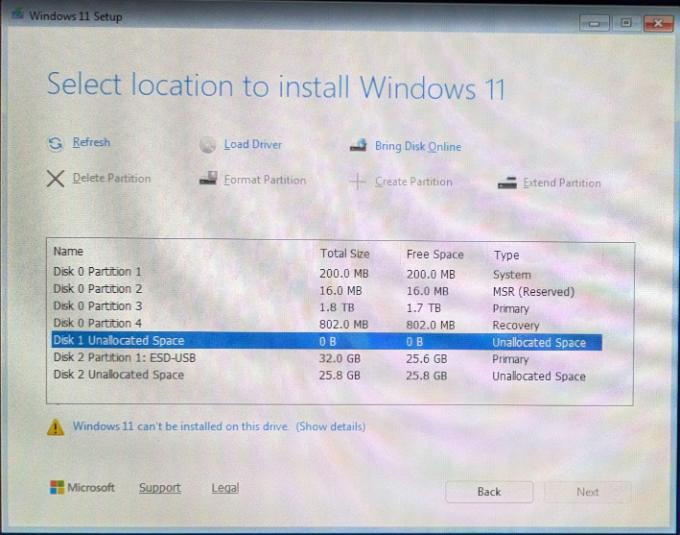
@mazzinia_ I took a couple of scren shots of the drive and controller information, also the diskmanger and the Windows installer, let me know if you need anything else. I also tried to manualy download drivers(RSTe_f6_iaVROC_win8_64). made no difference. Thanks for any help.


0
0
Posted July 20th, 2026 21:30
@bradthetechnut I tried seral times of enable/disable Raid and ACHI. In BIOS I can see the serial number of the drive, so it seems to be recognized, but always '"0" volume. I have a PCIE adapter so I currently have it removed from the Flexbay and connected directly to the motherboard PCIE connector. BIOS sees it as Mass storage again no size. But Windows sees it as a 1TB drive. I am also limited on using my Keyboard in BIOS and the onetime boot(F12). My mouse workes, but I can not enter any data using my keayboard. I have tried 3 differnt USB keyboards and servasl of the back USB ports. Thanks for the help.
0
0
Posted July 21st, 2026 08:29
At this point if there are also keyboard issues and such... maybe a bios reset ? (after writing down any setting currently in use)
0
0
Posted July 23rd, 2026 17:32
@ejbommer The keyboard issue you are facing is plaguing everyone with this version of bios. There is a separate thread https://www.dell.com/community/en/conversations/precision-fixed-workstations/precision-5820-tower-keyboard-and-bios-issues-after-installing-2501/6a5e584e993c1b1fb4dc95c9 here if you want to follow.
1
0
Posted July 23rd, 2026 18:12
I did a BIOS reset and made no difference. I also pulled a working M2 Samsung drive from another computer and it showing the same issues. I’m really thinking the problem is a bug with the BIOS. It’s my understanding once "BIOS 2.50.1" is installed, you cannot roll back, is that true.
After the BIOS reset I did need to use the trouble shooting boot features. An interesting thing was my Keyboard work with that. Thought that maybe it had to do with the BOIS reset, but the keyboard still doesn’t work with BIOS or one time boot.
I’m at least working running by using a Sata drive, but I hate the fact that 2 of my Flexbay’s are devoted NVME drives, which now does not work. The 4 bays was one of my main reasons for selecting this PC. Guess Ill have to try and find parts.


bradthetechnut
9 Technologist
•
9649 Posts
•
40713 Points
1
0
Posted July 20th, 2026 00:44
A few ideas:
Make sure BIOS is set to boot from Windows Boot Manager.
Try the F12 Boot & Diagnostics menu to see if the drive shows there.
If still no go, replace the size 2032 CMOS battery and do a BIOS reset via the blue jumper method.