How to Add a Signing Certificate in Dell Endpoint Security Suite Enterprise
Summary: Learn how to add an application signing certificate in Dell Endpoint Security Suite Enterprise by using these instructions.
This article applies to
This article does not apply to
This article is not tied to any specific product.
Not all product versions are identified in this article.
Instructions
Note:
- As of May 2022, Dell Endpoint Security Suite Enterprise has reached End of Maintenance. This article is no longer updated by Dell. For more information, reference Product Life Cycle (End of Support and End of Life) Policy for Dell Data Security. If you have any questions on alternative articles, either reach out to your sales team or contact endpointsecurity@dell.com.
- Reference Endpoint Security for additional information about current products.
An application signing certificate can be used to safelist a product in Dell Endpoint Security Suite Enterprise. This article discusses how to add a signing certificate to the Dell Data Security (formerly Dell Data Protection) administration console for Dell Endpoint Security Suite Enterprise.
Affected Products:
- Dell Endpoint Security Suite Enterprise
Affected Operating Systems:
- Windows
- Mac
- Linux
- Open a web browser and go to
https://<servername>.<company>.com:8443/webui.
 Note:
Note:- The example fully qualified domain name (FQDN) will differ from the server in your environment.
- Port 8443 may differ from the administration console port in your environment.
- Sign in to the administration console.

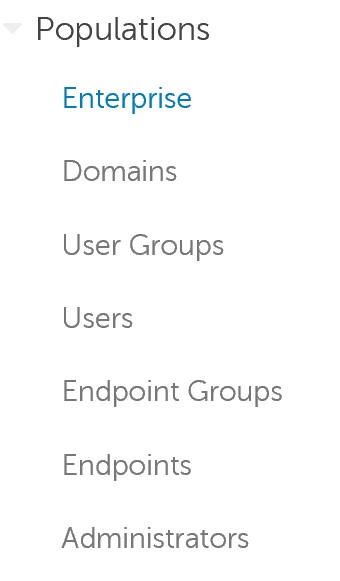
- In the left menu, expand Populations and click Enterprise.
- Click the Advanced Threats tab.

- Click the Certificate tab.

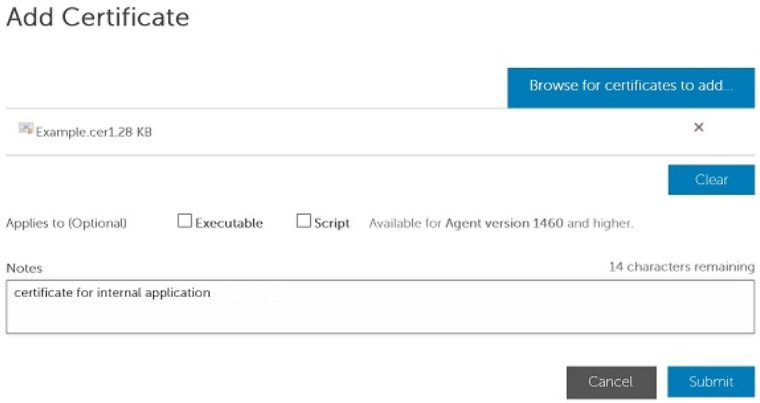
- Click Add Certificate.

- Click Browse for certificates to add.

- Go to the certificate (identifiable by the CER file extension) and click Open.
Note: For more information, reference How to Export an Application Signing Certificate on Windows.
- In the Add Certificate menu:
- Optionally, check if the signing certificate applies to an Executable or Script.
- Optionally, populate Notes on the purpose of the certificate.
- Click Submit.
 Note:
Note:- An administrator may proceed with safelisting a signing certificate by referencing How to Safe List Files in Dell Endpoint Security Suite Enterprise.
- The certificate name that is used in the example will differ in your environment.
Affected Products
Dell Endpoint Security Suite EnterpriseArticle Properties
Article Number: 000156396
Article Type: How To
Last Modified: 02 Jul 2026
Version: 14
Find answers to your questions from other Dell users
Support Services
Check if your device is covered by Support Services.