Dell Networking VEP4600: How to Access Console Ports
Summary: Access VEP4600's console and management ports for Central Processing Unit (CPU), Baseboard Management Controller (BMC), and Intelligent Platform Management Interface (IPMI) Hypertext Transfer Protocol Secure (HTTPS) access with default settings and login credentials ...
This article applies to
This article does not apply to
This article is not tied to any specific product.
Not all product versions are identified in this article.
Instructions
This article discusses on how to access Console ports of the VEP4600 Universal Customer Premise Equipment (uCPE) device.
Synopsis
- Introduction
- BMC
- IPMI
- Console Ports Description
- Access and Default Settings
Introduction
- VEP 4600 is a Universal Customer Premise Equipment (uCPE) running Virtual Network Functions (VNFs) like routing, firewall, SD-WAN, and Deep Packet Inspection on customer premises.
- VEP 4600 does not have any standard OS installed by default and comes with DIAG OS.
- It has two Serial console ports (One for CPU and one for BMC) and one backup USB-B console port for CPU.
Baseboard Management Controller (BMC)
- The VEP4600 is equipped with an onboard micro controller called Baseboard Management Controller (BMC).
- The BMC provides management capabilities such as automatic alerting, shutdown, restart, Power control, and so forth.
Intelligent Platform Management Interface (IPMI)
- IPMI is a computer interface specification that provides management capabilities.
- The BMC is compliant with the IPMI specification.
- IPMI is similar to Dell Remote Access Control (DRAC). However, DRAC is vendor-specific while IPMI is vendor neutral.
- The functionality of IPMI can be accessed from the IPMItool.
- IPMItool is a command prompt, which is used to manage IPMI-enabled devices.
Console Port Description
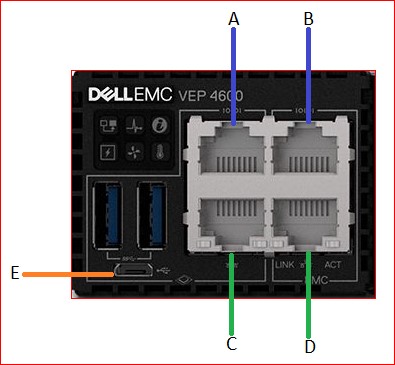
|
Port |
Description |
| Port A | Serial Console Port to Access CPU. |
| Port B | Serial Console Port to Access BMC |
| Port C | Management Port to Access CPU. |
| Port D | Management Port to Access BMC |
| Port E | USB-B Console port to Access CPU. |
Note: If a cable is connected to Port E (referenced above) even if not in use, the CPU RJ45 (Port A) console port does not work.
Access and Default Settings
Accessing the console ports:
- Port A/E - Serial/USB-B Console Port to access CPU
User Name: root
Password: calvin
Note: The above login credentials are only for the default installed DIAG OS. When installed with any other OS, follow vendor directions.
- Port B - Serial Console Port to access BMC
User Name: sysadmin
Password: superuser
- Accessing BMC through HTTPS
User Name: admin
Password: admin
Default Console Settings
Baud Rate: 115200
Data Bits: 8
Stop Bits: 1
Parity: None
Flow Control: None
Below are the latest updates:


Affected Products
DELL NETWORKING VEP4600 16-CORE, Dell Networking VEP4600 4-CORE, DELL NETWORKING VEP4600 8-COREArticle Properties
Article Number: 000112188
Article Type: How To
Last Modified: 05 Mar 2025
Version: 4
Find answers to your questions from other Dell users
Support Services
Check if your device is covered by Support Services.