VxRail: How to Create Service Request From the VxRail Plugin UI
Summary: How to create Service Request from VxRail plugin UI.
This article applies to
This article does not apply to
This article is not tied to any specific product.
Not all product versions are identified in this article.
Instructions
Starting from VxRail 7.0.400, users can leverage the VxRail plugin function to create a Service Request for any issue.
- Navigate to the VxRail plugin Support page on vCenter, and click the button "CREATE SERVICE REQUEST"
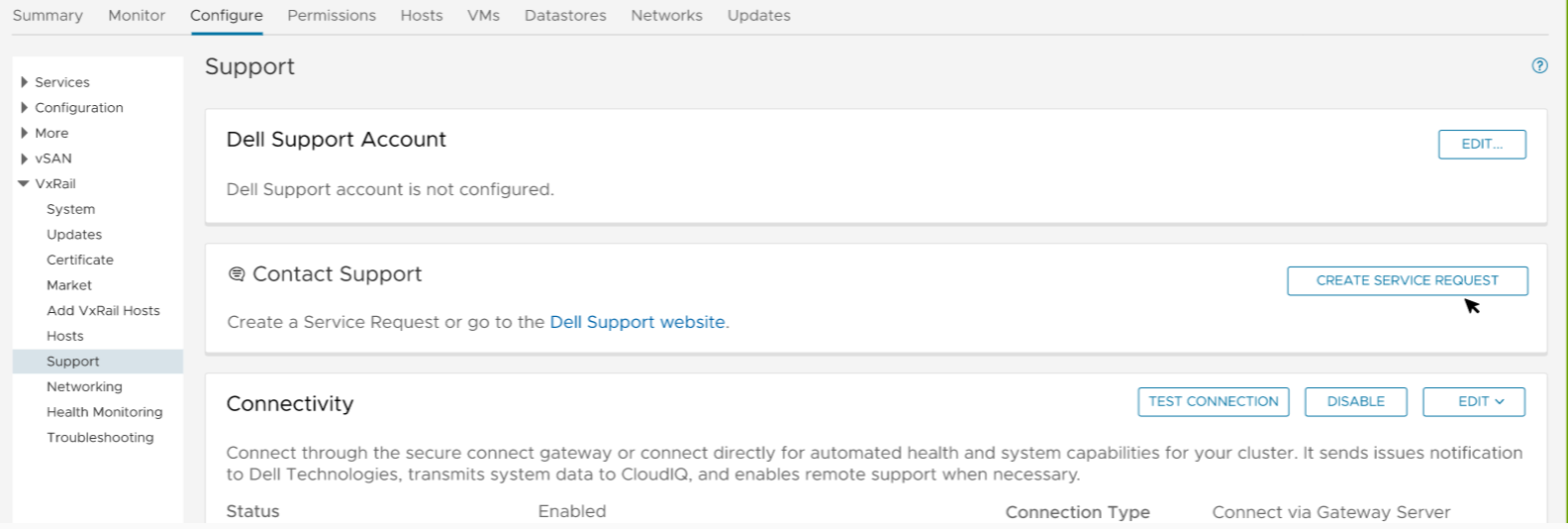
- After the service request is created, the below events will be generated on VxRail manager according to the priority of the event:
| Event Code | Event Message |
| VXR244000 | Create a service request for a high priority event. |
| VXR248000 | Create a service request for a medium priority event. |
| VXR24C000 | Create a service request for a low-priority event. |
Additional Information
Pre-requisites for this function:
- Configure support account
- Enable VxRail Connectivity
These events will not trigger an alarm on vCenter.
Affected Products
VxRail, VxRail Appliance Series, VxRail SoftwareArticle Properties
Article Number: 000201945
Article Type: How To
Last Modified: 04 Feb 2026
Version: 3
Find answers to your questions from other Dell users
Support Services
Check if your device is covered by Support Services.