NVP vProxy: VM backup does not complete with "VMware proxy is not available for datastores"
Summary: One or multiple Virtual Machine (VM) backups fail with "VMware proxy is not available for datastores X."
This article applies to
This article does not apply to
This article is not tied to any specific product.
Not all product versions are identified in this article.
Symptoms
VMware VMs are protected using the NetWorker VMware Protection (NVP) vProxy appliance.
During a backup, one or more VMs fail with the following error:
Figure 1: Error Message: VMware proxy is not available for datastores.
vProxies are configured with Network Block Device (NBD) transport mode disabled (0).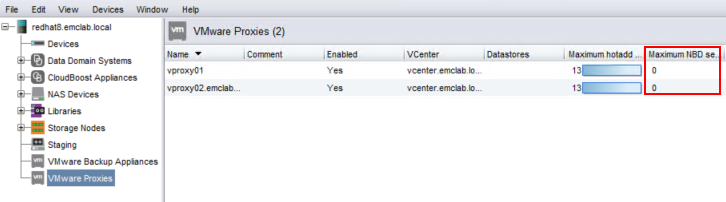
Figure 2: VMware Proxies Configured with NBD Transport Mode Disabled.
Cause
The vProxy used for the backup is running on a VMware ESXi host which does not have access to the VMware datastore the VM resides on.
Resolution
There are a couple of changes which can be done to identify the issue.
ProxyHC utility:
The ProxyHC command-line utility can be used to identify if the vProxy has any issues connecting to a specified VM using the Hot Add transport mode. ProxyHC is detailed in Dell article 22590, NVP-vProxy: How to use health check tool ProxyHC on vProxy appliance.
VMware Configuration:
Ensure that there is a vProxy on an ESXi host which has datastore access where the VMs which must be backed up reside.
There are several ways in which this can be done, however, here is one example:
-
Log in to the vSphere Web Client.
-
Go to the vProxy in the VM inventory.
-
In the Summary tab, check which ESXi host the VM resides on:
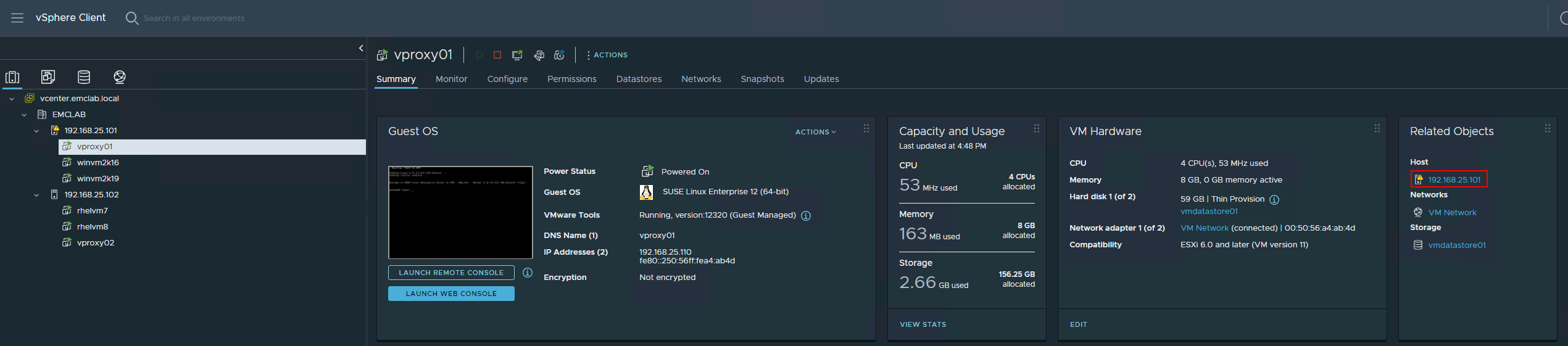
Figure 3: vSphere Web Client > vProxy > Summary tab, check which ESXi host the VM resides on -
Go to the ESXi host identified in step 3.
-
Click the Datastores tab.

Figure 4: vSphere Web Client > ESXi host > Datastores
The Datastores tab lists datastores that the vProxy could backup using Hot Add. In the example shown in the symptoms field, vproxy01 was used to backup a VM which resides on vmdatastore02. NBD was disabled on the vProxy. Since the VM resides on a datastore the vProxy's ESXi host does not have access to, the backup does not complete with the message "VMware proxy is not available for datastores (DATASTORE_NAME)."
Considerations:
If NBD is disabled, the vProxy must reside on an ESXi host which has datastore access to the datastore containing the VM.
If NBD is enabled but the ESXi host does not have access to the datastore, hot add fails, and the backup runs using the NBD transport mode. VM backups always attempt to use hot add first. For more information about hot add and NBD, see the NetWorker VMware Integration Guide available on the NetWorker Product Page at Dell Support.
General Recommendations:
- If the VMware environment contains many ESXi hosts and many datastores, and the ESXi hosts have varying access to the VM datastores, deploy a vProxy on ESXi hosts which have unique datastore access to ensure that hot add backups can be obtained.
- Ensure that all vProxies show as "Enabled" in the NetWorker Management Console.
- If a vProxy is unavailable, a message should appear in the NMC alerts window stating that the vProxy is unavailable.
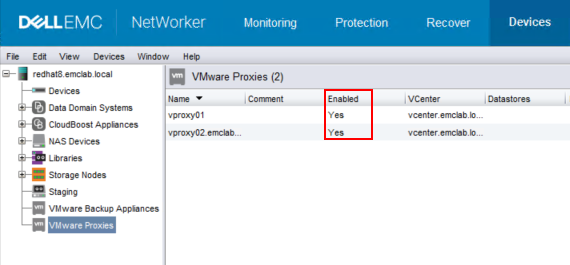
Figure 5: Ensure that all vProxies show as "Enabled" in the NetWorker Management Console.
- If a vProxy is unavailable, a message should appear in the NMC alerts window stating that the vProxy is unavailable.
- If NBD sessions are disabled (0), NBD sessions can be configured to match the hot add sessions (for example, 13).
- If there is not a vProxy available on an ESXi host with datastore access, the backup runs over the ESXi management network. It is recommended to avoid using NBD where possible; NBD backups are slower than hot add backups. If a lot of NBD backups are running, it may impact the ESXi management network:
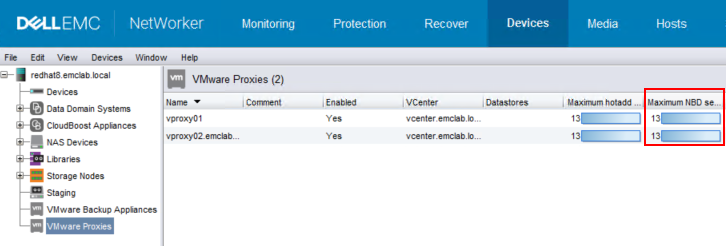
Figure 6: NetWorker > Devices > VMware Proxies
- If there is not a vProxy available on an ESXi host with datastore access, the backup runs over the ESXi management network. It is recommended to avoid using NBD where possible; NBD backups are slower than hot add backups. If a lot of NBD backups are running, it may impact the ESXi management network:
- If backups are configured on specific datastores in a workflow, use manual selection to select a vProxy which resides on an ESXi host with datastore access.
- Transversely, ensure that a vProxy is not manually specified which does not have datastore access.
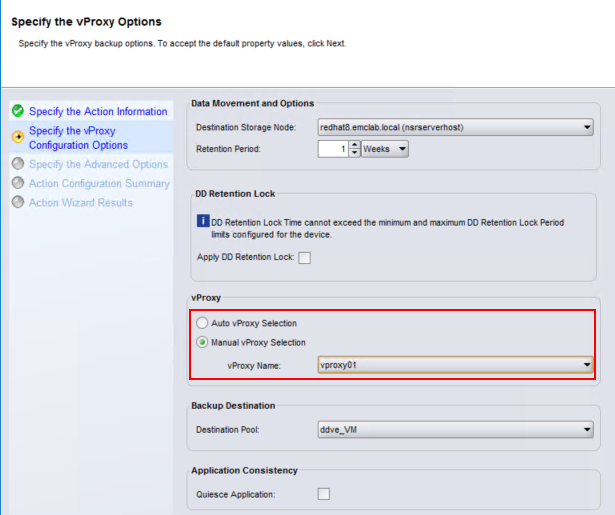
Figure 7: Ensure that a vProxy is not manually specified which does not have datastore access.
- Transversely, ensure that a vProxy is not manually specified which does not have datastore access.
Additional Information
Affected Products
NetWorkerProducts
NetWorker Family, NetWorker SeriesArticle Properties
Article Number: 000214615
Article Type: Solution
Last Modified: 27 Mar 2025
Version: 6
Find answers to your questions from other Dell users
Support Services
Check if your device is covered by Support Services.