Avamar: Not able to access Avamar UI due to the error "Avamar Administrator client is not compatible with the selected server"
Summary: The Avamar UI cannot be accessed with the error "Avamar Administrator client is not compatible with the selected server" reported.
Symptoms
The UI cannot be accessed, and the following error is reported:
The Avamar Administrator client is not compatible with the selected server.
The Avamar Administrator client cannot continue and will now exit.
Screenshot example:
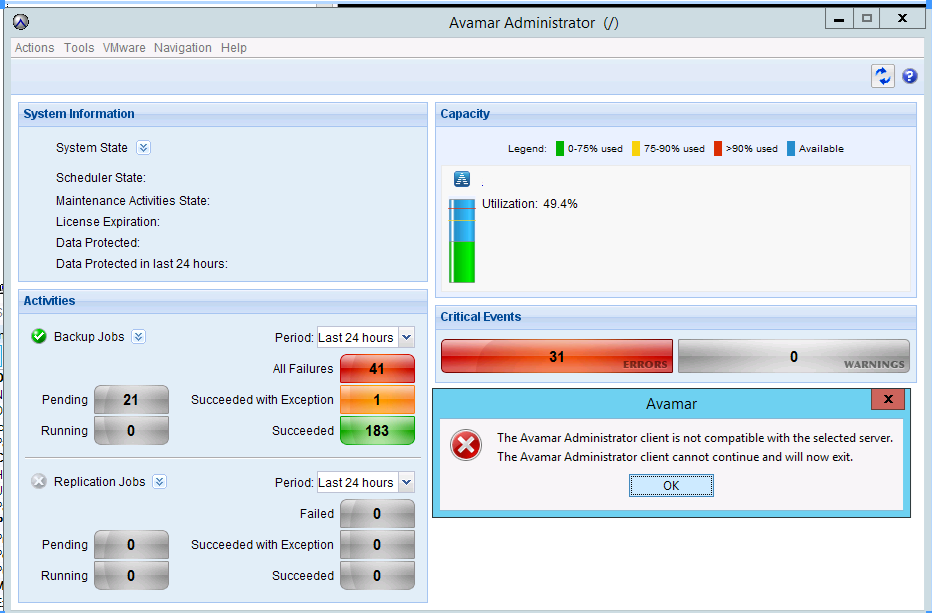
The Management Console Server (MCS) version has been verified to match the Avamar Administrator version.
Cause
Under certain circumstances, one or more Java Process IDs (PIDs) can become unresponsive.
Usually, these unresponsive Java PIDs have quite an old start date.
The following command can be used to confirm:
ps -ef | grep javaResolution
1. Log in to the Avamar Utility Node as admin.
2. Stop the MCS, EMT, and AVinstaller services:
(The backup scheduler is stopped with MCS.)
dpnctl stop mcs
dpnctl stop emt
dpnctl stop avinstaller
3. Elevate to root privilege.
4. As root, kill all java processes:
killall java
5. Verify that no java processes remain:
ps -ef |grep -i java
6. Switch to admin.
7. Restart the services:
dpnctl start
8. Assuming that no errors were reported in the output above, verify that all services are running:
dpnctl status