NetWorker: Client can override settings that does not apply to schedule if the level is set to skip at action level
Oversigt: The action property "Client Can Override" has been set but does not apply if the action schedule is set to skip.
Denne artikel gælder for
Denne artikel gælder ikke for
Denne artikel er ikke knyttet til et bestemt produkt.
Det er ikke alle produktversioner, der er identificeret i denne artikel.
Symptomer
The Policy->Workflow->Action contains a client override option. Client override is enabled, showing "Client Can Override."

When Client Can Override is enabled, the Client resource values for Schedule, Pool, Retention policy, and Storage Node attributes override the equivalent Action resource attributes.
Årsag
NetWorker is working by design. If the NetWorker policy action schedule is set to Skip backup level, the Client can Override option is not honored.
Løsning
For NetWorker to consider the Client Can Override option, change the action schedule to a different level.
If the client should be skipped, define the skip level schedule at client properties.
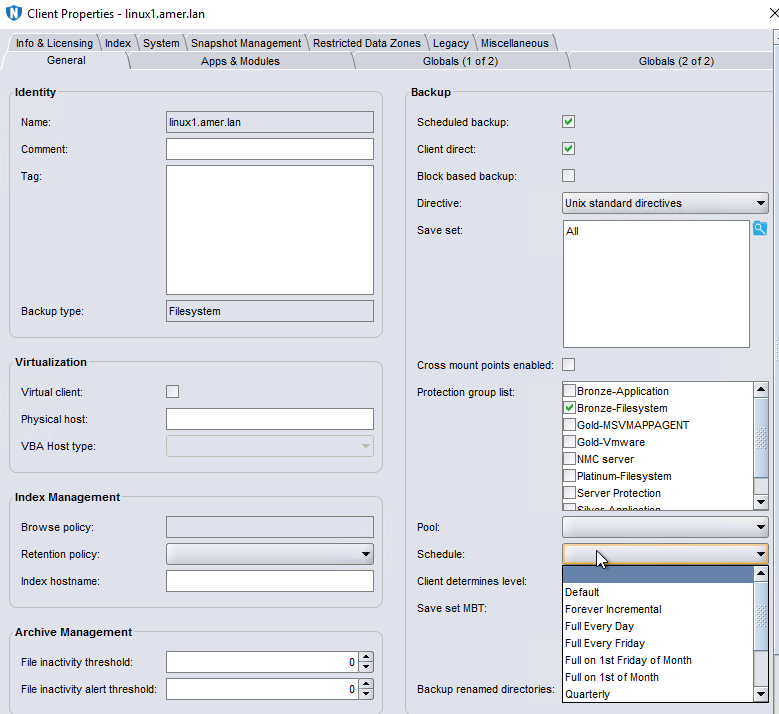
There are some default schedules defined. Custom schedules can be created under Protection->Schedules. Once created the scheduled is listed as an option in the Schedule drop-down in the client properties.
Flere oplysninger
Client Overrides and scheduling is detailed further in the NetWorker Administration Guide, available through: https://www.dell.com/support/home/product-support/product/networker/docs
Berørte produkter
NetWorkerProdukter
NetWorker Family, NetWorker SeriesArtikelegenskaber
Artikelnummer: 000032150
Artikeltype: Solution
Senest ændret: 14 mar. 2025
Version: 4
Find svar på dine spørgsmål fra andre Dell-brugere
Supportservices
Kontrollér, om din enhed er dækket af supportservices.