Openshift: Some hardware information is missing on the Red Hat Web Console Node Details view page
Oversigt: Add worker nodes via Dell APEX Cloud Platform node addition function, the newly added nodes hardware information is missing on the Red Hat Web Console Node Details view page.
Denne artikel gælder for
Denne artikel gælder ikke for
Denne artikel er ikke knyttet til et bestemt produkt.
Det er ikke alle produktversioner, der er identificeret i denne artikel.
Symptomer
Login to Red Hat OpenShift web console, navigate to Compute menu clicks the Nodes item, select one of the listed worker nodes.
On the Node detail view page, the information for CPU, Disks and NICs are missing and shows 0 CPUs, 0 Disks and 0 NICs.
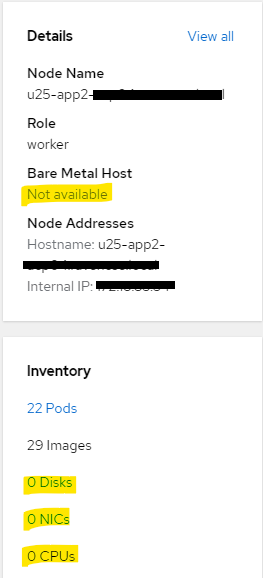
On the Node detail view page, the information for CPU, Disks and NICs are missing and shows 0 CPUs, 0 Disks and 0 NICs.
Årsag
In order to enforce the security in customer's environment, accessing to iDRAC network from management network is not allowed in current release of Dell APEX Cloud Platform for Redhat Openshift.
So after adding a worker node via Dell APEX Cloud Platform node addition function, the newly added node management network will not have permission to access the node iDRAC network and causes hardware information missing on the node view page.
This issue only impacts worker node that is added via Dell APEX Cloud Platform node addition function.
Control plane node is not impacted.
This issue will be fixed in future release of Dell APEX Cloud Platform for Redhat Openshift.
So after adding a worker node via Dell APEX Cloud Platform node addition function, the newly added node management network will not have permission to access the node iDRAC network and causes hardware information missing on the node view page.
This issue only impacts worker node that is added via Dell APEX Cloud Platform node addition function.
Control plane node is not impacted.
This issue will be fixed in future release of Dell APEX Cloud Platform for Redhat Openshift.
Løsning
For the missing hardware information, user can navigate to Inventory view of the Dell APEX Cloud Platform web console plugin, the CPU numbers can be found from node details view, the NIC details can be found from the back view of the node. Currently the disks are not displayed on Inventory view for Compute Cluster Nodes.
Berørte produkter
APEX Cloud Platform for Red Hat OpenShiftArtikelegenskaber
Artikelnummer: 000217296
Artikeltype: Solution
Senest ændret: 19 feb. 2026
Version: 4
Find svar på dine spørgsmål fra andre Dell-brugere
Supportservices
Kontrollér, om din enhed er dækket af supportservices.